I can't get to work WebTerminal in IRIS Health Connect 2023.1
Hello everybody,
I’m trying to install WebTerminal but I’m not able to have it working. I’ve looked all around the in github and the community but no-one seems to have the same problem. So I hope sharing this someone can give me a hint
So, I’m installing it on IRIS HEALTH:
IRIS for UNIX (Red Hat Enterprise Linux 8 for x86-64) 2023.1.3 (Build 517U) Wed Jan 10 2024 13:30:33 EST [Health:5.1.0-2.m3] I install the packageWebTerminal-v4.9.5.xml via Portal Manager and all goes fine:
Importing Selected Classes from /intersystems/prog/IRISHEALTH/mgr/Temp/importfromlocal.stream
Import to Namespace %SYS.
Load started on 10/03/2024 16:55:52
Loading file /intersystems/prog/IRISHEALTH/mgr/Temp/importfromlocal.stream as xml
Imported class: WebTerminal.Analytics
Imported class: WebTerminal.Autocomplete
Imported class: WebTerminal.Common
Imported class: WebTerminal.Core
Imported class: WebTerminal.Engine
Imported class: WebTerminal.ErrorDecomposer
Imported class: WebTerminal.Handlers
Imported class: WebTerminal.Installer
Imported class: WebTerminal.Router
Imported class: WebTerminal.StaticContent
Imported class: WebTerminal.Trace
Imported class: WebTerminal.Updater
Compiling 12 classes
Compiling class WebTerminal.Analytics
Compiling class WebTerminal.Common
Compiling class WebTerminal.ErrorDecomposer
Compiling class WebTerminal.StaticContent
Compiling class WebTerminal.Handlers
Compiling class WebTerminal.Updater
Compiling class WebTerminal.Autocomplete
Compiling class WebTerminal.Core
Compiling class WebTerminal.Trace
Compiling class WebTerminal.Router
Compiling class WebTerminal.Engine
Compiling routine WebTerminal.Common.1
Compiling routine WebTerminal.ErrorDecomposer.1
Compiling routine WebTerminal.Analytics.1
Compiling routine WebTerminal.StaticContent.1
Compiling routine WebTerminal.Updater.1
Compiling routine WebTerminal.Handlers.1
Compiling routine WebTerminal.Core.1
Compiling routine WebTerminal.Autocomplete.1
Compiling routine WebTerminal.Trace.1
Compiling routine WebTerminal.Router.1
Compiling routine WebTerminal.Engine.1
Recompiling WebTerminal, skipping the deletion...
Compiling class WebTerminal.Installer
Compiling routine WebTerminal.Installer.1
Installing WebTerminal application to %SYS
Updating web application "/terminal"...
WEB application "/terminal" is updated.
Assigning role %DB_IRISSYS to a web application; resulting roles: :%DB_IRISSYS
Updating web application "/terminalsocket"...
WEB application "/terminalsocket" is updated.
Mapping %WebTerminal package into all namespaces: %All
WebTerminal package successfully mapped into all namespaces.
Load finished successfully.
So, everything seems ok as /terminal and /terminalsocket applications are correctly created. But when I try to access to the port 52773 (the one on the setup) and /terminal/ I get a 401 error. In the Audit I can see it’s using UnknownUser do it can’t log in:
Error message: ERROR #864: An authenticated user name is required.
Web Application: /terminal
$I: |TCP|51773|3894836
$P: |TCP|51773|3894836
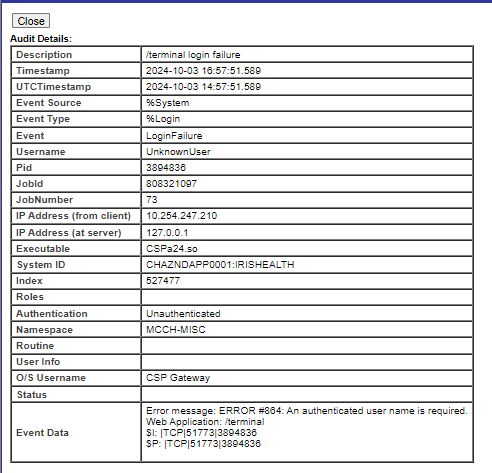
I’m confused, because if /terminal is set up as password it should not be UnknownUser right?
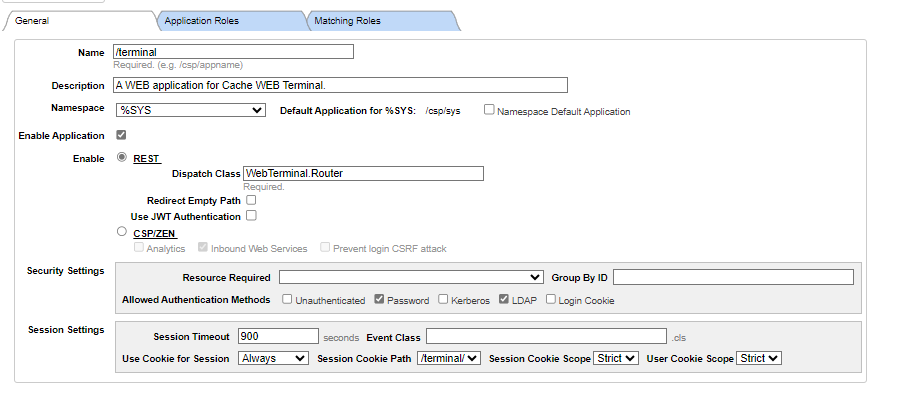
I’ve checked the Gateway and it uses CSPSystem to connect. So, I don’t really know what is going on as I’ve installed it in the past with no problem.
Might it be a problem with IRIS version? Anyone has had the same or similar issue?
Comments
It seems that you're not providing an IRIS user... and the app is configured to ask for password. Don't you get the login screen asking for user/password?
No, I don't get anything. Simply error 401 and then in the audit I can see how it has automatically taken UnknowUser on it own :)
Does it also happen if you use a private browser session?
wow! Using a private session works :-O All the testing I did, and never tried out with that.
So, is it then related to cookies?
Yes, maybe the Management Portal login on the server allows Unauthenticated.
no, LDAP or local password is compulsory.
In our env, we have Session Cookie Scope set to "None".
For authentication, we use LDAP and we have to have "Delegated" checked
.png)
If Delegated is not an option, this is how you make that option appear:
- System Administration / Security / System Security / Authentication/Web Session Options -setting is: Allow Delegated authentication
.png)
Hi Kirsten,
Thanks for this. But still doesn't work, I get same error:
| Error message: ERROR #864: An authenticated user name is required. Web Application: /terminal $I: |TCP|51773|134694 $P: |TCP|51773|134694 |
Weirdly, with Firefox I'm able to get the auth dialog. I suspect it is related to browser (Edge doesn't work) as I've removed all cookies and cleaned the cache :(
David, if you point your Edge to edge://policy/ does it report an AuthSchemes policy value?
Hi, yes it does! Current values are "ntlm,negotiate". I can't change it to any other value, though.. this is managed by the organisation