Checking for a value within a stream in the condition of a routing rule
Hello all,
I have a EnsLib.HTTP.GenericMessage inbound from a webhook with a GC stream.
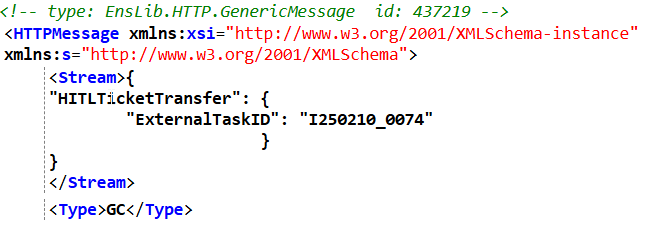
My router is defined as the following:
General Message Routing Rule
The msgClass for said rule is: EnsLib.HTTP.GenericMessage
I have tried a few variants of using a Contains in the condition to check the following: Document.StreamGC.Attributes.
I want to check the Stream for "HITL". If it contains that, we send downstream.
Is there a way to do this within the condition in the rule?
Is the best solution to instead write a function that rewinds the stream and returns a flag?
Thank you!
Comments
In the rule you should be able to have an expression with
Stream.Read(some number of character.. you might consider 3200000)
to get the first X characters of the stream content... of course assuming the thing you are searching for can be found in that string.
The streams we are processing are fairly short. I will give this a shot.
Any suggestion on syntax? I cannot get it to resolve in the rule editor:


Does not play nice.
Thank you
assuming Document.StreamGC is of type %Stream.Object you may
use method FindAt which combines Read() and Contains()
see: method FindAt()
method FindAt(position As %Integer, target As %RawString,
   ByRef tmpstr As %RawString = "", caseinsensitive As %Boolean = 0) as %Integer

Find the first occurrence of target in the stream, starting the search at position.
The method returns the position of this match, counting from the beginning of
the stream, and leaves the stream positioned at an indeterminate location.
If it does not find the target string, it returns -1.

If position=-1 then it starts searching from the location found in the
previous search and returns the offset from the last search.
This is useful for searching through the entire file.
If you are doing this, you should pass in tmpstr by reference in every call.
This is used to store the last buffer read, so the next call will start
where the last one left off.
If caseinsensitive=1 then the search will be case insensitive,
rather than the default case-sensitive search.I will give this a try. Thanks Robert!
Hello Robert,
Any suggestions on the below syntax?
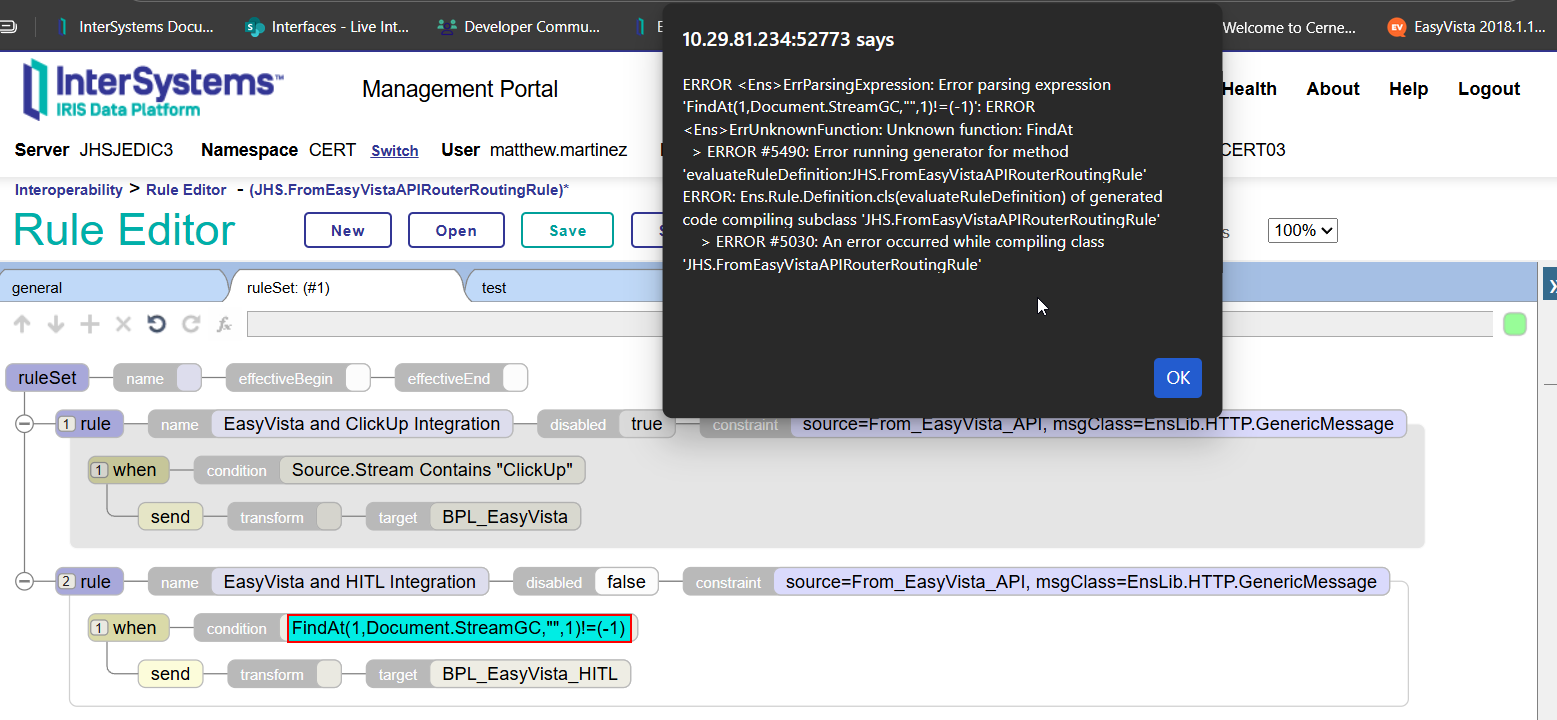
I am unable to compile/save the rule. Is this what you had in mind?
Thank you
Thanks for kicking me in the right direction, found a built in function in the building tool to create a syntax like the below that is working for me:
StreamFindAt(Document.StreamGC,"HITL",) >= 1
Thank you all.
THANKS for your feedback !
Yes — you’re correct to think about that edge case.
If you read the stream in fixed-size chunks (e.g., Read(32000)), a simple tChunk[pNeedle search can miss matches where the target string spans the boundary between two reads. For example, "HITL" could appear as "HI" at the end of one chunk and "TL" at the beginning of the next.
A common solution is to keep a small overlap buffer from the end of the previous chunk and prepend it to the next chunk before searching. The overlap only needs to be ($Length(pNeedle)-1) characters.
The general pattern looks like this:
- Read the next chunk from the stream
- Prepend the trailing characters from the previous iteration
- Search the combined buffer
- Preserve the last (needle length - 1) characters as the next overlap
- Continue until a match is found or the stream ends
- Rewind the stream before returning so downstream components can still read it
Here’s an example implementation
Class MyApp.Rule.Functions Extends Ens.Rule.FunctionSet
{
ClassMethod StreamContains(
   pMsg As EnsLib.HTTP.GenericMessage,
   pNeedle As %String = "HITL"
   ) As %Boolean
{
   Set tSC = $$$OK
   Set tFound = 0
   Set tTail = ""
   Set tChunkLen = 32000
   Set tNeedleLen = $Length(pNeedle)
   Set tStream = pMsg.Stream
   If '$IsObject(tStream) Quit 0
   If pNeedle="" Quit 0
   Do tStream.Rewind()
   While ('tStream.AtEnd) && ('tFound) {
       Set tChunk = tStream.Read(tChunkLen,.tSC)
       Quit:$$$ISERR(tSC)
       Set tData = tTail _ tChunk
       If tData[pNeedle {
           Set tFound = 1
           Quit
       }
       If tNeedleLen>1 {
           Set tTail = $Extract(tData,*-(tNeedleLen-2),*)
       } Else {
           Set tTail = ""
       }
   }
   Do tStream.Rewind()
   Quit tFound
}
}
Then your routing rule condition can simply call the function:
MyApp.Rule.Functions.StreamContains(Document,"HITL")This keeps the routing rule readable while safely inspecting the stream without consuming it.
This is awesome, thank you Jenna. I will save this and modify our implementation.
💡 This question is considered a Key Question. More details here.