Containerising .Net/Java Gateways (or Kafka Integration Demo)
In this article, I will show how you can easily containerize .Net/Java Gateways.
For our example, we will develop an Integration with Apache Kafka.
And to interoperate with Java/.Net code we will use PEX .
Architecture
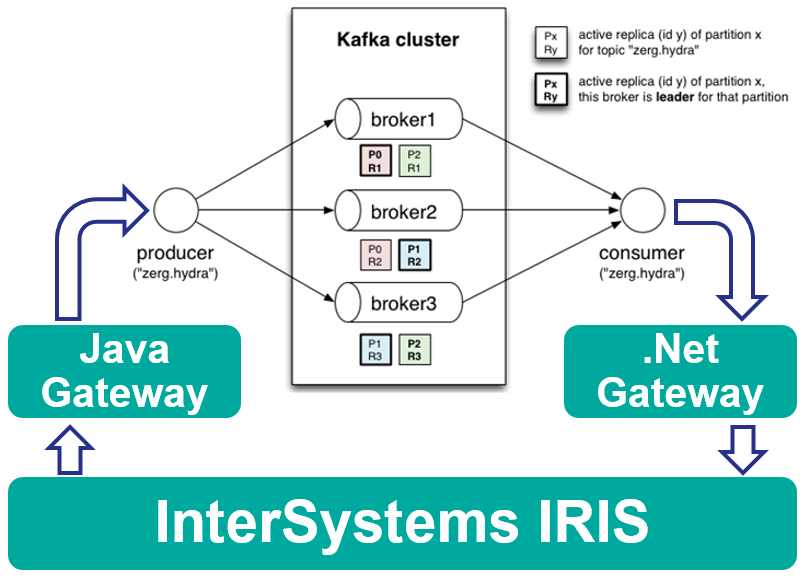
Our solution will run completely in docker and look like this:
Java Gateway
First of all, let's develop Java Operation to send messages into Kafka. The code can be written in your IDE of choice and it can look like this.
In short:
- To develop new PEX Business Operation we need to implement abstract com.intersystems.enslib.pex.BusinessOperation class
- Public properties are Business Host Settings
- OnInit method is used to init connection to Kafka and get a pointer to InterSystems IRIS
- OnTearDown is used to disconnect from Kafka (at process shutdown)
- OnMessage receives dc.KafkaRequest message and sends it to Kafka
Now let's pack it into Docker!
Here's our dockerfile:
FROM eclipse-temurin:8-jre-alpine AS builder

ARG APP_HOME=/tmp/app

COPY src $APP_HOME/src

COPY --from=intersystemscommunity/jgw:latest /jgw/*.jar $APP_HOME/jgw/

WORKDIR $APP_HOME/jar/
ADD https://repo1.maven.org/maven2/org/apache/kafka/kafka-clients/2.5.0/kafka-clients-2.5.0.jar .
ADD https://repo1.maven.org/maven2/ch/qos/logback/logback-classic/1.2.3/logback-classic-1.2.3.jar .
ADD https://repo1.maven.org/maven2/ch/qos/logback/logback-core/1.2.3/logback-core-1.2.3.jar .
ADD https://repo1.maven.org/maven2/org/slf4j/slf4j-api/1.7.30/slf4j-api-1.7.30.jar .

WORKDIR $APP_HOME/src

RUN javac -classpath $APP_HOME/jar/*:$APP_HOME/jgw/* dc/rmq/KafkaOperation.java && \
    jar -cvf $APP_HOME/jar/KafkaOperation.jar dc/rmq/KafkaOperation.class

FROM intersystemscommunity/jgw:latest

COPY --from=builder /tmp/app/jar/*.jar $GWDIR/
Let's go line by line and see what's going on here (I assume familiarity with multi-stage docker builds):
FROM eclipse-temurin:8-jre-alpine AS builderOur starting image is JDK 8 (Note that image is deprecated, use one of the suggested alternatives).
ARG APP_HOME=/tmp/app
COPY src $APP_HOME/src
We're copying our sources from /src folder into /tmp/app folder.
COPY --from=intersystemscommunity/jgw:latest /jgw/*.jar $APP_HOME/jgw/
We're copying Java gateway sources into /tmp/app/jgw folder.
WORKDIR $APP_HOME/jar/
ADD https://repo1.maven.org/maven2/org/apache/kafka/kafka-clients/2.5.0/kafka-clients-2.5.0.jar .
ADD https://repo1.maven.org/maven2/ch/qos/logback/logback-classic/1.2.3/logback-classic-1.2.3.jar .
ADD https://repo1.maven.org/maven2/ch/qos/logback/logback-core/1.2.3/logback-core-1.2.3.jar .
ADD https://repo1.maven.org/maven2/org/slf4j/slf4j-api/1.7.30/slf4j-api-1.7.30.jar .

WORKDIR $APP_HOME/src

RUN javac -classpath $APP_HOME/jar/*:$APP_HOME/jgw/* dc/rmq/KafkaOperation.java && \
    jar -cvf $APP_HOME/jar/KafkaOperation.jar dc/rmq/KafkaOperation.class
Now all dependencies are added and javac/jar is called to compile the jar file. For a real-life projects it's better to use maven or gradle.
FROM intersystemscommunity/jgw:latest

COPY --from=builder /tmp/app/jar/*.jar $GWDIR/
And finally, the jars are copied into base jgw image (base image also takes care of starting the gateway and related tasks).
.Net Gateway
Next is .Net Service which will receive messages from Kafka. The code can be written in your IDE of choice and it can look like this.
In short:
- To develop new PEX Business Service we need to implement abstract InterSystems.EnsLib.PEX.BusinessService class
- Public properties are Business Host Settings
- OnInit method is used to init connection to Kafka and subscribe to topics and get a pointer to InterSystems IRIS
- OnTearDown is used to disconnect from Kafka (at process shutdown)
- OnMessage consumes messages from Kafka and sends Ens.StringContainer messages to other Interoperability hosts
Now let's pack it into Docker!
Here's our dockerfile:
FROM mcr.microsoft.com/dotnet/core/sdk:2.1 AS build

ENV ISC_PACKAGE_INSTALLDIR /usr/irissys
ENV GWLIBDIR lib
ENV ISC_LIBDIR ${ISC_PACKAGE_INSTALLDIR}/dev/dotnet/bin/Core21

WORKDIR /source
COPY --from=store/intersystems/iris-community:2020.2.0.211.0 $ISC_LIBDIR/*.nupkg $GWLIBDIR/

# copy csproj and restore as distinct layers
COPY *.csproj ./
RUN dotnet restore

# copy and publish app and libraries
COPY . .
RUN dotnet publish -c release -o /app

# final stage/image
FROM mcr.microsoft.com/dotnet/core/runtime:2.1
WORKDIR /app
COPY --from=build /app ./

# Configs to start the Gateway Server
RUN cp KafkaConsumer.runtimeconfig.json IRISGatewayCore21.runtimeconfig.json && \
    cp KafkaConsumer.deps.json IRISGatewayCore21.deps.json

ENV PORT 55556

CMD dotnet IRISGatewayCore21.dll $PORT 0.0.0.0
Let's go line by line:
FROM mcr.microsoft.com/dotnet/core/sdk:2.1 AS buildWe use full .Net Core 2.1 SDK to build our app.
ENV ISC_PACKAGE_INSTALLDIR /usr/irissys
ENV GWLIBDIR lib
ENV ISC_LIBDIR ${ISC_PACKAGE_INSTALLDIR}/dev/dotnet/bin/Core21

WORKDIR /source
COPY --from=store/intersystems/iris-community:2020.2.0.211.0 $ISC_LIBDIR/*.nupkg $GWLIBDIR/
Copy .Net Gateway NuGets from official InterSystems Docker image into our builder image
# copy csproj and restore as distinct layers
COPY *.csproj ./
RUN dotnet restore

# copy and publish app and libraries
COPY . .
RUN dotnet publish -c release -o /app
Build our library.
# final stage/image
FROM mcr.microsoft.com/dotnet/core/runtime:2.1
WORKDIR /app
COPY --from=build /app ./
Copy library dlls into the final container we will actually run.
# Configs to start the Gateway Server
RUN cp KafkaConsumer.runtimeconfig.json IRISGatewayCore21.runtimeconfig.json && \
    cp KafkaConsumer.deps.json IRISGatewayCore21.deps.json
Currently, .Net Gateway must load all dependencies on startup, so we make it aware of all possible dependencies.
ENV PORT 55556

CMD dotnet IRISGatewayCore21.dll $PORT 0.0.0.0
Start gateway on port 55556 listening on all interfaces.
And we're done!
Here's a complete docker-compose to get it all running together (including Kafka and Kafka UI to see the messages).
To run the demo you need:
- Install:
- Execute:
git clone https://github.com/intersystems-community/pex-demo.git
cd pex-demo
docker-compose pull
docker-compose up -d
Important notice: Java Gateway and .Net Gateway libraries MUST come from the same version as InterSystems IRIS client.
Comments
Hello,
I am trying to use a simple Production with an Operation using EnsLib.SQL.OutboundAdapter. As I am running inside a Dcoker container I am trying to use your approach of running the JavaGateway in another container (https://github.com/intersystems-community/JavaGatewayImage).
So I configure the docker-compose in order to up two containers.
version: '3.6'
services:
  jgw:
    build:
      context: jgw
      dockerfile: Dockerfile
    restart: always
    ports:
      - 2021:55555
  iris:
    build:
      context: .
      dockerfile: Dockerfile
    restart: always
    ports:
      - 51773
      - 52773
      - 53773
    volumes:
      - ~/iris.key:/usr/irissys/mgr/iris.key
      - ./:/irisdev/app
as you can see I am getting the JGW from port 2021.
I configured the JGW in a production:
  <Item Name="JGW" Category="" ClassName="EnsLib.JavaGateway.Service" PoolSize="1" Enabled="true" Foreground="false" Comment="" LogTraceEvents="false" Schedule="">
    <Setting Target="Host" Name="Address">host.docker.internal</Setting>
    <Setting Target="Host" Name="Port">2021</Setting>
  </Item>
I am using Mac so I have to use "host.docker.internal" or explicit IP in order to reach the right host.
Finally I configured a BO using SQL.OutboundAdapter in order to connect to an external PostgreSQL database:
  <Item Name="DbOperation" Category="" ClassName="demo.DbOperation" PoolSize="1" Enabled="true" Foreground="false" Comment="" LogTraceEvents="true" Schedule="">
    <Setting Target="Adapter" Name="Credentials">Demo</Setting>
    <Setting Target="Adapter" Name="DSN">jdbc:postgresql://host.docker.internal:5432/demo</Setting>
    <Setting Target="Adapter" Name="JDBCDriver">org.postgresql.Driver</Setting>
    <Setting Target="Adapter" Name="JGService">JGW</Setting>
  </Item>
As I want to use the configures JGW then I set the JGW config name at JGService setting.
Well the BO is UNABLE to connect to the database... after spend hours of investigation and testing, I check that from the JG container I can connect to the database without problems, but the problem persist. With a Ensemble trace level I can see the next:
The JG service connects and communicate with the external container without problems. I see this trace:
JGW -- JG PING: Invoking ##class(%Net.Remote.Gateway).%Ping(host.docker.internal, 2021, 4) JGW -- Returned OK from OnProcessInput(); Output=, %WaitForNextCallInterval=1, %QuitTask=0
The JGW perfectly goes to host.docker.internal... but
SQLOperation -- Connecting to JavaGateway: 127.0.0.1:2021+%Net.Remote.Java.JDBCGateway:
SQLOperation -- ERROR
Please see the 127.0.0.1 ... Do you have experience this? Do you have any workaround?
It seems like the EnsLib.SQL.OutboundAdaptor don't get the Server setting from JG and always use 127.0.0.1... that's crazy
Any help???
I forget to add IRIS version:
IRIS for UNIX (Ubuntu Server LTS for x86-64 Containers) 2020.1 (Build 215U) Mon Mar 30 2020 20:27:11 EDT
Tell me what is this in EnsLib.JavaGateway.Common??
Method initJG() As %Status
{
	Set ..%JavaGateway = ##class(%Net.Remote.Java.JavaGateway).%New()
	If ""'=..JGService {
		Set tItem=##class(Ens.Host).GetShadowInstance(..JGService,.tSC)  Quit:$$$ISERR(tSC) tSC
		//Set ..%JGServer=tItem.Server
		Set ..%JGPort=tItem.Port
		//Set ..%JGConnectTimeout=tItem.ConnectTimeout
		//Set ..%JGSSLConfig=tItem.SSLConfig
	} ElseIf ..#REQUIREJGSERVICE {
		Quit $$$ERROR($$$EnsErrGeneral,"In order to work this Adapter requires the JGService setting to be configured")
	}
	Quit $$$OK
}
This line is commented:
//Set ..%JGServer=tItem.Server
I test that if you replace or insert a new line instead of that with:
Set ..%JGServer=tItem.Address
And Set ENSLIB Database to Read/Write and compile the BO can connect!!!
Although I found the bug in EnsLib.JavaGateway.Common, I still unable to connect to the database. this is a trace from JG log:
<< CONNECT

Received: (20:40:50:976) [Job number = -1] [ThreadID = 14]
  0000:  17  00  00  00  02  00  00  00  00  00  00  00  59  57      ............YW
  000E:  17  01  6F  72  67  2E  70  6F  73  74  67  72  65  73      ..org.postgres
  001C:  71  6C  2E  44  72  69  76  65  72                          ql.Driver


 >> LOAD_JAVA_CLASS_SYNCH: org.postgresql.Driver

Sent: (20:40:50:977) [Job number = -1] [ThreadID = 14]
  0000:  00  00  00  00  02  00  00  00  00  00  00  00  59  57      ............YW


 << LOAD_JAVA_CLASS_SYNCH

Received: (20:40:50:979) [Job number = -1] [ThreadID = 14]
  0000:  5C  00  00  00  02  00  00  00  00  00  00  00  59  4D      \...........YM
  000E:  03  04  0B  1E  01  64  72  69  76  65  72  3A  6F  72      .....driver:or
  001C:  67  2E  70  6F  73  74  67  72  65  73  71  6C  2E  44      g.postgresql.D
  002A:  72  69  76  65  72  31  01  6A  64  62  63  3A  70  6F      river1.jdbc:po
  0038:  73  74  67  72  65  73  71  6C  3A  2F  2F  68  6F  73      stgresql://hos
  0046:  74  2E  64  6F  63  6B  65  72  2E  69  6E  74  65  72      t.docker.inter
  0054:  6E  61  6C  3A  35  34  33  32  2F  6C  63  77  05  01      nal:5432/demo..
  0062:  6C  63  77  05  01  6C  63  77                              demo..demo


 >> MESSAGE:

  msgId: 11

Sent: (20:40:51:018) [Job number = -1] [ThreadID = 14]
  0000:  02  00  00  00  00  00  00  00  00  00  00  00  59  4D      ............YM
  000E:  02  05                                                      ..


 << MESSAGE

Received: (20:40:51:020) [Job number = -1] [ThreadID = 14]
  0000:  03  00  00  00  02  00  00  00  00  00  00  00  59  4D      ............YM
  000E:  03  04  01                                                  ...


 >> MESSAGE:

  msgId: 1

Sent: (20:40:51:020) [Job number = -1] [ThreadID = 14]
  0000:  50  00  00  00  00  00  00  00  00  00  00  00  59  4D      P...........YM
  000E:  50  01  52  65  6D  6F  74  65  20  4A  44  42  43  20      P.Remote JDBC
  001C:  65  72  72  6F  72  3A  20  4E  6F  20  73  75  69  74      error: No suit
  002A:  61  62  6C  65  20  64  72  69  76  65  72  20  66  6F      able driver fo
  0038:  75  6E  64  20  66  6F  72  20  64  72  69  76  65  72      und for driver
  0046:  3A  6F  72  67  2E  70  6F  73  74  67  72  65  73  71      :org.postgresq
  0054:  6C  2E  44  72  69  76  65  72  2E  20                      l.Driver.


 << MESSAGE

Received: (20:40:51:023) [Job number = -1] [ThreadID = 14]
  0000:  00  00  00  00  00  00  00  00  00  00  00  00  59  34      ............Y4


 >> DISCONNECT
I am having "No suitable driver found for driver:org.postgresql.Driver". But the postgre JDBC jar file is in the /jgw directory... any help?
The directory show:
root@06fac93de710:/jgw# ls -l
total 1844
-rw-r--r-- 1 root  root     1796 Feb  7 17:19 JDBCTest.jar
-rwxr-xr-x 1 51773 52773  241622 Jun 26  2020 gson-2.8.5.jar
-rwxr-xr-x 1 51773 52773  116930 Jun 26  2020 intersystems-gateway-3.1.0.jar
-rwxr-xr-x 1 51773 52773  426856 Jun 26  2020 intersystems-jdbc-3.1.0.jar
-rwxr-xr-x 1 51773 52773   85272 Jun 26  2020 intersystems-utils-3.1.0.jar
-rw------- 1 root  root  1004719 Oct 15 13:11 postgresql-42.2.18.jar
And the JG is started with:
root@06fac93de710:/jgw# ps -ef
UID        PID  PPID  C STIME TTY          TIME CMD
root         1     0  0 20:37 ?        00:00:00 /bin/sh -c java $JVMARGS -Xrs -classpath "$GWDIR/*" com.intersystems.gateway.JavaGateway $PORT $LOG 2>&1
root         8     1  0 20:37 ?        00:00:06 java -Xrs -classpath /jgw/* com.intersystems.gateway.JavaGateway 55555 /tmp/jgw-trace.log
root       161     0  0 20:59 pts/0    00:00:00 bash
root       193   161  0 21:02 pts/0    00:00:00 ps -ef
root@06fac93de710:/jgw#
- Is your postgresql in the same docker-compose?
- Please post your dockerfile for jgw (or link your repo).
- I'd also give
chmod +777onpostgresql-42.2.18.jarduring build jic
- No, the postgresql is not in the docker-compose, but is easy to include:
version: '3.6'
services:
  db:
    image: postgres
    restart: always
    environment:
      POSTGRES_USER : demo
      POSTGRES_DB: demo
      POSTGRES_PASSWORD: demo
    container_name: demo-pg
    volumes:
      - ${PWD}/pg-scripts:/docker-entrypoint-initdb.d/
    ports:
      - 5432:5432
The Docker file is a bit messy because testing... sure you can clean it:
FROM openjdk:8 AS builder
ARG APP_HOME=/tmp/app

# copy JDBCTest
COPY src $APP_HOME/src

# copy JGW jars
COPY --from=intersystemsdc/jgw:latest /jgw/*.jar $APP_HOME/jgw/

# compile and create JDBCTest
WORKDIR $APP_HOME/src
RUN javac -classpath $APP_HOME/jar/*:$APP_HOME/jgw/* JDBCTest.java && \
    mkdir $APP_HOME/jar && \
    jar -cvf $APP_HOME/jar/JDBCTest.jar JDBCTest.class

WORKDIR $APP_HOME/jar/
ADD https://jdbc.postgresql.org/download/postgresql-42.2.18.jar .

FROM openjdk:8u252-jre

ENV GWDIR /jgw
ENV PORT 55555
# add LOG
ENV LOG /tmp/jgw-trace.log
ENV ISC_PACKAGE_INSTALLDIR /usr/irissys
ENV ISC_JARDIR $ISC_PACKAGE_INSTALLDIR/dev/java/lib/JDK18

COPY --from=store/intersystems/iris-community:2020.2.0.211.0 \
     $ISC_JARDIR/intersystems-gateway-3.1.0.jar \
     $ISC_JARDIR/intersystems-jdbc-3.1.0.jar \
     $ISC_JARDIR/intersystems-utils-3.1.0.jar \
     $ISC_PACKAGE_INSTALLDIR/dev/java/lib/gson/gson-2.8.5.jar \
     $GWDIR/

CMD java $JVMARGS -Xrs -classpath "$GWDIR/*" com.intersystems.gateway.JavaGateway $PORT $LOG 2>&1

COPY --from=builder /tmp/app/jar/*.jar $GWDIR/

## install additional packages for debug
RUN apt-get update && apt-get install -y procps
JDBCTest is a simple JDBC java class for testing the connection
I have manually set chmod +777 to jars but still getting the same error
💡 This article is considered as InterSystems Data Platform Best Practice.