Menu bar in Studio
While I'm working in Studio, every now and then, the menu bar gets "unglued" and becomes a window of its own outside of Studio.
Is there a setting that prevents this from happening?
Also, if I happen to close Studio while the menu bar is "loose", the menu bar remains missing when I open a new Studio Session.
Is there a way to get the menu bar back in such a situation?
Comments
Also, if I happen to close Studio while the menu bar is "loose", the menu bar remains missing when I open a new Studio Session.
Is there a way to get the menu bar back in such a situation?
Vew -> Panels -> Uncheck missing panel
Vew -> Panels -> Check missing panel
I don't see a "Panels" on the View menu:
Version is: Cache for Windows (x86-64) 2017.1 (Build 792U) Mon Mar 20 2017 19:13:14 EDT
I can't see the image. But it should be the last Item in a first part of the View menu. It's also the only item of a first part of the View menu with a dropdown.
For my Studio, to toggle the menubar it seems to be View->Toolbars, and then choose Customize...

There, go to the Toolbars tab:
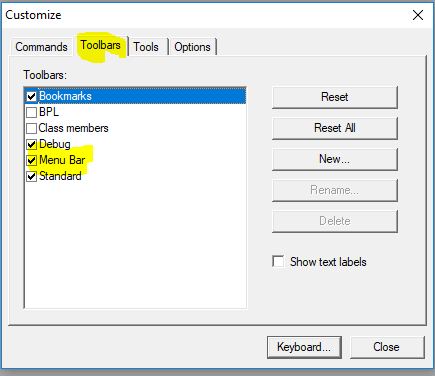
Pressing on a Toolbar in the first menu should toggle it too.