Redirect output of Cache write command to Python interpreter
Hi,
I am experimenting with Cache-Python binding. In the following piece of Python code
import intersys.pythonbind3
conn = intersys.pythonbind3.connection( )
conn.connect_now('localhost[1972]:SAMPLES', '_SYSTEM', '123', None)
samplesDB = intersys.pythonbind3.database(conn)
p10 = samplesDB.openid("Sample.Person",'10',-1,-1)
p10.run_obj_method("PrintPerson",[])
I am opening the 10th record of Sample.Person class and then I am calling an object method (PrintPerson).
Method PrintPerson()
{
Write !, "Name: ", ..Name
Quit
}
How can I redirect the output of Write command so that Person's name is printed on Python interpreter ?
I searched a bit on TCP Client/Server communication and specifically the WRITE Command for TCP Devices. I am not sure how I can configure this and where exactly to place call such as
open "|TCP|4":("127.0.0.1":4200::$CHAR(3,4)):10
use "|TCP|4"
Could you please write down the exact solution so that I can run a test on my localhost ?
Comments
Hello Athanassios,
I think you're on the right track. But that should be only the beginning.
To capture "writes" from Caché you need to redirect your IO and write the data back to the device you binded your Python interpreter. This is your writer device. If you need help about how to configure your writer device, check the Job Command Example.
Remember that it's your responsibility how you'll implement a buffer and how much it can store before writing it back to the implementer. I do recommend using a stream here.
Now I don't know if simply by calling the binded method you're able to see it's output before returning. If it doesn't, you problably need to open a TCP connection from the implementer's side too and listen to the writer device using a separated thread.
Hi Rubens, the only reason I need this redirection is for sending messages to the Python console for debugging, introspection purposes NOT for sending data. CachePython Query and CachePython Object packages can handle this automatically. Therefore in general I am looking for something simple, like this method Robert wrote above. Alternatively if it's too complicate, I am thinking of opening a stream and write a log there.
Wouldn't it require all methods to implement the device logic? I guess that's why he asked for device redirection.
{
set tcp="|TCP|4200"
open tcp:("127.0.0.1":4200:"PSTE"):1 else quit
use tcp
Write "Name: ", ..Name,!
close tcp
Quit
}
Sorry, I saw just that one Print method fromSAMPLES.
The redirect is especially required to convert a Write Command to a Write() Method and vice versa.
For "classic" devices as files , TCP, UDP, all kind of pipes ,SPOOL,Console, Teerminal,...all you find in Caché I/O Device Guide I just see no added value except fiddling around $P which I never had the need to do over 40yrs
Hi Robert, thanks for posting an answer, I added an extra PrintPersonTCP() at Sample.Person with your code and then I called the method from Cache Python binding package but it did not print anything on IPython console.
The ouput goes to port 4200. That works with Caché. (see test code)
Attention: The ! at the end of the WRITE is important as it triggers the send.
in SAMPLES it is at the beginning: So you just get an empty line. and rest remains in buffer.
You may also add WRITE !! before the CLOSE to flush the buffer and send an empty line for termination .
I have no knowledge on Python or PythonConsole but from your code I see no indication
where it starts listening at port 4200. pls. check.
Test code from Caché Terminal:
USER>open tcp:(:4200):1 write $s($t:"OK",1:"failed"),!
OK
USER>for line=1:1 use tcp read text use 0 write line,?5,text,!
1 Name: Uhles,Rob O.
<READ>
[ <READ> is the reaction to the connection CLOSE of the sender as I don't check termination ]
Hi Robert, thanks for the update, let's try to sort this out in Cache Terminal then. I have added an extra write !! statement before the close tcp. Then I opened a terminal switched to SAMPLES namespace and entered the following commands
set person = ##class(Samples.Person).%OpenId(1)
w person.Name
do person.PrintPersonTCP()
set tcp="|TCP|4200"
open tcp:(:4200):1 write $s($t:"OK",1:"failed"),!
The result is OK
But the next line of your code
for line=1:1 use tcp read text use 0 write line,?5,text,!
just made the cursor blink in the next line without returning anything
Hi Athanassios,
you can not run the sender code in the same terminal as the receiver code
you have to use 2 terminals:
Terminal #1) start receiver. This simulates your Phyton Console
open tcp:(:4200):1 write $s($t:"OK",1:"failed"),!
for line=1:1 use tcp read text use 0 write line,?5,text,!
now you wait for something to be sent:
#Terminal #2): run sender
w person.Name
do person.PrintPersonTCP()
for this test it's essential that the sender finds a receiver waiting for input. Probably the same issue with PhytonConsole?
It's like real life: If nobody listens, your words are lost.  And it has to happen at the same time.
Done, thanks for the lesson Robert ;-) I voted your comments and I verified that this method works for two Cache terminals, one listener, one sender. But I do not have a clue how this can be done in the same or different Python consoles and this way such an answer to my question will be complete.
your private google search service delivered some material.
[this is not a standard service]
.
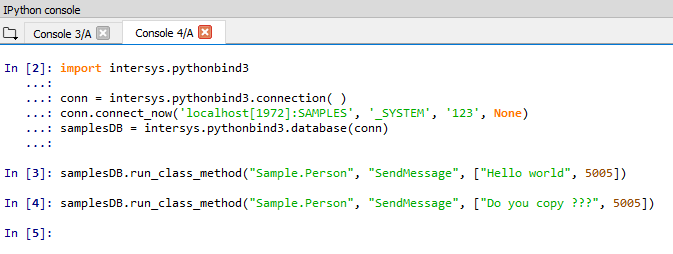
Good morning Robert, based on the piece of code you sent me for a Python TCP socket server I made these SocketReceiver, SocketSender classes for Python 3 so now it is super easy for anyone to run a simple TCP socket communication test on two Python consoles.
Then I wrote this ClassMethod
ClassMethod SendMessage(msg As %String = "", port As %Integer)
{
set tcp="|TCP|"_port
    open tcp:("127.0.0.1":port:"PSTE"):1 else  quit
    use tcp
    write msg,!
    write !!
    // close tcp
    Quit
}
The only problem here is the 'close tcp' statement that closes the listener which has been set at a Python console and I commented this out (I am sure there can be a better way).
Finally I opened two python consoles and successfully tested the whole thing
Case is closed, hope this will be useful for others too, thank you again for your assistance and guidance

Athanassios,
I googled some time around Python console:
It is single threaded.
But your expectations seem to be that the behavour is like a terminal.
To achieve this your have to run 2 Phyton consoles / shells as you required 2 Terminals.
a) 1 passive to receive messages from WRITE see attaches example starting before b)
b) 1 active to trigger action in Caché
Your initial code from your questions using the Caché Phyton binding covers b) OK!
for a) you may use a listener similar to this Phyton example with the correct port, buffer,... ToDo
   1 #!/usr/bin/env python
   2
   3 import socket
   4
   5
   6 TCP_IP = '127.0.0.1'
   7 TCP_PORT = 5005
   8 BUFFER_SIZE = 20  # Normally 1024, but we want fast response
   9
  10 s = socket.socket(socket.AF_INET, socket.SOCK_STREAM)
  11 s.bind((TCP_IP, TCP_PORT))
  12 s.listen(1)
  13
  14 conn, addr = s.accept()
  15 print 'Connection address:', addr
  16 while 1:
  17     data = conn.recv(BUFFER_SIZE)
  18     if not data: break
  19     print "received data:", data
  20     conn.send(data)  # echo
  21 conn.close()