Brendan Batchelder · Aug 14, 2019 go to post

Ens.MessageHeader has a Status column.  You may need to select on the name or its corresponding number depending on select mode.  For example, status "Suspended" is 5.  If selecting in display mode, use Status='Suspended' and in raw mode use Status=5 in your where clause.

The number for each status is defined in macros in EnsConstants.inc - the ones that start with eMessageStatus

Brendan Batchelder · Jul 19, 2018 go to post

I was able to find APIs for the tasks being performed in Sebastian's custom code.  It is preferrable that APIs are used rather than direct global access.  I also discovered another method of finding the PatientID, rather than having to extract it from the RowID.  This code should be equivalent to Sebastian's code:

ClassMethod GetSneezinessViewerTransform(id) As %String
{
set patientid = %request.Data("PatientID",1)
set streamletID = ##class(web.SDA3.Loader).GetStreamletId(,patientid,"ALG",id)
set tSC = ##class(HS.SDA3.Container).LoadSDAObject(streamletID,.allergySDA3)
set sneeziness = allergySDA3.sneeziness
quit sneeziness
}

Brendan Batchelder · Jan 25, 2017 go to post

The reason this is happening is because your message specifies UTF-8 in MSH:18.  If you remove that from your test message, it will look correct.

When using the 'test' button to test a DTL, it will always try to use the encoding defined in MSH:18 to read the message.

When using a business service to read the message, it will try to use the encoding defined in MSH:18 if it is defined.  If it is not defined, then the 'Default Char Encoding' setting determines which encoding will be used.  You can force the 'Default Char Encoding' to override MSH:18 by putting a ! before it.

http://docs.intersystems.com/ens20161/csp/docbook/DocBook.UI.Page.cls?K…

Brendan Batchelder · Jan 10, 2017 go to post

class Ens.Util.LookupTable has %Import and %Export methods.  You can use %Export to export an existing table to see the format expected by %Import.

Another option is to import a csv file using the SQL Data Import Wizard.  You can find that at System Explorer -> SQL and then click the 'Wizards' link at the top and choose Data Import.  I believe the csv file needs 3 columns: tablename, key, value.  The table name gets repeated for every row.  I'm not sure if this can be automated.

The last option is to edit the globals directly.  Ens.Util.LookupTable doesn't use standard default storage.  Instead, everything is stored in ^Ens.LookupTable with this format:

^Ens.LookupTable("TableName","key")="value"

The last two options break the abstraction barrier so if the way lookup tables are stored ever changes, they'll stop working.  %Import and %Export are preferred.

Brendan Batchelder · Dec 22, 2016 go to post

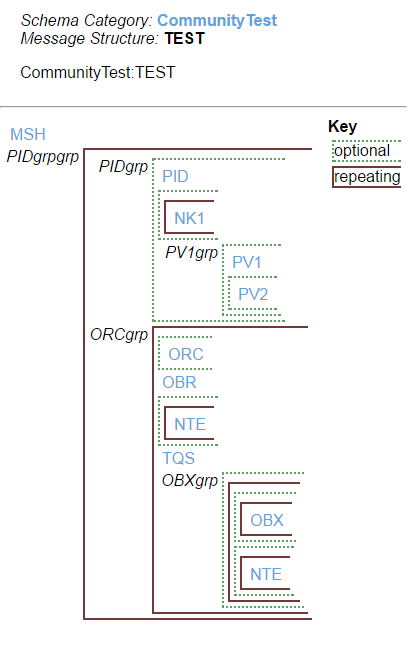
I just tested this in latest and it worked fine for me.  Here is the Message Structure Raw Definition I used:

2.3.1:MSH~{~[~2.3.1:PID~[~{~2.3.1:NK1~}~]~[~2.3.1:PV1~[~2.3.1:PV2~]~]~]~{~[~2.3.1:ORC~]~2.3.1:OBR~[~{~2.3.1:NTE~}~]~CommunityTest:TQS~[~{~[~{~2.3.1:OBX~}~]~[~{~2.3.1:NTE~}~]~}~]~}~}

Here is a screenshot showing the visual representation of the Message Structure:

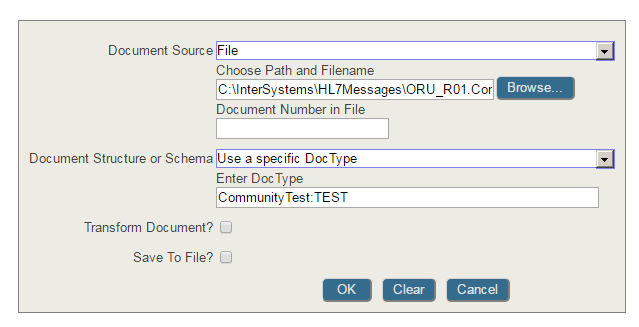
I created a sample message by modifying a sample ORU_R01 I had and I opened it in the Interoperate message viewer using these settings (my Schema is named CommunityTest and my DocType is named TEST):

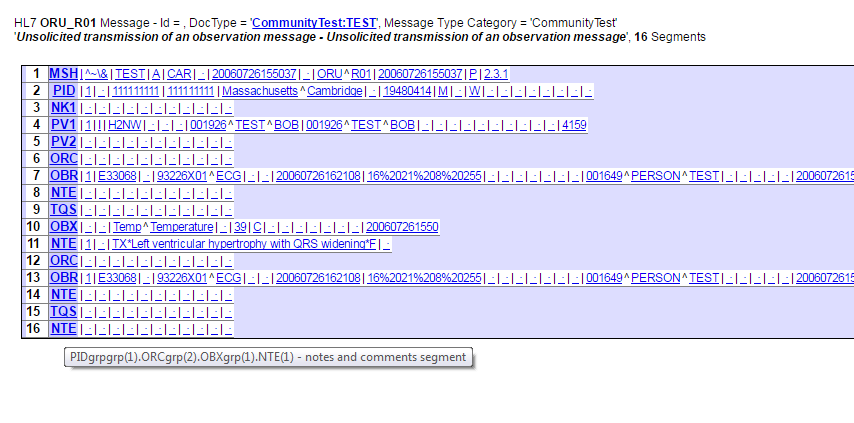
When I view the file and mouse over the final NTE segment, here is the VDoc path I'm given.  You can see that it's in the OBXgrp:

What version are you on?  I think you should open a WRC problem to investigate this further.  You can call the WRC at 617-621-0700 or you can email support@intersystems.com

Brendan Batchelder · Dec 22, 2016 go to post

Why does saving the content of the PID segment in a SQL table require you to convert it to JSON or XML?  What format does it need to be in in the SQL table?

You can extract the entire PID segment with something like source.GetValueAt("PID") depending on your DocType structure.  If you just need to wrap it in XML tags then set xml = "<PID>"_source.GetValueAt("PID")_"</PID>".

Brendan Batchelder · Dec 22, 2016 go to post

There's no SFT in your DocType structure.  Your ORCgrp has optional/repeatable NTE, and your OBXgrp has optional/repeatable OBX and NTE.  Your ORCgrp also requires there to be a TQS segment before the start of OBXgrp.

Without a TQS segment, any NTEs after an OBR will be part of ORCgrp.  In other words, all NTEs after an OBR but before a TQS are part of the ORCgrp, not the OBXgrp.

If you expect that the TQS segment can be missing before the start of the OBXgrp then it needs to be optional.  The SFT segment also needs to be accounted for, either in the ORCgrp or the OBXgrp.

It's probably a good idea to contact your sales engineers for assistance designing your custom schema, or to open a WRC problem to investigate this further.

Brendan Batchelder · Dec 15, 2016 go to post

On top of that, for the field portion of the VDoc path, using a numeric reference will always work, even if the segment structure of the message doesn't match the schema.

In order to see how to reference the field by name rather than numeric, the best tool to use is the Interoperate message viewer.  This can be found in the management portal at Ensemble->Interoperate->HL7 v2.x->HL7 Message Viewer.

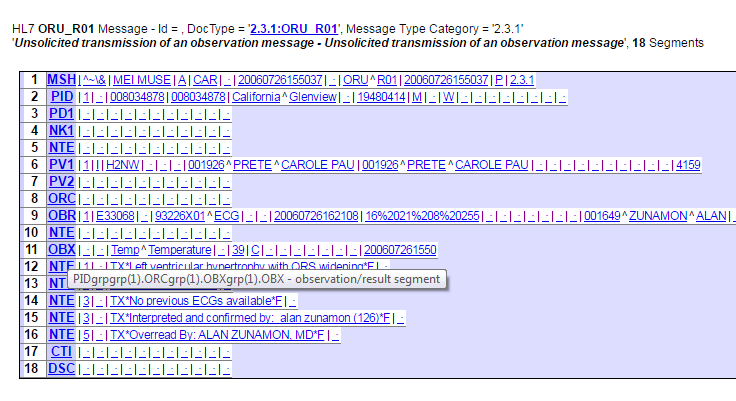
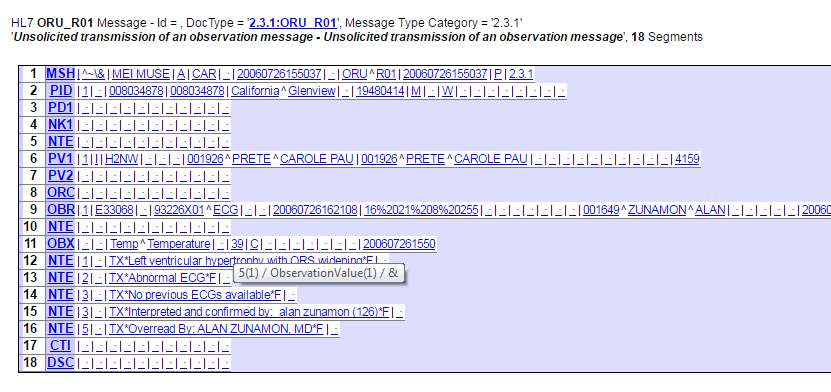
If you save your message as a file and open it using this message viewer, and set the DocType correctly, then you will see the message on the right side with all segment identifiers and fields highlighted in blue.  You can mouse over any segment identifier to see the exact segment path needed to reach that segment, and then you can mouse over any field to see the name that should be used to reference that field.

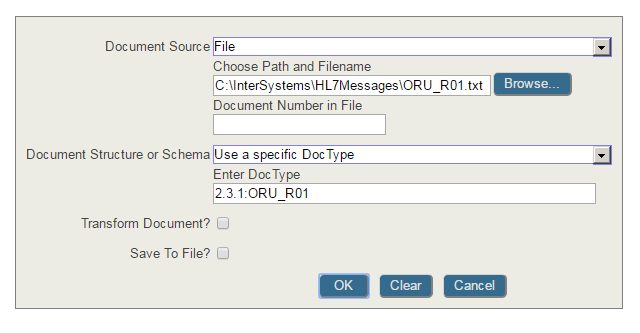
Here are some examples.  First is the settings I used to open the message, followed by the tooltip when I mouse over the OBX segment, followed by the tooltip when I mouse over the '39' field.

Brendan Batchelder · Dec 15, 2016 go to post

In general, you should not leave any parentheses in the segment portion of a VDoc path empty.  If your DTL references target.{PIDgrpgrp().ORCgrp().OBXgrp(1).OBX:5.2}, how will the DTL know which PIDgrpgrp or which ORCgrp you're trying to reference?

If you can guarantee your messages will only have one PIDgrpgrp and one ORCgrp within that, then you can just use 1's, like this: target.{PIDgrpgrp(1).ORCgrp(1).OBXgrp(1).OBX:5.2}

If it's possible your messages will have multiple PIDgrpgrps or ORCgrps, then you may need nested foreach loops to reach all of them.  Even in the foreach loop, only the last set of parentheses in the segment path should be empty.

Brendan Batchelder · Dec 15, 2016 go to post

I do this in terminal all the time.  When you do this, you also need to manually set the DocType.  Here's an example:

ENSEMBLE>set msg = ##class(EnsLib.HL7.Message).ImportFromFile("C:\InterSystems\HL7Messages\ADT_A01.txt")

ENSEMBLE>set msg.DocType="2.3.1:ADT_A01"

ENSEMBLE>write msg.GetValueAt("MSH:9")
ADT^A01
ENSEMBLE>write msg.GetValueAt("PID:DateTimeOfBirth.timeofanevent")
19560129
ENSEMBLE>
Brendan Batchelder · Dec 12, 2016 go to post

Good point.  If it's routing HL7 messages and using an HL7 Message Routing Rule, then the router class should be EnsLib.HL7.MsgRouter.RoutingEngine.  For general messages, use EnsLib.MsgRouter.RoutingEngine.

There is a known problem with our documentation, scheduled to be fixed in 2017.1.

The class documentation for %Net.SSH.Session states: "Once connected and authenticated, the SSH object can be used to perform SCP (Secure Copy) operations of single files to and from the remote system".

This is not true.  There is no way to use %Net.SSH.Session to do a secure copy.

The example at this URL in the documentation shows how to create a REST business service which retrieves JSON data, converts it to a proxy object, and then extracts values from the proxy object to store in a response:

http://docs.intersystems.com/latest/csp/docbook/DocBook.UI.Page.cls?KEY…

Assuming you are retrieving your JSON data from a REST service, your use case is similar.  Instead of storing the values in a response, you would want to create a new request class to hold the values.  Replace pResponse in the example with an instance of your new request class, fill it with data from the JSON proxy object, then send it to a message router component with ..SendRequestAsync.

Then, in your message router, you can add a DTL which transforms your new request class into an ADT_A31 HL7 message.

I read your question more carefully.  Here is example JSON with an array:

{

    "test":"abc",

    "arr":["one","two","three"]

}

Here is how to access the contents of the array once it's loaded in the tProxy object:

USER>w tProxy.test
abc
USER>w tProxy.arr.GetAt(1)
one
USER>w tProxy.arr.GetAt(2)
two
USER>

<PROPERTY DOES NOT EXIST> means your code is trying to reference a class property that does not exist.  The rest of the error message should tell you which property you tried to reference that didn't exist.

After you added those 3 properties to the WeatherResponse class, did you save and compile it?

If you're not able to resolve this, can you post the complete error message?  What property is it telling you doesn't exist?

%Net.SMTP method Send handles connecting to the SMTP server, extracting all the necessary data from %Net.MailMessage, formatting it for SMTP, and writing it to the server.

If you copy this method and modify it to skip the connecting to server portion and instead have it OPEN and USE a file, then all of the write commands (well, $$$WriteLine commands) will write to a file rather than to the SMTP server.  This might be the simplest way to serialize the %Net.MailMessage

If the embedded file is long enough, then that GetValueAt call will truncate it.  Instead you need to use GetFieldStreamRaw.  You do not need to save the file locally in order to attach it to an email.  If you want to do both, you should use a file operation for saving the file to disk and a separate email operation for sending out the email.

What I would do is extract the file from the HL7 with GetFieldStreamRaw and then store it in a message object.

To make Ensemble send an email you need a custom EMail operation:

http://docs.intersystems.com/ens20161/csp/docbook/DocBook.UI.Page.cls?K…

Your message object that you send to the email operation needs to have a stream property to hold the file contents.

Your custom email operation will need to create a %Net.MailMessage object to send the mail.  This object is where you attach the file.  You can use the AttachStream method to attach the stream as a file.

http://docs.intersystems.com/ens20152/csp/documatic/%25CSP.Documatic.cl…

I think the way I would code this is create a new message object which contains properties for all the fields that might appear in the file.  Then create a new custom file service using the adapter EnsLib.File.InboundAdapter.  In the OnProcessInput for that new file service, use Dmitry and Carlos's suggestion to read the file with pRequest.ReadLine() and parse each line to extract the property name and value and store the value in the appropriate property of the new message object.

Then, have the service send that message object to a router with a DTL transform which will convert from your new message object class into an HL7 message and send that message to the target.

I don't think there is a way to repeatedly receive queue count alerts if the queue remains high.

What you could do is use Managed Alerts rather than simple alerts and you can configure the managed alert to repeatedly send notification emails until the person responsible closes the alert.

Doing it this way will require a person to actually look at the queue and either verify it's gone down and close the alert, or take action to reduce the queue.

Brendan Batchelder · Oct 26, 2016 go to post

I just thought of another method.  Getting the count should work for checking for existence as well.  If using DOM-style paths, then get the count with [*] and if using VDoc style paths, then get the count with (*).  Using the VDoc path example from above:

<if condition='source.{element1.element2.element3(*)}&gt;0'>

This will return True if there are any element3's inside the element2.  It will return False if there are not.

Brendan Batchelder · Oct 26, 2016 go to post

If you just want to know whether there is a value or not in element1.element2.element3, compare it to "".  The 'not equal' ('=) operator in Cache contains an apostrophe, so it must be escaped in the XML. (if a '= b write "a is not equal to b")

<if condition='source.{element1.element2.element3}&apos;=""'>

This will return True if element1.element2.element3 has a value, or it will return False if either element1.element2.element3 does not exist or if element1.element2.element3 exists but contains no value, like this:

<element3></element3>

If you need to differentiate between these two cases, things get more difficult.  There is no method in XML VDoc that can tell you whether an element exists or not.  In general with XML, the existence of an element shouldn't be used as a logical boolean value.  Instead you should use a boolean datatype in your XML schema.

If you must check whether element3 exists or not, you could do it like this:

say your XML document looks like this:

<element1><element2><element3>sometext</element3></element2></element1>

If you were to get the value of element2 with an assign action like this:

<assign value='element1.element2' property='e2' action='set' />

then after that line, the variable e2 will hold the value "<element3>sometext</element3>" so to check for the existence of element3, you could search e2 for the text "<element3>" with the ..Contains function:

<if condition='..Contains(e2,"&lt;element3&gt;")' >

If your element3 might be self-closed (like this: <element3 />) then you'll need to account for that possibility as well.

Brendan Batchelder · Oct 13, 2016 go to post

Any given core can only run one process at a time, so it is surprising that you saw faster performance with a pool size of 100 than a pool size of 50.  If anything, that should result in more context switching resulting in a reduction in performance.

Brendan Batchelder · Sep 27, 2016 go to post

I am seeing the same thing.  OutputToString() internally uses OutputToIOStream() but it sets the CharEncoding on the stream to "binary" before passing it.  I think this is the source of the problem.

I was able to work around it using OutputToLibraryStream instead:

ENSEMBLE>set msg = ##class(EnsLib.EDI.XML.Document).ImportFromString("<Test>מִבְחָן</Test>")

ENSEMBLE>write msg.OutputToString()
<Test>???????</Test>
ENSEMBLE>set stream = ##class(%Stream.TmpCharacter).%New()

ENSEMBLE>write msg.OutputToLibraryStream(.stream)
1
ENSEMBLE>write stream.Read()
<Test>מִבְחָן</Test>
Brendan Batchelder · Aug 24, 2016 go to post

Just to add on to this, lookup tables are stored in ^Ens.LookupTable, subscripted by the table name and then the key.  The value of each node is the lookup value of the key in the subscript.

For example, if you have a table named Codes which contains a key named 123 that maps to value "ABC", it will look like this in the global:

^Ens.LookupTable("Codes",123)="ABC"

The reason reverse lookups are not supported is because we allow many keys to map to the same value.  So if you need to find a key, given a value, there may be many values that match.

Writing code to perform a reverse lookup will involve copying the ^Ens.LookupTable global into a variable subscripted by value rather than by key, like this:

ReverseLookupTable("Codes","ABC")=123

and then performing a lookup on that variable.