We can make it available. Currently it is in a private Git repo
- Log in to post comments
We can make it available. Currently it is in a private Git repo
Great! I already used it in a project and it made my life much easier
I just uploaded it again
I just uploaded it again
If you still need the SEF-files, please let me kniw your e-mail address and I can send it to you too.
Please let me know your e-mail address and I can send the files.
Michael
D01B.SEF File
Hi Jose,
I can provide a SEF file for D01B to you. But please note, I haven't used it myself and it is not an official InterSystems product. Use is at your own risk. My customer typically use D96A.
I have attached it to this answer.
Hope this helps
Michael
well done!
You need to wrap it into a classmethod which is exposed as a stored procedure as in the example below:
Class DC.Utils [ Abstract ]
{
ClassMethod AESBCEncrypt(
pPlainText As %String,
pKey As %String) As %String [ SqlProc ]
{
return $system.Encryption.AESCBCEncrypt(pPlainText, pKey)
}
}
Once you have done this, you can use something like:
update sample.person (Name) values (DC.Utils_AESBCEncrypt(name,'key'))Mmmh, I'm lazy too ;-)
What I did here is use the capabilty of indices on collections. But in my class the lastname isn't really a collection. That's why you have to implement the BuildValueArray method. It should be possible to create a method generator who generates the code neccessary to do all the indexing. What do you think?
You should use Caché security features to prevent unauthorized access to the index global and the code etc. I didn't use a standard hash like SHA-1 or SHA-256 and used a "salted" hash to make it harder to use standard rainbow tables.
I didn't claim that it is 100% safe. As long as you get access to the hashes and the MakeSearchField function there is a potential risk.
Dan,
creating a datatype might make encryption/decryption more convenient. But what if you want to search AND want to use indices to speed up the search? What do you index, the plain-text? The encrypted values are not suitable for indexing.
Hi Marcel,
I have one. I'll send it to you in a separate mail.
Haven't tried it. My customer usually use 96A.
Regards,
Michael
There is PERFMON and the Line-By-Line Monitor which you can use to analyze your routines. With PERFMON you can identify the most busy and expensive ROUTINES and you can then analyze a specific routine in detail.
Here are the links to the docs:
http://docs.intersystems.com/latest/csp/docbook/DocBook.UI.Page.cls?KEY…
http://docs.intersystems.com/latest/csp/docbook/DocBook.UI.Page.cls?KEY…
Hope this helps.
-Michael
Hi Evgeny,
you can add a context parameter to the MDX exression. It an be filters, rows or columns. So if I change my code to:
[Measures].[Amount Sold]/
%MDX("select [Measures].[Amount Sold] on 1 from holefoods","%CONTEXT","columns")
it gives me the follwoing result:
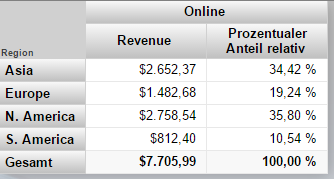
Does this help?
Michael
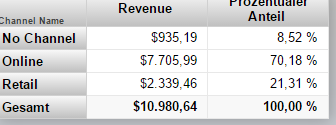
Sample screenshot
Evgeny,
for these purposes I use a calculated measure. The MDX-expression for the measure looks like this:
[Measures].[Amount Sold]/
%MDX("select [Measures].[Amount Sold] on 1 from holefoods")
My complete MDX is:
SELECT {[Measures].[Amount Sold],[MEASURES].[Percentage]} ON 0,NON EMPTY [Channel].[H1].[Channel Name].Members ON 1 FROM [HOLEFOODS]
Hope this helps.
-Michael
All you need to do is, to specify the property name/sql field name in the select-list of your query.
You have a couple of choices.
Either use the built in function $zhex or %SYSTEM.Utils.HexToDecimal or %SYSTEM.Utils.DecimalToHex.
See the documentation for details
Hope this helps.
Something like this should do it:
set x=""
set x = $o(@x)
while x'="" {
write !,x," ",@x
set x = $o(@x)
}