Amir Samary · Aug 8, 2017 go to post

Agreed. I believe this information should have come inside the main exception. Many developers probably have a hard time debugging errors without the real root cause. But then, the documentation explains how to get to the root cause and even give code snippets on how you should code to always have the root cause (that is on %objlasterror).

Amir Samary · Aug 8, 2017 go to post

I believe this recommendation you linked on our documentation is outdated and wrong. One must use %objlasterror on several instances. Examples:

Java Gateway: http://docs.intersystems.com/latest/csp/docbook/DocBook.UI.Page.cls?KEY…

.NET Gatewayhttp://docs.intersystems.com/latest/csp/docbook/DocBook.UI.Page.cls?KEY…

SOAP Error Handlinghttp://docs.intersystems.com/latest/csp/docbook/DocBook.UI.Page.cls?KEY…

Caché ActiveX Gatewayhttp://docs.intersystems.com/latest/csp/docbook/DocBook.UI.Page.cls?KEY…

%New() constructorhttp://docs.intersystems.com/latest/csp/docbook/DocBook.UI.Page.cls?KEY…

Using %Dictionary Classeshttp://docs.intersystems.com/latest/csp/docbook/DocBook.UI.Page.cls?KEY…

There are many instances where %objlasterror is the ONLY place where you can find out what REALLY happened. Not using this information on production is, IMHO, unwise.

Kind regards,

Amir Samary

Amir Samary · Aug 7, 2017 go to post

Hi Dan!

Yes! I kept reading after I answered and I just noticed that. Thank you for pointing that out!

Kind regards,

AS

Amir Samary · Aug 7, 2017 go to post

Hi Dan!

I don't really like macros. :) But I love exceptions. It would be awesome if %SQL.Statement simply threw the Exception when an error occurs instead of returning a SQLCODE that must be checked and transformed to either an exception or a %Status... In this way, we could keep the number of ways we deal with errors reduced to two, instead of three.

Your explanation is indeed very compelling and I will start using %SQL.Statement from now on. I was thinking about building a macro named $$$THROWONSQLERROR(result) that will receive the resultset returned by %Prepare and check it's SQLCODE and, if there is an error, throw it using result.%SQLCODE and %Message just like CreateFromSQLCODE does. This would allow me to hide SQLCODE.

Kind regards,

AS

Amir Samary · Aug 7, 2017 go to post

When you receive a <ZSOAP> or <ZGTW> error, throw it away and take whatever comes into %objlasterror as your final %Status code. For <ZSOAP>, %objlasterror will have the real error description such as the timeout, XML parsing errors, authentication errors, etc. For <ZGTW> errors, %objlasterror will have the complete Java stack trace of the error.

Kind regards,

AS

Amir Samary · Aug 5, 2017 go to post

I started using $System.Status.* methods about 10 years ago when I wanted to demo how we could take code from Visual Basic 6, VBA or ASP and copy most of its logic into a Caché class method and use Language = basic.

If you need to call one of our API methods from this VBScript code you would probably receive a %Status. As VBScript doesn't use the $$$ macros, the only way to parse the error was by using $System.Status methods. I believe supporting other languages as VBScript was one of the reasons we put this code in there... But I may be wrong.

So, for consistency, I started using only $System.Status methods everywhere. I could write some code in COS that would parse an error with $System.Status.IsError() and I could rewrite the same method in VBScript using the same $System.Status methods without having to explain to people why, on the same product, we would make you deal with errors in different ways. We couldn't avoid "On Error" x "Try/Catch" though.

This also helps people notice $System and %SYSTEM package of classes and see what else is in there. Very useful.

I understand using macros will result in faster code. I also believe our compile could optimize $System.Status.IsError() and $System.Status.OK() method calls to produce the same byte code as the macros. We probably don't do this, but as a Sales Engineer, that is trying to show people how simple and powerful our technology can be, I prefer consistency and clarity over speed. I would also prefer consistency and clarity over some additional speed in any professional code that must be maintained by someone else in the future... 

I have strong feelings about &SQL() too. I would avoid it at all costs whilst I know that it will be the faster way to run a query in Caché. I prefer using %SQL.Statement or %ResultSet because I hate to make my code uglier just to accommodate SQLCODE error handling. Beside this, &SQL can't be used on other supported languages such as VBScript (that is not important anymore) and will force you to compile your classes if you decide to add a new index to your class or make more dramatic changes such as changing your class storage definition. You can change your storage definition, add indices, etc. without having to recompile your classes when using %SQL.Statement or %ResultSet because those cached routines will be automatically deleted for you... That is what most people would expect. I like when things look clear, simple and natural... So I also avoid using &SQL.

Finally, people tend to not even check for errors . If you make things complex, most people will produce bad code and blame you for having a complex programming language. Consistency makes people safer.

Kind regards,

AS

Amir Samary · Aug 4, 2017 go to post

Hi Dan!

I have been using %ResultSet forever and my coding style is as follows:

/// Always return a %Status
ClassMethod SomeMethod() As %Status
{
     Set tSC = $System.Status.OK()
     Try
     {
          Set oRS = ##class(%ResultSet).%New()
          Set tSC = oRS.Prepare("Select ......")
          Quit:$System.Status.IsError(tSC)        

          Set tSC = oRS.Execute()
          Quit:$System.Status.IsError(tSC)

          While oRS.Next()
          {
              //Do something...
          }     
     }
     Catch (oException)
     {
          Set tSC = oException.AsStatus()
     }
     Quit tSC
}

As you can see, it is painful enough to have to deal with both Try/Catch and %Status ways of handling errors. I have used Try/Catch in the same way I used to use $ZT back in the days. We must protect the code from unpredictable errors such as <FILEFULL>, <STORE>, etc. On the other hand, most of our API return %Status. So, there is no choice but to use a similar structure for handling both ways of reporting errors.

With the new %SQL.Statement interface I am required to check yet another way of reporting errors (SQLCODE) and translate those errors to either %Status or an Exception. That makes my code look ugly and no so much object oriented as I would like. You see, when I am doing demos and coding in front of people I tend to code the same way I code when I am building something for real and vice-versa. Caché/Ensemble is really a formidable technology and one can build things with our technology that would take anyone else months on other technologies. But the first impression is key and when I am doing demos I want to show beautiful code that is easy to read and understand. That is why I keep using %ResultSet. It's true %Prepare() will return a %Status but %Execute won't and I would have to inspect %SQL.StatementResult for it's SQLCODE and transform it into a %Status/Exception.

I opened a prodlog for this some time ago (118943), requesting an enhancement for this class to support a %Status property as well as a SQLCODE. 

Kind regards,

AS

Amir Samary · Aug 2, 2017 go to post

I understand the power of %SQL.Statement but as most of my queries are simple I continue using %ResultSet since the error treatment with %Status is more consistent.

It is bad enough that we have to deal with a mix of %Status and Exception handling. I don't like to have to check for %SQLCODE being negative after %Execute() and, if it is, having to transform it to a %Status to keep error handling consistent.

%ResultSet's Execute() method will return me a %Status while %SQL.Statement interface makes me have to deal with yet another type of error (%SQLCODE) making error handling code yet uglier... 

I like consistency, so I continue using %ResultSet. But when I need more functionality or more speed, I use %SQL.Statement instead.

Respectfully,

AS

Amir Samary · Jul 28, 2017 go to post

Hi Daniel!

I tend to look at REST services as a SOA Web Service an, as such, it must have a "contract". Binding this contract to the internal implementation can be problematic. Normally, you would try to work with a JSON object that is more "natural" to your web application while dealing with CRUD operations related to it on the server. That would allow you to decouple the client from the server through the contract and change your server implementation while keeping you client untouched.

So, beware that this excessive coupling can indeed increase productivity right now but may become a nightmare in the future...

Kind regards,

AS

Amir Samary · Jun 19, 2017 go to post

There is a GitHub Studio Hook already built out there in the wild. I wouldn't rewrite another one if I were you...

On the other hand, I wouldn't use this hook exactly because it generates XML exports of our files and I hate seeing my source code as XML on GitHub.

Instead, I would use Atelier with EGit plugin connected to my local Caché server. If you don't like Atelier, you can still use Studio if you want to. You will spend most of your time working with Studio on your local machine. When you are ready to commit your work to GitHub, you can open Atelier, synchronize your source code (what will export each class/routine to plain text files with your plain source code instead of XML) and commit the changes to GitHub.

It's like using Atelier as you would use Tortoise, except that Tortoise won't connect to Caché and export all/import all your source code for you like Atelier does... ;)

I like Atelier. I am used to it. Try it and maybe you will like it too. I can't wait to see the new release of it! Good luck!

Amir Samary · Jun 19, 2017 go to post

Hi!

I am not sure if I understood your questions. But here is an explanation that may help you...

If you want to run a SQL query filtering by a date

Let's take Sample.Person class on the SAMPLES namespace as an example. There is a DOB (date of birth) field of type %Date. This stores dates in the $Horolog format of Caché (an integer that counts the number of dates since 12/32/1940.

If your date is in the format DD/MM/YYYY (for instance), you can use TO_DATE() function to run your query and convert this date string to the $Horolog number:

select * from Sample.Person where DOB=TO_DATE('27/11/1950','DD/MM/YYYY')

That will work independently of the runtime mode you are on (Display, ODBC or Logical).

On the other hand, if you are running your query with Runtime Select Mode ODBC, you could reformat your date string to the ODBC format (YYYY-MM-DD) and don't use TO_DATE():

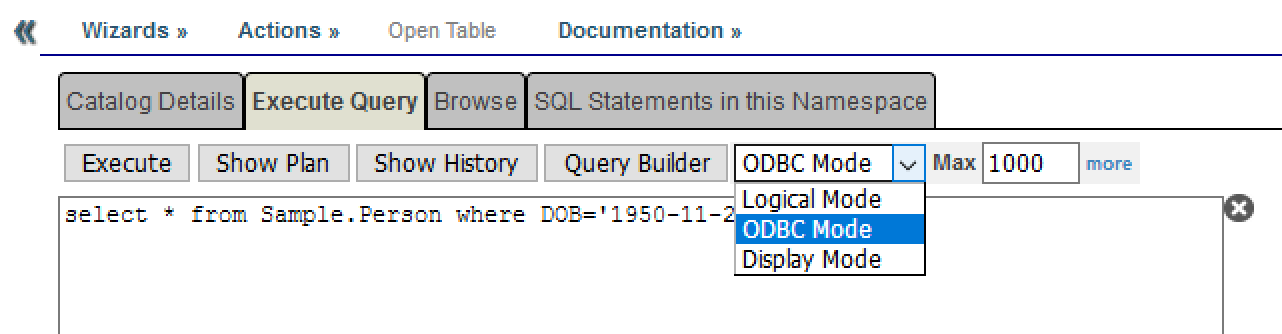
select * from Sample.Person where DOB='1950-11-27'

That still is converting the string '1950-11-27' to the internal $Horolog number that is:

USER>w $ZDateH("1950-11-27",3)

40142

If you already has the date on the internal $Horolog format you could run your query using Runtime Select Mode Logical:

select * from Sample.Person where DOB=40142

You can try these queries on the management portal. Just remember changing the 

If you are using dynamic queries with %Library.ResultSet or %SQL.Statement, set the Runtime Mode (%SelectMode property on %SQL.Statement) before running your query.

If you want to find records from a moving window of 30 days

The previous query brought, on my system, the person "Jafari,Zeke K.".  He was born on 1950-11-27. The following query will bring all people that was born on '1950-11-27' and 30 days before '1950-11-27'. I will use DATE_ADD function to calculate this window. I have also selected ODBC Runtime Select Mode to run the query:

select Name, DOB from Sample.Person where DOB between DATEADD(dd,-30,'1950-11-27') and '1950-11-27'

Two people will appear on my system: Jafari and Quixote. Quixote was born '1950-11-04'. That is inside the window. 

Moving window with current_date

You can use current_date to write queries such as "who has been born between today and 365 days ago?":

select Name, DOB from Sample.Person where DOB between DATEADD(dd,-365,current_date) and current_date

Using greater than or less than

You can also use >, >=, < or <= with dates like this:

select Name, DOB from Sample.Person where DOB >= DATEADD(dd,-365,current_date) 

Just be careful with the Runtime Select Mode. The following works with ODBC Runtime Select Mode, but won't work with Display or Logical Mode:

select Name, DOB from Sample.Person where DOB >= DATEADD(dd,-30,'1950-11-27') and DOB<='1950-11-27'

To make this work with Logical Mode, you would have to apply TO_DATE to the dates first:

select Name, DOB from Sample.Person where DOB >= DATEADD(dd,-30,TO_DATE('1950-11-27','YYYY-MM-DD')) and DOB<=TO_DATE('1950-11-27','YYYY-MM-DD')

To make it work with display mode, format the date accordingly to your NLS configuration. Mine would be 'DD/MM/YYYY' because I am using a spanish location.

Amir Samary · Jun 10, 2017 go to post

You are right Eduard. Column level security would be enough. It is even simpler!

Amir Samary · Jun 9, 2017 go to post

Hi!

It looks like you are trying to implement security on your class model instead of just configuring it. I think you only need a single class with all the properties. Then you will give user A full access to the table by configuring this user on a Role that gives him INSERT, DELETE, UPDATE, SELECT privileges. 

User B would be assigned to another role that would give it SELECT privilege only.

And if User B can only see a subset of columns from your table, then configure row level security using the Role information on $Role. InterSystems documentation here explains row level security configuration very clearly.

Amir Samary · May 30, 2017 go to post

This is a quick an dirty code I just wrote that can convert simple JSON strings to XML. Sometimes, the JSON will be simple enough for simple code like this... I am not a JSON expert but maybe this can be a good starting point for something better.

This will work only on Caché 2015.2+.

Call the Test() method of the following class:

Class Util.JSONToXML Extends %RegisteredObject
{

ClassMethod Test()
{
    Set tSC = $System.Status.OK()
    Try
    {
        Set oJSON={"Prop1":"Value1","Prop2":2}
        Set tSC = ..JSONToXML(oJSON.%ToJSON(), "Test1", .tXML1)
        Quit:$System.Status.IsError(tSC)
        Write tXML1
        
        Write !!
        Set oJSON2={"Prop1":"Value1","Prop2":2,"List":["Item1","Item2","Item3"]}
        Set tSC = ..JSONToXML(oJSON2.%ToJSON(), "Test2", .tXML2)
        Quit:$System.Status.IsError(tSC)
        Write tXML2
        
        Write !!
        Set oJSON3={
                "name":"John",
                "age":30,
                "cars": [
                    { "name":"Ford", "models":[ "Fiesta", "Focus", "Mustang" ] },
                    { "name":"BMW", "models":[ "320", "X3", "X5" ] },
                    { "name":"Fiat", "models":[ "500", "Panda" ] }
                ]
             }
        Set tSC = ..JSONToXML(oJSON3.%ToJSON(), "Test3", .tXML3)
        Quit:$System.Status.IsError(tSC)
        Write tXML3

    }
    Catch (oException)
    {
        Set tSC =oException.AsStatus()
    }
    
    Do $System.Status.DisplayError(tSC)
}

ClassMethod JSONToXML(pJSONString As %String, pRootElementName As %String, Output pXMLString As %String) As %Status
{
        Set tSC = $System.Status.OK()
        Try
        {
            Set oJSON = ##class(%Library.DynamicObject).%FromJSON(pJSONString)
            
            Set pXMLString="<?xml version=""1.0"" encoding=""utf-8""?>"_$C(13,10)
            Set pXMLString=pXMLString_"<"_pRootElementName_">"_$C(13,10)
            
            Set tSC = ..ConvertFromJSONObjectToXMLString(oJSON, .pXMLString)
            Quit:$System.Status.IsError(tSC)
            
            Set pXMLString=pXMLString_"</"_pRootElementName_">"_$C(13,10)
        }
        Catch (oException)
        {
            Set tSC = oException.AsStatus()
        }
        
        Quit tSC
}

ClassMethod ConvertFromJSONObjectToXMLString(pJSONObject As %Library.DynamicAbstractObject, Output pXMLString As %String) As %Status
{
        Set tSC = $System.Status.OK()
        Try
        {
            Set iterator = pJSONObject.%GetIterator()
            
            While iterator.%GetNext(.key, .value)
            {
                Set tXMLKey=$TR(key," ")
                Set pXMLString=pXMLString_"<"_tXMLKey_">"
                
                If value'=""
                {
                    If '$IsObject(value)
                    {
                        Set pXMLString=pXMLString_value
                    }
                    Else
                    {
                        Set pXMLString=pXMLString_$C(13,10)
                        If value.%ClassName()="%DynamicObject"
                        {
                            Set tSC = ..ConvertFromJSONObjectToXMLString(value, .pXMLString)
                            Quit:$System.Status.IsError(tSC)                            
                        }
                        ElseIf value.%ClassName()="%DynamicArray"
                        {
                            Set arrayIterator = value.%GetIterator()
                                        
                            While arrayIterator.%GetNext(.arrayKey, .arrayValue)
                            {
                                Set pXMLString=pXMLString_"<"_tXMLKey_"Item key="""_arrayKey_""">"
                                If '$IsObject(arrayValue)
                                {
                                    Set pXMLString=pXMLString_arrayValue
                                }
                                Else
                                {                                    
                                    Set tSC = ..ConvertFromJSONObjectToXMLString(arrayValue, .pXMLString)
                                    Quit:$System.Status.IsError(tSC)                            
                                }
                                Set pXMLString=pXMLString_"</"_tXMLKey_"Item>"_$C(13,10)
                            }
                            Quit:$System.Status.IsError(tSC)
                        }
                    }
                }
                
                Set pXMLString=pXMLString_"</"_tXMLKey_">"_$C(13,10)
            } //While
        }
        Catch (oException)
        {
            Set tSC = oException.AsStatus()
        }
        
        Quit tSC
}

}

Here is the output:

Do ##class(Util.JSONToXML).Test()
<?xml version="1.0" encoding="utf-8"?>
<Test1>
<Prop1>Value1</Prop1>
<Prop2>2</Prop2>
</Test1>
 
 
<?xml version="1.0" encoding="utf-8"?>
<Test2>
<Prop1>Value1</Prop1>
<Prop2>2</Prop2>
<List>
<ListItem key="0">Item1</ListItem>
<ListItem key="1">Item2</ListItem>
<ListItem key="2">Item3</ListItem>
</List>
</Test2>
 
 
<?xml version="1.0" encoding="utf-8"?>
<Test3>
<name>John</name>
<age>30</age>
<cars>
<carsItem key="0"><name>Ford</name>
<models>
<modelsItem key="0">Fiesta</modelsItem>
<modelsItem key="1">Focus</modelsItem>
<modelsItem key="2">Mustang</modelsItem>
</models>
</carsItem>
<carsItem key="1"><name>BMW</name>
<models>
<modelsItem key="0">320</modelsItem>
<modelsItem key="1">X3</modelsItem>
<modelsItem key="2">X5</modelsItem>
</models>
</carsItem>
<carsItem key="2"><name>Fiat</name>
<models>
<modelsItem key="0">500</modelsItem>
<modelsItem key="1">Panda</modelsItem>
</models>
</carsItem>
</cars>
</Test3>
I hope that helps!
Kind regards,
AS
Amir Samary · May 30, 2017 go to post

Hi!

If you are not using OS single sign-on, this shell script should do it:

#!/bin/bash

csession AUPOLDEVENS <<EOFF
SuperUser
superuserpassword
ZN "%SYS"
Do ^SECURITY
1
3


halt
EOFF

Where:

  • SuperUser - Is your username
  • superuserpassword - Is your SuperUser password

I have chosen SECURITY menu options 1, then option 3. Then I hit ENTER until I exited ^SECURITY routine and terminated the session with the halt command.

If you are using OS single sign-on, remove these two first lines since Caché won't ask for them.

The blank lines after number 3 are the ENTERs you enter to go up into the menu hierarchy until you exit.

The halt is necessary to avoid an error such as the following:

ERROR: <ENDOFFILE>SYSTEMIMPORTALL+212^SECURITY
%SYS>
<ENDOFFILE>
<ERRTRAP>

You can do more complex stuff with this technique such as validate errors and return unix error codes to your shell so that you can know if the operation was successful or not:

#!/bin/bash

csession INSTANCENAME <<EOFF
ZN "MYNAMESPACE"

Set tSC = ##class(SomeClass).SomeMethod()
If $System.Status.IsError(tSC) Do $System.Status.DisplayError(tSC) Do $zu(4,$j,1) ;Failure!

Do $zu(4,$j,0) ;OK!
EOFF

The $zu(4,$j,rc) will halt the session and return the return code on rc to your shell script. As you can notice, the Halt command is not necessary when using this $zu function.

I hope that helps!

Kind regards,

AS

Amir Samary · May 24, 2017 go to post

Hi!

The stream has an attribute called "Filename" that you can query like this on your OnProcessInput():

Set tFileName=pInput.Attributes("Filename")

You can query the same attribute on your Business Process or Business Operation.

This is documented on the Adapter documentation here.

Kind regards,

AS

Amir Samary · May 23, 2017 go to post

Hi!

     Assuming you meant "BPL" (Business Process Language) instead of "DTL" (Data Transformation Langue):

     If you simply want your Business Operation to try forever until it gets it done:

  •  On the BPL, make a synchronous call or make an asynchronous call with a sync activity for it
  •  On the BO, set FailureTime=-1. Also, try to understand the "Reply Code Actions" setting of your Business Operation. You don't want to retry for all kinds of errors. You probably want to retry for some errors and failure for others. If you set FailureTime=-1 and your Reply Code  Actions decides to retry for that kind of error, it will retry forever until it gets it done. If your Reply code Actions decides to fail for other types of errors, it will return an error to your Business Process.
  •  If you know that, for some errors, the BO will return a failure, protect the call you just did on your BPL with a scope action so you can capture this and take additional actions.

More about "Reply Code Actions" here.

Kind regards,

Amir Samary

Amir Samary · May 23, 2017 go to post

Hi Eduard!

Here is a simple way of finding it out:

select top 1 TimeLogged from ens_util.log

where configname='ABC_HL7FileService' 

and SourceMethod='Start' 

and Type='4' --Info

order by %ID desc

You put the logical name of your component on the configname. There is a bitmap index on both Type and ConfigName so this should be blazing fast too! Although, for some reason, the query plan is not using Type:
 
Relative cost = 329.11
    Read bitmap index Ens_Util.Log.ConfigName, using the given %SQLUPPER(ConfigName), and looping on ID.

    For each row:
    - Read master map Ens_Util.Log.IDKEY, using the given idkey value.
    - Output the row.
     
    Kind regards,
    AS
    Amir Samary · May 23, 2017 go to post

    I normally use a Web Application for serving CSP pages and static files and another for the REST calls. I configure one under the other like:

    • /csp/myapp
    • /csp/myapp/rest

    And I configure both with the same Group ID, with session cookie and set the UseSession parameter on the Dispatcher class. That way, once logged in through CSP, the rest calls will just work without requiring login.

    Kind regards,

    Amir Samary

    Amir Samary · May 19, 2017 go to post

    Sure! I can write about that. It will be good to get some peer review on the choice I have made.

    Amir Samary · May 19, 2017 go to post

    Hi Sean!

    Can you please, tell me what is the exact $ZV of the instance you used to do your tests?

    Kind regards,

    AS

    Amir Samary · May 16, 2017 go to post

    I haven't read the article yet but, just to let you know, the first two images are missing.

    Amir Samary · May 12, 2017 go to post

    Why not use REST services? That scales better and is the way things are done nowadays everywhere, right?

    Amir Samary · May 12, 2017 go to post

    Hi Sean!

    Thank you for your analysis. But try doing it with a %CSP.REST service instead of a %CSP.Page. %CSP.REST overrides the Page() method with a completely new one. The behavior is different because it is on the Page() method that the IO translation table is set up.

    It looks like my problem was related to the fact that I didn't have the CHARSET parameter declared on my main %CSP.REST dispatcher. I only had it on the %CSP.REST delegates. When I put it on the main dispatcher, it worked perfectly.

    But you may be onto something... I would rather specify the charset the way you do (on the javascript call) because I may want to use the same %CSP.REST dispatcher to receive a binary file or something other than UTF-8. That is an excellent point. Thank you very much for this tip. I will do what you said and try to remove the CHARSET parameter from both my main %CSP.REST dispatcher and delegates and see what happens. I will let you know!

    Kind regards,

    Amir Samary

    Amir Samary · May 11, 2017 go to post

    Ok... I think I have found how to do it.

    The problem was that I use a Main dispatcher %CSP.REST class that routes the REST calls to other %CSP.REST classes that I will call the delegates.

    I had the CHARSET parameter on the delegates but not on the main router class! I just added it to the main router class and it worked!

    So, in summary, to avoid doing $ZConvert everywhere with REST applications, make sure you have both parameters CONVERTINPUTSTREAM=1 and CHARSET="utf-8". It won't hurt having the CHARSET declarations on your CSP and HTML pages as well like:

    <!DOCTYPE html>
    <html>
    <head>
        <CSP:PARAMETER Name="CHARSET" Value="utf-8">
        <title>My tasks</title>
        <meta charset="utf-8" />
    </head>

    Kind regards,

    Amir Samary

    Amir Samary · May 11, 2017 go to post

    Hi Danny!

    That is exactly what I want to avoid...

    If you have written simple old style CSP applications, you will remember that CSP infrastructure will do this translation for you. UTF-8 comes in, but you don't notice it because by the time you need to store it on the database, it is already converted into the character encoding used by the database. And when you write that data from the database back to the user to compose a new html page, it is again translated to UTF-8.

    I was expecting the same behavior with %CSP.REST. 

    Why %CSP.REST services go only half way? I mean:

    • If I do nothing and leave CONVERTINPUTSTREAM=0, data will come in as utf-8 and I will save it on the database as utf-8. Then, when I need to give back the data to the page, it will present itself ok, since it is utf-8. But the data on the database is not on the right encoding and that will cause different problems. To avoid these problems, I must do what you suggest and use $ZConvert on everything. 
    • If I set CONVERTINPUTSTREAM=1, data will come in as utf-8 and be translated by %CSP.REST/%CSP.Page infrastructure and I will save it on the database using whatever encoding Caché uses to store Unicode characters on the database. So, I am avoiding doing the $ZConvert my self. It is done automatically. But then, when I need to use that stored data to show a new page, %CSP.REST won’t translate it back to utf-8 and it will be presented as garbage. So I am required to use $ZConvert to do the translation myself what is absurd and inelegant since %CSP.REST has done half of the job for me already.

    So, I want to use CONVERTINPUTSTREAM=1 to mimic the typical behavior of CSP pages that you describe and we all love. But it goes only halfway for some reason and I wonder what could I do to fix this right now for my client. 

    Do you realize that CONVERTINPUTSTREAM is good thing? I am only sorry that we don't have CONVERTOUTPUTSTREAM...

    Kind regards,

    AS