Why VISM cannot return result in PLIST
Hello Everyone
I use VB.NET to dev. some program for query data
Code in VB like this
Private Sub Button4_Click(sender As Object, e As EventArgs) Handles Button4.Click
AxVisM1.MServer = "CN_IPTCP:myserver[1972]"
AxVisM1.NameSpace = "LABDATA"
AxVisM1.Code = "s err="""",err=$$select^LVBEPVIS(""" & ln & """)"
AxVisM1.Execute(AxVisM1.Code)
tmptxt = AxVisM1.PLIST.ToString
messagebox.show(tmptxt)
but it show only 
and then i try to run same command in Cterm. it show
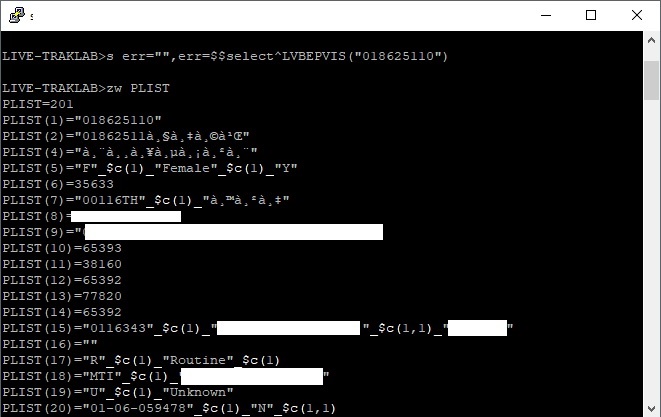
Could you suggest What wrong ?? and Why VISM.OCX cannot return values to PLIST?
Thank
Comments
Could you cite the test code for $$select^LVBEPVIS and run it from a VBScript program from Windows Explorer.
Also give your $zv (interested primarily in 8-bit or Unicode).
My test for the Caché Unicode:
LVBEPVIS.MAC:select(n)
  s PLIST=4
  s PLIST(1)="018625110"
  s PLIST(2)="01862511"_$c(9,233,769)
  s PLIST(3)="F"_$c(1)_"Female"_$c(1)_"Y"
  s PLIST(4)=35633
  q 1test.vbs:Set AxVisM1 = CreateObject("VISM.VisMCtrl.1")
AxVisM1.Server="CN_IPTCP:localhost[1972]:_system:@SYS"
AxVisM1.NameSpace="USER"
AxVisM1.Execute("s err="""",err=$$select^LVBEPVIS(""018625110"")")
WScript.Echo AxVisM1.PLISTResult:
.png)
It work
Thank you
Is VISM still ported by IRIS? Thanks.
That is what I would like to know, can we still use VISM in IRIS. It is not in the standard installer. Does somebody have the answer?
There is InterSystems IRIS Adoption Guide available from WRC.
It states:
.png)
.png)
.png)
You should check with WRC which kit to use.
But I'd personally suggest to move to IRIS NativeAPI for .NET
see also Using the Native API for .NET
Hi Sagun,
I would check after Execute, the Vism property Error or ErrorName. If there is any error, you should see there.
Regards
Manel
It no error after execute