how to release row lock?
I have restored one database from backup, but when I query from some of tables, prompt error :
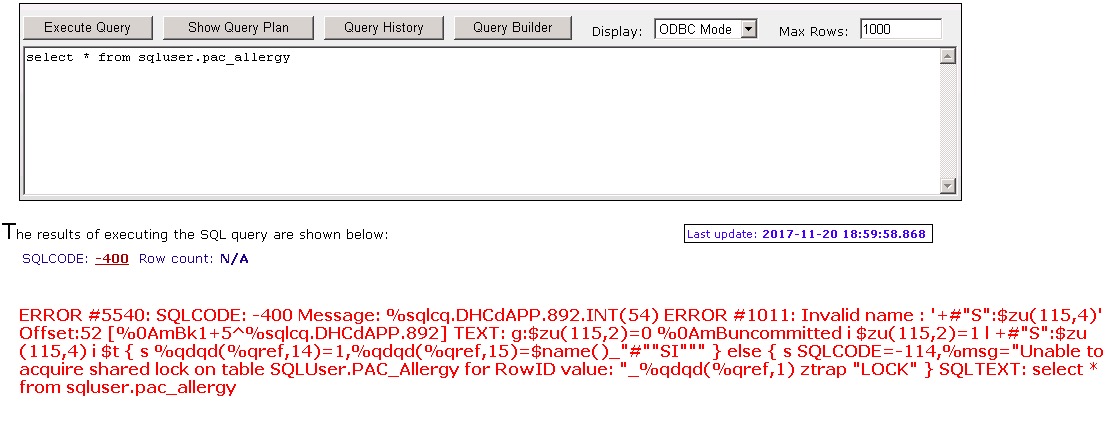 this error remain after restart Caché service
I can skip this error with %nolock in select query.
My question is:
1. why there were locks after restart service?
2. Can I release/rollback these locks by sql so I can query without %nolock?
Comments
Are there locks against this global? You can check this with View Locks in the Management Portal
Also, are you sure that the Backup was taken using an appropriate backup tool? Generally a backup will be taken from a consistent state, and would not include locking
no locks in the view locks. I backuped with
BACKUP^^DBACK("","F","backup","tplusn_db.cbk","Y","%bakPath%\backup.log", "NOISY","Y","Y","",60, "F")
and restored with
do EXTSELCT^DBREST(1,0,"plusn_db.cbk","list.txt",4,"","")
and do not appy Journal Files
It is hard to say, but i think the error is 'Invalid Name' and the reference to locks is just in the text of the long line of code where the error occurs.
the name it says is invalid appears in the text but it doesn't look like valid COS to me so i can't see how it would compile. i would look at the cached query %sqlcq.DHCdAPP.892.INT and see what code it contains.