Awesome work Geet!
- Log in to post comments
Awesome work Geet!
Good catch, I've corrected this, thank you John!
This is a really cool project and a great addition to the IRIS Python ecosystem!
Hi Kate, this is a great guide, thank you for sharing! In particular thank you for highlighting the new quickstart resources at https://developer.intersystems.com/resources/
Are there any additional resources that you wish you had when starting out?
One extra resource I found useful when starting out was looking at the templates on Open Exchange. At first, these are easy repositories to clone/fork to ignore some of the setup required with a fresh IRIS install. Then, later in the learning journey, they are also great examples to dig into how other community members set-up their IRIS environment. Some recommended templates:
Hi Xander, sorry that its been so difficult for you! I understand that the documentation can be overwhelming. IRIS is a massive platform with different use cases and technical set-ups, it can be difficult to find the right one to get started quickly.
We have quickstart guides available on developer.intersystems.com which you might find useful, including:
There are also lot courses available from Learning Services which just require a free account.
I understand there is an overwhelming amount of resources and it can be difficult to find what you need, so feel free to send me a DM here and I can try to point you towards other resources you may find useful.
As suggested by the bot, I've had success looking at the network tab of the developer tools. The form submission is a post request to "/csp/fhirsql/api/ui/v2/analysis", viewing the response can give you some information on the error, e.g. "403 Unauthenticated"
Good catch, thank you! I've removed this test because correct version already exists.
From what I understand (I'm sure more knowledgeable community members will jump in if anything is incorrect) you have two options: Mounting the namespace to your workspace, or importing and exporting individual files from your workspace.
Option 1:
From the Servers tab, which your screenshot shows, you can hover over any namespace to find options to mount the namespace to your VS Code workspace, either in a read-only or editable session. This screenshot shows it with the buttons - pencil is editable, eye symbol is read-only.
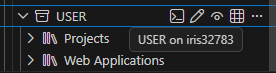
Option 2:
My preferred usage method is to use the Explorer Panel below the servers panel. To start, click choose server and namespace to sign in to your chosen namespace: 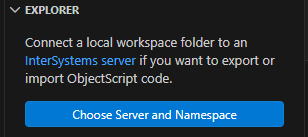
This will connect your workspace to that namespace. After this you can see the classes in your namespace.
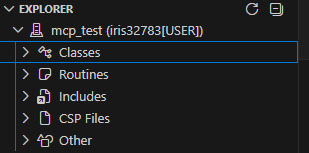
If you would like to edit classes, right click on them and choose Export:
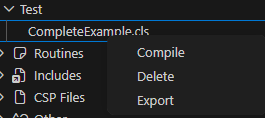
After this you can use vs code as normal, with a copy of the file on your local computer. If you want to create a new class, just create a new file in your VS Code workspace with the .cls extension, and then it will auto-compile on save. If it doesn't, you can right click on the file from the menu and choose Import and Compile.
The connection info is stored in .vscode/settings.json so you can always edit it here, or delete it and reconnect to a different namespace. 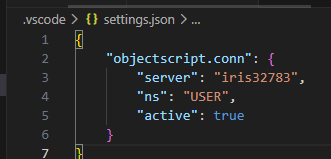
You don't need to obtain an evaluation license directly, you just need to download the community edition of InterSystems IRIS for Health (IRIS For Health includes FHIR server capabilities). You can download installation kits here: Evaluate InterSystems Products or containers from docker hub with:
docker run --name my-iris-health --publish 52773:52773 --publish 1972:1972 -d intersystems/irishealth-community:2025.3The community edition is free to use, but has limits to prevent it being in production (e.g. max database size, max number of connections etc).
Easiest way is with the community edition in a local docker container. Install docker and then run:
docker run --publish 52773:52773 --publish 1972:1972 intersystems/iris-community:2025.3You can also check out some of the dev templates which put this in a docker-compose file so you can clone a repo and run a working version with example code with just a couple of commands. You just have to make sure that in the Dockerfile it is pulling from version 2025.3 (or latest-cd).
- Interoperability template
- Embedded Python Template
(theres more available on the open exchange)
Globals can be defined and accessed directly using a caret (^) symbol. For example, you can set or access a global with:
// define a global by setting a value
set ^GlobalName = "Hello World"
// Access different sub-nodes
set ^GlobalName(1, "foo") = "bar"
// You access the global in a similar way
write ^GlobalName // prints Hello World
// write all global values
zwrite ^GlobalName
// ^GlobalName = "Hello World"
// ^GlobalName(1,"foo") = "bar"
This can be useful for quickly saving values globally or looking up values.
I recommend having a look at the Using Caché Globals section of the Cache documentation because it has far more information on globals usage than could be relayed in a comment.
When I tested this morning, the FHIR Management part was available in the FHIR namespace before the
do ##class(HS.Util.Installer.Foundation).Install("fhir")process even finished running, so I don't think it should take any time for changes to propagate. I'm afraid I can't help further, it sounds like a frustrating issue but glad it seems to have resolved itself today.
Hi Robert, they should be available! I just checked with a fresh install and I can access them, but before doing so you need to create a FHIR enabled namespace. Here's the steps I took:
Do a fresh install with docker:
# Fresh docker install
docker run --name iris-for-health --publish 32782:1972 --publish 32783:52773 -d intersystems/irishealth-community:latest-em

# Start IRIS terminal

docker exec -it iris-for-health iris session iris
Then install a new namespace using HS.Util.Installer.Foundation (I called it FHIR)
set $NAMESPACE = "%SYS"

do:'##class(%SYS.Namespace).Exists("fhir") ##class(HS.Util.Installer.Foundation).Install("fhir")
With just this step, I can open the FHIR Server Configuration by going to the health tab of the management portal: .png)
Click FHIR:
.png)
Then click FHIR Server Management to get to the FHIR Server UI with all the available features on the left hand panel:.png)
I hope this helps! If not, you can also try using a docker-compose template here: pjamiesointersystems/Dockerfhir: Open repository for training with FHIR using IRIS for Health Community Edition
You can still install the InterSystems AutoML onto the normal IRIS Community edition with a pip install - its difficult to find in the documentation but its this:
```
python3 -m pip install --index-url https://registry.intersystems.com/pypi/simple --no-cache-dir --target /usr/irissys/mgr/python intersystems-iris-automl
```
That way you no longer need a specific ML docker image to use AutoML.
I know I am late to comment here but no one has shared another workaround so I thought I would share mine! I have started using a browser extension on Microsoft Edge called Dark Reader - Microsoft Edge Addons which does a pretty decent job at turning any webpage, including community and management portal, to dark mode. It isn't always perfect, sometimes images don't work with a dark background or code blocks don't change colour, but is very easy to turn on and off when its needed.
It looks like the same extension is available for Chrome too, although I haven't tested it. I'll still advocate for real options in the management portal but this workaround works quite well for me!
I believe concatenation runs the risk of SQL injection - a good example is given in the article Optimizing SQL LIKE Security, Performance and Best Practices | InterSystems. The example in the article shows someone add an `OR 1=1` parameter to be added to a WHERE clause to access all available data, rather than just the data they should access. As I understand it, preparing the statement with ? for parameters prevents this risk.