IPM Version 0.10.7 Release Notes
IPM version 0.10.7 was released on May 29th, 2026. As usual, you can check it out on the GitHub page or through the Community Registry.
Highlighted Features
Utility Scripts iriscli and ipm
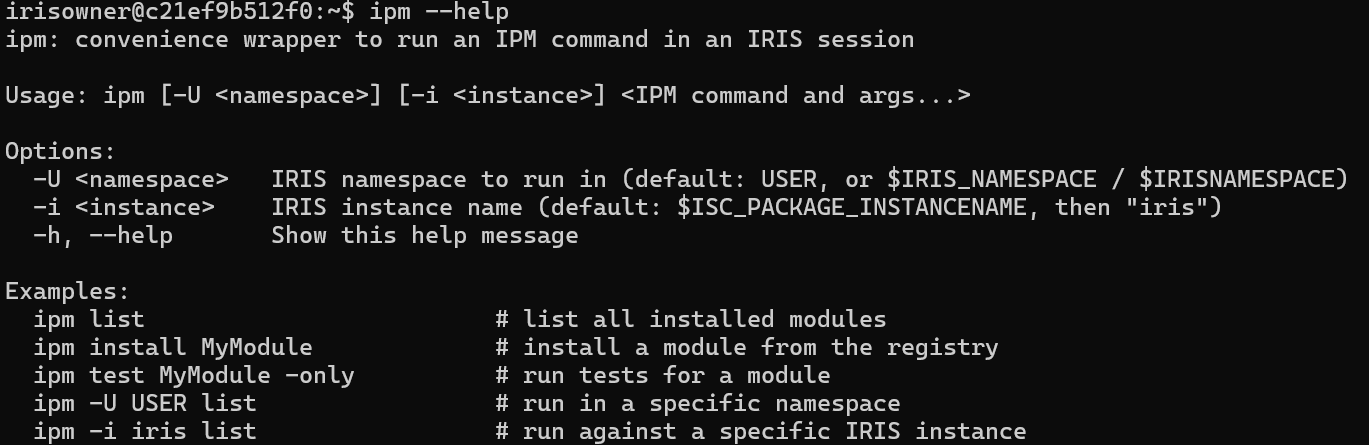
IPM is now bundled with two convenience scripts that are runnable from a standard terminal. iriscli launches an interactive IRIS terminal and ipm runs IPM commands directly. These are automatically installed to both ~/.local/bin/ and ~/bin/, so they work inside and outside of containers (Unix/Linux only).
Examples:
- Entering the IRIS shell in the "iris" container:
docker exec -it iris iriscli - Listing installed IPM modules:
ipm list
Structured Test Output Formats
The test and verify commands now offer different structured output formats for results: json, yaml, and toon. These new output formats will also show a summary block before the failing tests.
Use config set TestReportFormat <format> for a persistent default, or -f <format> to override it for a single run. If neither is set, the pre-existing output format will be used. The output can also be redirected to a file using the -output-file <path> flag, with the format inferred from the file extension (.json, .yaml, .toon, or .xml for JUnit). In addition, the -quiet flag has been modified to suppress the build and install noise. The most LLM-friendly output will be with test <module-name> -quiet -format toon. In contrast, the -verbose flag paired with a format option will show every test (passing or failing) in the output.
Examples:
-
No specified format results in the pre-existing style for failing tests, but adds the test result summary block.
zpm:USER>test-output-format test -only [USER|test-output-format] Test START Building dependency graph...Done. Use the following URL to view the result: http://172.19.0.3:52773/csp/sys/%25UnitTest.Portal.Indices.cls?Index=100&$NAMESPACE=USER Some tests FAILED in suites: ,(root) Test Results: Test Run #100 (USER) .799303s 2026-04-24 17:20:12 Methods: 18 total, 6 passed, 12 failed Assertions: 22 total, 20 passed, 2 failed FAILED (root):Test.Output.Format.AfterAllReturn: OnAfterAllTests: ERROR #5001: deliberate OnAfterAllTests return-error FAILED (root):Test.Output.Format.AfterAllThrow: OnAfterAllTests: ERROR #5001: deliberate OnAfterAllTests throw FAILED (root):TestMethodBodyPasses: OnAfterOneTest: ERROR #5001: deliberate OnAfterOneTest return-error for TestMethodBodyPasses FAILED (root):TestMethodBodyPasses: OnAfterOneTest: ERROR #5001: deliberate OnAfterOneTest throw for TestMethodBodyPasses FAILED (root):Test.Output.Format.BeforeAllReturn: OnBeforeAllTests: ERROR #5001: deliberate OnBeforeAllTests return-error FAILED (root):Test.Output.Format.BeforeAllThrow: OnBeforeAllTests: ERROR #5001: deliberate OnBeforeAllTests throw FAILED (root):TestFirstMethod: OnBeforeOneTest: ERROR #5001: deliberate OnBeforeOneTest return-error for TestFirstMethod FAILED (root):TestSecondMethod: OnBeforeOneTest: ERROR #5001: deliberate OnBeforeOneTest return-error for TestSecondMethod FAILED (root):TestFirstMethod: OnBeforeOneTest: ERROR #5001: deliberate OnBeforeOneTest throw for TestFirstMethod FAILED (root):TestSecondMethod: OnBeforeOneTest: ERROR #5001: deliberate OnBeforeOneTest throw for TestSecondMethod FAILED (root):TestFailingAssertions: AssertTrue - deliberate failure: zero is not true FAILED (root):TestFailingAssertions: AssertEquals - deliberate mismatch FAILED (root):TestThrowsFromBody: TestThrowsFromBody: ERROR #5001: deliberate throw from test body [test-output-format] Test FAILURE ERROR! 13 failure(s). -
Specifying a test format results in both the test result summary block and the failing tests in the specified format.
zpm:USER>test-output-format test -only -f toon

[USER|test-output-format]       Test START
Building dependency graph...Done.
Use the following URL to view the result:
http://172.19.0.3:52773/csp/sys/%25UnitTest.Portal.Indices.cls?Index=101&$NAMESPACE=USER
Some tests FAILED in suites:
  ,(root)

Test Results:

summary:
  id: 101  namespace: USER  duration: .834048s  testDateTime: 2026-04-24 17:20:33
  methods[18]: 6 passed, 12 failed
  assertions[22]: 20 passed, 2 failed

failures[13]{suiteName,testcaseName,methodName,status,assertAction,assertCounter,assertDescription,assertLocation}:
  (root),Test.Output.Format.AfterAllReturn,Test.Output.Format.AfterAllReturn,failed,OnBeforeAllTests,0,"OnAfterAllTests:  ERROR #5001: deliberate OnAfterAllTests return-error",""
  (root),Test.Output.Format.AfterAllThrow,Test.Output.Format.AfterAllThrow,failed,OnBeforeAllTests,0,"OnAfterAllTests:  ERROR #5001: deliberate OnAfterAllTests throw",""
  (root),Test.Output.Format.AfterOneReturn,TestMethodBodyPasses,failed,error,0,"OnAfterOneTest:  ERROR #5001: deliberate OnAfterOneTest return-error for TestMethodBodyPasses",""
  (root),Test.Output.Format.AfterOneThrow,TestMethodBodyPasses,failed,error,0,"OnAfterOneTest:  ERROR #5001: deliberate OnAfterOneTest throw for TestMethodBodyPasses",""
  (root),Test.Output.Format.BeforeAllReturn,Test.Output.Format.BeforeAllReturn,failed,OnBeforeAllTests,0,"OnBeforeAllTests:  ERROR #5001: deliberate OnBeforeAllTests return-error",""
  (root),Test.Output.Format.BeforeAllThrow,Test.Output.Format.BeforeAllThrow,failed,OnBeforeAllTests,0,"OnBeforeAllTests:  ERROR #5001: deliberate OnBeforeAllTests throw",""
  (root),Test.Output.Format.BeforeOneReturn,TestFirstMethod,failed,error,0,"OnBeforeOneTest:  ERROR #5001: deliberate OnBeforeOneTest return-error for TestFirstMethod",""
  (root),Test.Output.Format.BeforeOneReturn,TestSecondMethod,failed,error,0,"OnBeforeOneTest:  ERROR #5001: deliberate OnBeforeOneTest return-error for TestSecondMethod",""
  (root),Test.Output.Format.BeforeOneThrow,TestFirstMethod,failed,error,0,"OnBeforeOneTest:  ERROR #5001: deliberate OnBeforeOneTest throw for TestFirstMethod",""
  (root),Test.Output.Format.BeforeOneThrow,TestSecondMethod,failed,error,0,"OnBeforeOneTest:  ERROR #5001: deliberate OnBeforeOneTest throw for TestSecondMethod",""
  (root),Test.Output.Format.MethodAssertFailure,TestFailingAssertions,failed,AssertTrue,2,"deliberate failure: zero is not true","TestFailingAssertions+2^Test.Output.Format.MethodAssertFailure.cls"
  (root),Test.Output.Format.MethodAssertFailure,TestFailingAssertions,failed,AssertEquals,3,"deliberate mismatch","TestFailingAssertions+3^Test.Output.Format.MethodAssertFailure.cls"
  (root),Test.Output.Format.MethodThrowFailure,TestThrowsFromBody,failed,error,0,"TestThrowsFromBody:  ERROR #5001: deliberate throw from test body",""

[test-output-format]    Test FAILURE
ERROR! 13 failure(s).
Configurable Custom Root for load and install
v0.10.4 introduced a standard unpacking directory $System.Util.DataDirectory()/ipm/<packagename>/<version>/ for modules installed using the install command. Now, modules installed from a tarball using the load command will also unpack in the same directory. Directory loads are unaffected and load in-place.
In addition, this module root can now be user-configured using config set ModuleRoot /custom/path/. If /custom/path/ does not exist, the directory chain will be automatically created.
Packaging Tests with Modules
Tests can now be packaged with a module by using the -include-tests flag with either the package or publish commands or adding <IncludeTests>1</IncludeTests> in module.xml as an element of <Module>.
Sorted list/list-installed Command Output
The list/list-installed command can now be sorted by name, date, or version, either in ascending or descending order, defaulting to name ascending. Note that IPM itself will always appear at the top of the list regardless of sort option.
Examples:
Sort by version:list -sort -version
Sort by name descending:list -sort -n-d
Important Bug Fixes
Configuring ORAS repositories for certain OCI registries
Fixed an issue where it was impossible to properly authenticate an IPM ORAS repository for some OCI registries like GitHub Container Registry (GHCR). ORAS repositories in IPM also now show an "Authenticated?" status in the repo -list summary.
To configure a GHCR repo, use this command:repo -o -n github -url ghcr.io -namespace <gh-username> -username <gh-username> -password <gh-personal-access-token>
Optionally, use -password-stdin instead of -password for security.
The info display for namespaces with mapped IPM
Previously, the welcome display (also shown by info) would not show the IPM version when IPM was mapped into a namespace. It now shows both the version and the namespace it is mapped from.

IPM self-uninstallation
IPM now gracefully uninstalls itself without throwing errors.
Smarter dependency resolution during update
When updating a module (using the load, install or update command), IPM will no longer erroneously use the currently installed versions as limitations for dependency resolution, but will instead consider the post-update versions. This fixes an issue where diamond dependencies could not be updated without uninstalling completely and reinstalling.
Example of diamond dependency topology, where all modules are being updated from 1.0.0 to 2.0.0 simultaneously:
     parent
     /    \
    a      b
     \    /
      base
Full Changelog
Added
- #408: Modules can now list dependencies without specifying version; will be assumed to be "*"
- #945: When loading from a tarball, the
loadcommand now unpacks into the configured module root (defaults to$System.Util.DataDirectory()/ipm/) under<packagename>/<version>/instead of a temporary directory, matching the behavior of theinstallcommand. Directory loads are unaffected and continue to load in-place. - #992: Implement automatic history purge logic
- #973: Enables CORS and JWT configuration for WebApplications in module.xml
- #1110: Add
iriscliandipmcontainer utility scripts that are auto-installed to~/.local/bin/and~/bin/so they work both inside and outside of containers (Unix/Linux only) - #1013: Implement recursive placeholder resolution in Default parameters
- #971: Adds structured test output formats (JSON, YAML, Toon). Use
-f <format>for a one-shot override orconfig set TestReportFormat <format>for a persistent default. Without either, legacy output is shown. Also adds-output-filefor writing results to a file (including JUnit XML via.xmlextension) and improves-quietto suppress build noise. - #1029: Add support for user-configurable ModuleRoot for IPM module installation
- #1053: Add file system permissions check before install/load.
- #870: When running tests for just a single suite or class, will only load and compile the relevant classes instead of all the tests
- #843: Optionally include tests when packaging using either the
-include-testsflag or<IncludeTests>1</IncludeTests>in module.xml - #1079: Add semantic sorting and shortcuts to list-installed
- #1152: Adds information about scoped dependencies in the output array of BuildDependencyGraph()
Fixed
- #1175: Fix issue parsing version for packages with both deployed and non-deployed versions
- #964: Fix poor error handling on some install failures due to incorrect error message variable in embedded SQL
- #1130: Fix issue with ORAS repositories pointing to some OCI registries that require authentication (e.g. ghcr.io) not accepting credentials properly.
repo -listnow shows anAuthenticated?status for ORAS repos with credentials configured. - #1001: The
unmapandenablecommands will now only activate CPF merge once after all namespaces have been configured instead of after every namespace - #1052: In a namespace with mapped IPM, the
infocommand works again and the intro message displays the IPM version and where it's mapped from - #1102: %IPM.Storage.QualifiedModuleInfo:%New() will now copy over version properties when passed in a resolvedReference
- #1112: Packaging a module with a globals resource now respects SourcesRoot, placing the exported file at the correct path in the tarball
- #1057: Fix IPM not cleaning up after itself on self-uninstall
- #1122: Packaging should recognize resources in dependency modules set to deploy
- #1119: The update command should check version requirements using post-update values instead of what's currently installed
- #1097: The Test resource processor now supports nested tests
- #1116: Fix behavior inconsistencies between install and uninstall for package name casing.
- #1114: Fix issue with SystemRequirements being confused by multiple namespaces with different version of IPM installed
- #1128: Fixed an issue where an update can fail if a resource is moved from one module to another
- #430: Updating shared transitive dependencies with lock-step version requirements now works instead of erroring out
- #1179: IPM will no longer erroneously complain about Python 3.13+ on compatible versions of IRIS. The lower bound check (3.10+) remains, but the upper bound is left to the user. There is a compatibility matrix in the README.
Security
- urllib3 Python wheel updated to 2.7.0
- requests Python wheel updated to 2.33.0
- #1138: Warn when using
-passwordinstead of-password-stdin.