Randomizing Unit Tests With %Populate
In our previous article, we explored the basics of unit testing in IRIS and the ways to apply it to a REST API. We even figured out how to test logic before finalizing network configurations and authentication, allowing us to focus solely on testing the API contents. Today, we will build upon that foundation and elevate our unit testing strategy by using another tool: %Populate .
At first glance, the %Populate class appears to be very simple. You can create a class that extends both %Persistent and %Populate and inherit a Populate method designed to generate randomized records. This utility recognizes certain field names (e.g., “name,” “ssn,” and “phone”) and applies specialized logic to ensure the data is good. If a field name is not recognized as special, it is populated with random values corresponding to its assigned data type. Suppose we develop such a class with the following properties programmed to keep track of some basic customer information at our store (our class also extends %JSON.Adaptor, which will come in handy later):
Class User.CustomerList Extends (%Persistent, %Populate, %JSON.Adaptor)
{
Property Name As %String;
Property DOB As %Date;
Property Age As %Numeric(SCALE = 0);
Property IsMember As %Boolean;
Property MemberID As %String(POPSPEC = ".GenID()");
}
The Populate method will generate entries where Name is an actual name, DOB is a random date, Age is a numeric value, IsMember (a parameter that verifies whether a customer is a member of our loyalty program) is a random 1 or 0, and MemberID is a random string. It takes several arguments, all of which have defaults that we will use for now. While this sounds good, the data may end up looking like the following :
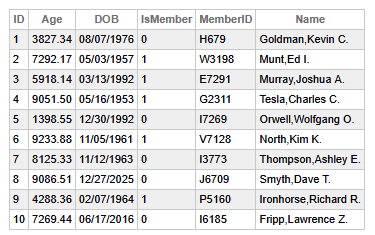
You might notice that even though the method did exactly what it was supposed to, the data turned out to be not quite what we wanted. It is highly unlikely that we actually have customers who are thousands of years old unless we are running the world’s most successful anti-aging clinic. Additionally, those ages fail to align with the dates of birth. We also know that non-members should not have member ID numbers. As an example, we can set our member ID numbers to be eight alphanumeric characters with a dash in the middle, meaning that those are wrong as well. Besides, remember that there are various other ways to mess up even the basic functions of the Populate method. For instance, if we assigned to the field Name a (MAXLEN = 10), none of these records would be successfully created since the automatically populated names would be too long, and the record save would fail.
First, we can resolve a couple of these issues by leveraging the OnPopulate method built into the %Populate class. This method will run for each generated entry immediately after it has been created. We can use it to "clean" the objects and ensure they follow business logic. We will define it as follows:
Method OnPopulate() As %Status
{
    set:'..IsMember ..MemberID = ""
    set ..Age = $select(..DOB="":"",1:($ZD($H,8)-$ZD(..DOB,8)\10000))
    quit ..%Save()
}
After adding this, we will call the class’s delete extent method to clear the existing data:
##class(User.CustomerList).%DeleteExtent()
Then we will call the Populate method again. This time, let’s look at the optional arguments for this method, which are as follows:
- count: An integer specifying how many entries to create (default: 10).
- Verbose: A boolean defining whether or not the method should echo its output to the console (default: 0).
- DeferIndices: If true, index sorting occurs at the end of the operation (default: 1).
- objects: If set to 1 and passed by reference, returns an array of the created objects (default: 0).
- tune: A boolean indicating whether or not to tune the table after generating the objects (default: 1).
- deterministic: If true, identical calls at different times produce identical data sets (default: 0). In other words, if we call Populate, delete the class’s extent, and call it again with this set to 1 and no other changes made to the class both times, the resulting records will be the same.
This time, we will create 50 records, allow the output to be written to the console, get the objects as an array, and make the process deterministic. We will still defer the indices and tune the table. Please note that the use of the objects argument is not intuitive. We must set a variable to 1, then pass it by reference to get the array back from the created objects, meaning that we will issue commands from the console to accomplish our next Populate:
USER>set objects = 1
USER>w ##class(User.CustomerList).Populate(50,1,1,.objects,1,1)
As this method runs, we will see a lot of information directed to the console, including all of the records being saved and the results of the table tuning data. We can refer to the created objects via the objects array when it is completed:
USER>zw objects(23)
objects(23)=27@User.CustomerList  ; <OREF,refs=1>
+----------------- general information ---------------
|      oref value: 27
|      class name: User.CustomerList
|           %%OID: $lb("23","User.CustomerList")
| reference count: 1
+----------------- attribute values ------------------
|       %Concurrency = 1  <Set>
|                Age = 80
|                DOB = 38144
|           IsMember = 0
|           MemberID = ""
|               Name = "Tsatsulin,Angelo V."
+-----------------------------------------------------
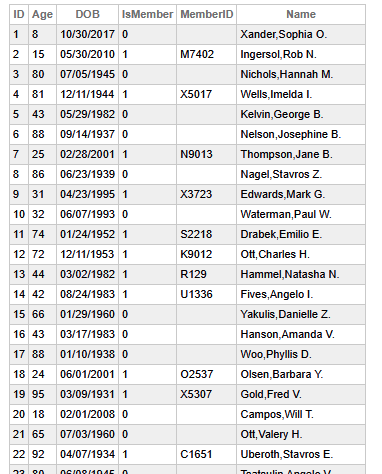
Now, when we query our table once more, we can see that the ages make sense and that non-members do not have a member ID:
However, we still need to fix those member ID numbers. To accomplish this, we will set a POPSPEC for the MemberID field. A POPSPEC lets us define how a field should be automatically filled when Populate is called. We will change the definition of the property itself and add a method as follows:
Property MemberID As %String(POPSPEC = ".GenID()");
Method GenID() As %String
{
    set chars = "ABCDEFGHIJKLMNOPQRSTUVWXYZ0123456789"
    set ID = ""
    for i=1:1:8{
        set ID = ID _ $E(chars,$RANDOM($LENGTH(chars) + 1))
    }
    set ID = $E(ID,1,4)_"-"_$E(ID,5,8)
    return ID
}
Note that there is a period at the beginning of the POPSPEC. It indicates that Populate should use the method found in this class. If you create one without the period, it will attempt to employ a method from the %Library.PopulateUtils class. That class, however, does have a bunch of useful methods predefined for various kinds of properties, so you may wish to check it out before reinventing the wheel! Your POPSPEC can also be a class method if that suits your needs better.
We can also introduce biases into our data with POPSPEC. For instance, by default %Boolean fields are pretty evenly distributed between true and false. However, we might know that 75% of our customers are a part of our loyalty program, so we could define a method like the following and utilize it as the POPSPEC for that field:
Method GenIsMember() As %Boolean
{
    return $RANDOM(100) < 75
}
Thus, our final class will look like the one below:
Class User.CustomerList Extends (%Persistent, %Populate, %JSON.Adaptor)
{
Property Name As %String;
Property DOB As %Date;
Property Age As %Numeric(SCALE = 0);
Property IsMember As %Boolean(POPSPEC = ".GenIsMember()");
Property MemberID As %String(POPSPEC = ".GenID()");

Method OnPopulate() As %Status
{
    set:'..IsMember ..MemberID = ""
    set ..Age = $select(..DOB="":"",1:($ZD($H,8)-$ZD(..DOB,8)\10000))
    quit ..%Save()
}

Method GenID() As %String
{
    set chars = "ABCDEFGHIJKLMNOPQRSTUVWXYZ0123456789"
    set ID = ""
    for i=1:1:8{
        set ID = ID _ $E(chars,$RANDOM($LENGTH(chars) + 1))
    }
    set ID = $E(ID,1,4)_"-"_$E(ID,5,8)
    return ID
}

Method GenIsMember() As %Boolean
{
    return $RANDOM(100) < 75
}
}
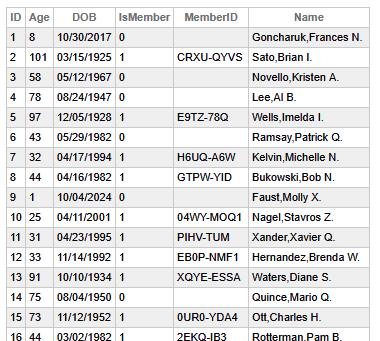
If we delete the class’s extent and populate it again, each member will have a member ID in our desired format. We might also see more ones in the Boolean field than before.
Now that we can generate a table full of controlled but randomized data, all we have to do for a unit test is iterate through the table.
Class User.REST Extends %CSP.REST
{
XData UrlMap [ XMLNamespace = "http://www.intersystems.com/urlmap" ]
{
<Routes>
	<Route Call="VerifyAge" Method="GET" Url="/verifyage" />
	<Route Call="SeniorDiscount" Method="Get" Url="/seniordiscount" />
</Routes>
}

ClassMethod VerifyAge() As %Status
{
    set reqobj = ##class(%Library.DynamicObject).%FromJSON(%request.Content)
    set respobj = ##class(%Library.DynamicObject).%New()
    set age = reqobj.%Get("Age")
    if age < 18{
        do respobj.%Set("verified",0,"boolean")
    }
    else{
        do respobj.%Set("verified",1,"boolean")
    }
    write respobj.%ToJSON()
    return $$$OK
}

ClassMethod SeniorDiscount() As %Status
{
    set reqobj = ##class(%Library.DynamicObject).%FromJSON(%request.Content)
    set respobj = ##class(%Library.DynamicObject).%New()
    set age = reqobj.%Get("Age")
    set member = reqobj.%Get("IsMember")
    if (age > 55) && (member){
        do respobj.%Set("discount",1,"boolean")
    }
    else{
        do respobj.%Set("discount",0,"boolean")
    }
    write respobj.%ToJSON()
    return $$$OK
}
}
The use of the JSON Adaptor makes setting up the %request a snap. We will keep it simple and ensure that the methods return an OK status and dispatch as expected.
Class User.TestRequest Extends %UnitTest.TestCase
{
/// Test Methods.
Method TestByPopulate()
{
    set stmt = ##class(%SQL.Statement).%New()
    set query = "select id from sqluser.customerlist"
    set sc = stmt.%Prepare(query)
    set rs = stmt.%Execute()
    while rs.%Next(){
        set mycust = ##class(CustomerList).%OpenId(rs.%GetData(1))
        set %request = ##class(%CSP.Request).%New()
        set %request.Content = ##class(%CSP.BinaryStream).%New()
        do mycust.%JSONExportToStream(%request.Content)
        set %response = ##class(%CSP.Response).%New()
        set sc = ##class(User.REST).VerifyAge()
        do $$$AssertStatusOK(sc)
        do ##class(User.REST).DispatchRequest("/verifyage","GET")
        do $$$AssertEquals(%response.Status,"200 OK","HTTP Status Test")
        set sc = ##class(User.REST).SeniorDiscount()
        do $$$AssertStatusOK(sc)
        do ##class(User.REST).DispatchRequest("/seniordiscount","GET")
        do $$$AssertEquals(%response.Status,"200 OK","HTTP Status Test")
    }
}
}
We should save this in our unit test root folder to return later to the console and run the unit tests the same way we always do:
do ##class(%UnitTest.Manager).RunTest()
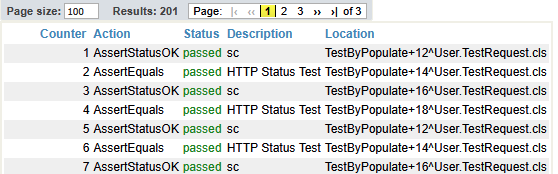
We can then witness the results in the Unit Test Portal:
With just this one new tool in our toolbox, we can easily create much more thorough and robust API unit testing.
Comments
Ótimo artigo! O uso combinado de OnPopulate() e POPSPEC para gerar dados realistas e consistentes é uma abordagem elegante que eleva significativamente a qualidade dos testes unitários.