How to add your APIs to the Interoperability Production
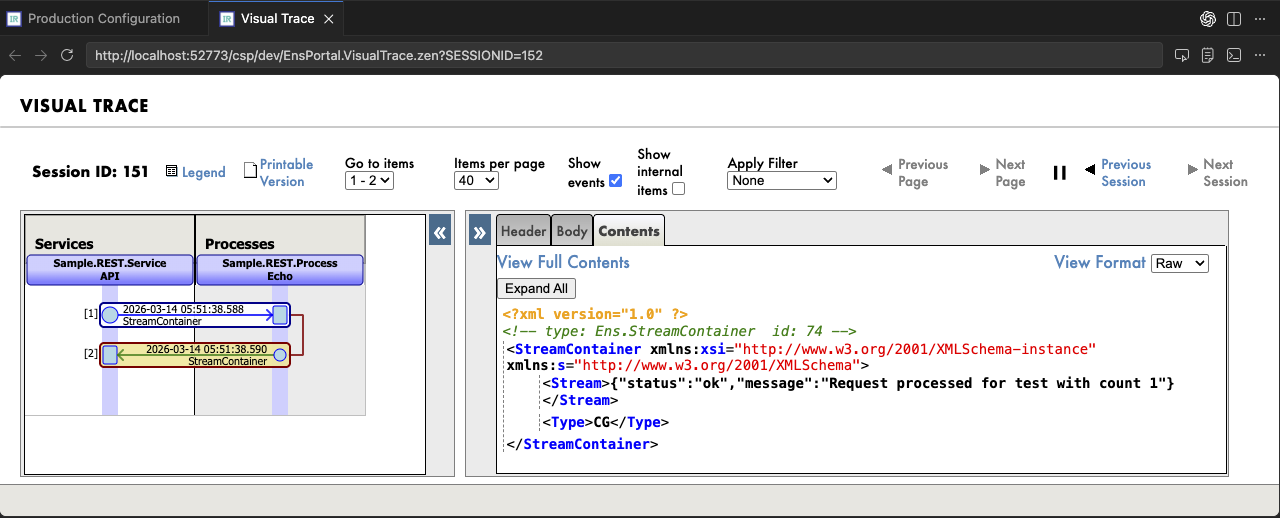
I may have mentioned this before: I believe the Visual Traces, these sequence diagrams with full content of each step, are a fantastic feature of the IRIS Data platform! Detailed information about how the API works internally, as a visual trace, can be very useful for projects on the IRIS platform. Of course, this applies when we are not developing a high-load solution, in which case we simply don't have time for saving/reading messages. For all other cases, welcome to this tutorial!
I will be using a specification-first approach, so the first step will be to create a specification. I asked Codex to create a sample OpenAPI specification and got the following JSON:
{
  "swagger": "2.0",
  "info": {
    "version": "1.0.0",
    "title": "Sample Spec API",
    "description": "Example Swagger 2.0 specification"
  },
  "basePath": "/sample-api",
  "schemes": [
    "http"
  ],
  "consumes": [
    "application/json"
  ],
  "produces": [
    "application/json"
  ],
  "paths": {
    "/sample/echo": {
      "post": {
        "summary": "Accepts JSON payload and returns another JSON payload",
        "operationId": "postSampleEcho",
        "parameters": [
          {
            "in": "body",
            "name": "body",
            "required": true,
            "schema": {
              "$ref": "#/definitions/SampleRequest"
            }
          }
        ],
        "responses": {
          "200": {
            "description": "Successful response",
            "schema": {
              "$ref": "#/definitions/SampleResponse"
            }
          }
        }
      }
    }
  },
  "definitions": {
    "SampleRequest": {
      "type": "object",
      "required": [
        "name",
        "count"
      ],
      "properties": {
        "name": {
          "type": "string",
          "example": "test"
        },
        "count": {
          "type": "integer",
          "format": "int32",
          "example": 1
        }
      }
    },
    "SampleResponse": {
      "type": "object",
      "properties": {
        "status": {
          "type": "string",
          "example": "ok"
        },
        "message": {
          "type": "string",
          "example": "Request processed successfully"
        }
      }
    }
  }
}
Next comes the creation of Cache classes: spec, disp, and impl. I will use the IRIS system API for it. Let's run the following request in Postman (or CURL) and export the generated files to the project:
curl --location 'http://localhost:52773/api/mgmnt/v2/dev/Sample.REST.API?IRISUsername=_system&IRISPassword=SYS' \
--header 'Content-Type: application/json' \
--data '/// your spec here ///'
Where:
dev- my namespaceSample.REST.API- package for API classes
After that, we will need a Business Service. I propose to create a common base service and extend our particular service from this one. This is necessary to provide a separate entry point into the Interoperability Production for each of our future APIs. Here is the complete code of this base service:
Class Sample.REST.Service.Core Extends (Ens.BusinessService, %REST.Impl)
{

/// Call this method from your .impl class</br>
/// pTarget - the Business Process that processes the message</br>
/// pPayload - the body of the HTTP request
ClassMethod OnMessage(pTarget As %String, pPayload As %DynamicObject) As %DynamicObject
{
    Do ..%SetContentType("application/json")

    Set input = ##class(Ens.StreamContainer).%New()
    Set input.Stream = ##class(%Stream.GlobalCharacter).%New()
    Do input.Attributes.SetAt(pTarget, "Target")

    Do pPayload.%ToJSON(input.Stream)

    Return:$CLASSNAME()'=$GET($$$ConfigClassName($CLASSNAME())) ..Error($$$ERROR($$$EnsErrBusinessDispatchNameNotRegistered, $CLASSNAME()))

	Set tSC = ##class(Ens.Director).CreateBusinessService($CLASSNAME(), .service)
	Return:$$$ISERR(tSC) ..Error(tSC)

	Set tSC = service.ProcessInput(input, .output)
	Return:$$$ISERR(tSC) ..Error(tSC)

    Return ..Success(output)
}

ClassMethod Error(pStatus As %Status) As %DynamicObject
{
    Do ..%SetStatusCode(##class(%CSP.REST).#HTTP500INTERNALSERVERERROR)
    Do ##class(%CSP.REST).StatusToJSON(pStatus, .json)
    Return json
}

ClassMethod Success(pOutput As Ens.StreamContainer) As %DynamicObject
{
    Do ..%SetStatusCode(##class(%CSP.REST).#HTTP200OK)

    If $iso(pOutput) {
        // HTTP status can be set during the processing of the call in the Business Process
        Do:pOutput.Attributes.GetAt("Status")'="" ..%SetStatusCode(pOutput.Attributes.GetAt("Status"))
        Set stream = pOutput.StreamGet()
		Return:$iso(stream)&&(stream.Size>0) {}.%FromJSON(stream)
	}

    Return ""
}

Method OnProcessInput(pInput As Ens.StreamContainer, Output pOutput As Ens.StreamContainer) As %Status
{
    Return ..SendRequestSync(pInput.Attributes.GetAt("Target"), pInput, .pOutput)
}
}
A few implementation details. I'm using Ens.StreamContainer to pass JSONs between the Business Service and the Business Process. The OnMessage() method is:
- Called from the
implclass - Receives the HTTP request body as
%DynamicObject - Creates a Business Service instance
- Sends a message from the Service to the handler Business Process (see the
pTargetparameter) viaOnProcessInput() - And returns the
%DynamicObjectreceived from the business process as an HTTP response
Next, let's create a simple handler for our messages:
Class Sample.REST.Process.Echo Extends Ens.BusinessProcess
{

Method OnRequest(pRequest As Ens.StreamContainer, Output pResponse As Ens.StreamContainer) As %Status
{
    Set jsonIn = {}.%FromJSON(pRequest.StreamGet())
    Set jsonOut = {"status": "ok", "message": ($$$FormatText("Request processed for %1 with count %2", jsonIn.name, jsonIn.count))}

    Set pResponse = ##class(Ens.StreamContainer).%New()
    Set pResponse.Stream = ##class(%Stream.GlobalCharacter).%New()
    Do jsonOut.%ToJSON(pResponse.Stream)

    Return $$$OK
}
}
And last from the Cache classes is a child class of Sample.REST.Service.Core:
Class Sample.REST.Service.API Extends Sample.REST.Service.Core
{

ClassMethod OnGetConnections(Output pArray As %String, pItem As Ens.Config.Item)
{
	Set pArray(##class(Sample.REST.Process.Echo).%ClassName(1)) = ""
}
}
Here, you need only override OnGetConnections() to describe connections to Business Processes in Production. This does not affect functionality, but is necessary for building correct links in Production UI.
⚠️ What is important here: you must use class names for business hosts in Production. This is critical for our example to work and is, in my opinion, a good practice.
Now, we can add implementation to our impl class:
ClassMethod postSampleEcho(body As %DynamicObject) As %DynamicObject
{
    Return ##class(Sample.REST.Service.API).OnMessage(##class(Sample.REST.Process.Echo).%ClassName(1), body)
}
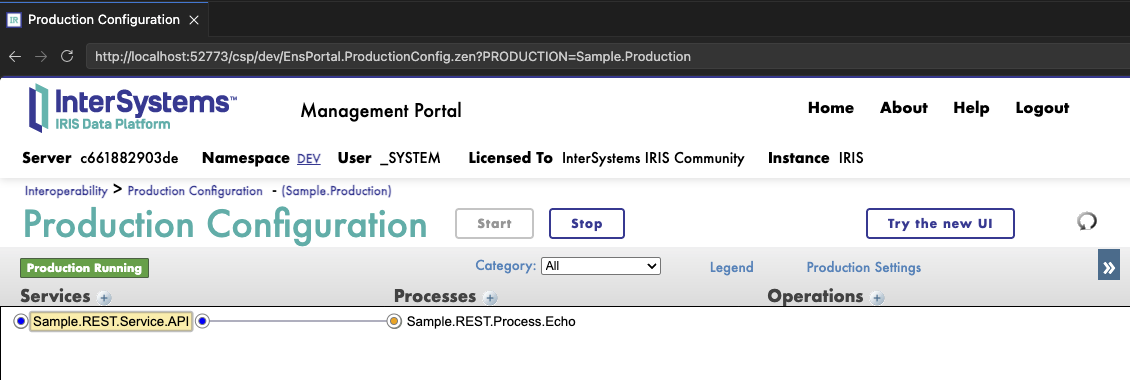
The coding part is finished. Next, we need to add a web application named /sample-api (same as basePath in our spec), set the Sample.REST.API.disp class as Dispatch Class, and create the following business hosts in Production:
Sample.REST.Service.APISample.REST.Process.Echo
We should get Production looks like:
Let's try to execute the request:
curl --location 'http://localhost:52773/sample-api/sample/echo' \
--header 'Content-Type: application/json' \
--data '{
  "name": "test",
  "count": 1
}'
We will get a response:
{
    "status": "ok",
    "message": "Request processed for test with count 1"
}
And also, in the Sample.REST.Service.API service messages, we will get a visual trace detailing our call.
That's all I wanted to tell you today about REST APIs in Interoperability Productions. I recommend using iris-web-swagger-ui to provide your OpenAPI specification to external teams in a convenient form. And use built-in JWT authentication for security. I believe this is what a harmonious API on the IRIS Data Platform should look like.
Feel free to ask any questions.