Vector Search with Embedded Python in InterSystems IRIS
One objective of vectorization is to render unstructured text more machine-usable. Vector embeddings accomplish this by encoding the semantics of text as high-dimensional numeric vectors, which can be employed by advanced search algorithms (normally an approximate nearest neighbor algorithm like Hierarchical Navigable Small World). This not only improves our ability to interact with unstructured text programmatically but makes it searchable by context and by meaning beyond what is captured literally by keyword.
In this article I will walk through a simple vector search implementation that Kwabena Ayim-Aboagye and I fleshed out using embedded python in InterSystems IRIS for Health. I'll also dive a bit into how to use embedded python and dynamic SQL generally, and how to take advantage of vector search features offered natively through IRIS.
Environment Details:
- OS: Windows Server 2025
- InterSystems IRIS for Health 2025.1
- VS Code / InterSystems Server Manager
- Python 3.13.7
- Python Libraries: pandas, ollama, iris**
- Ollama 0.12.3 and model all-minilm
- Dynamic SQL
- Sample database of unstructured text (classic poems)
Process:
0. Setup the environment; complete installs
-
Define an auxiliary table
- The embeddings table
User.SamplePoetryVectorshas a foreign key onUser.SamplePoetryas well as anEMBEDDINGproperty of type%Library.Vector. Ollamaall-minilmgenerates embeddings of 384 dimensions, so we imposed a length constraint accordingly.
- *Note that because the goal is to ultimately take advantage of IRIS' native HNSWIndex and IRIS' native vector search methods, we must have a column of type %Library.Vector (or %Library.Embedding) of fixed length that is of type decimal or double upon which to index.
- The embeddings table
-
Define a
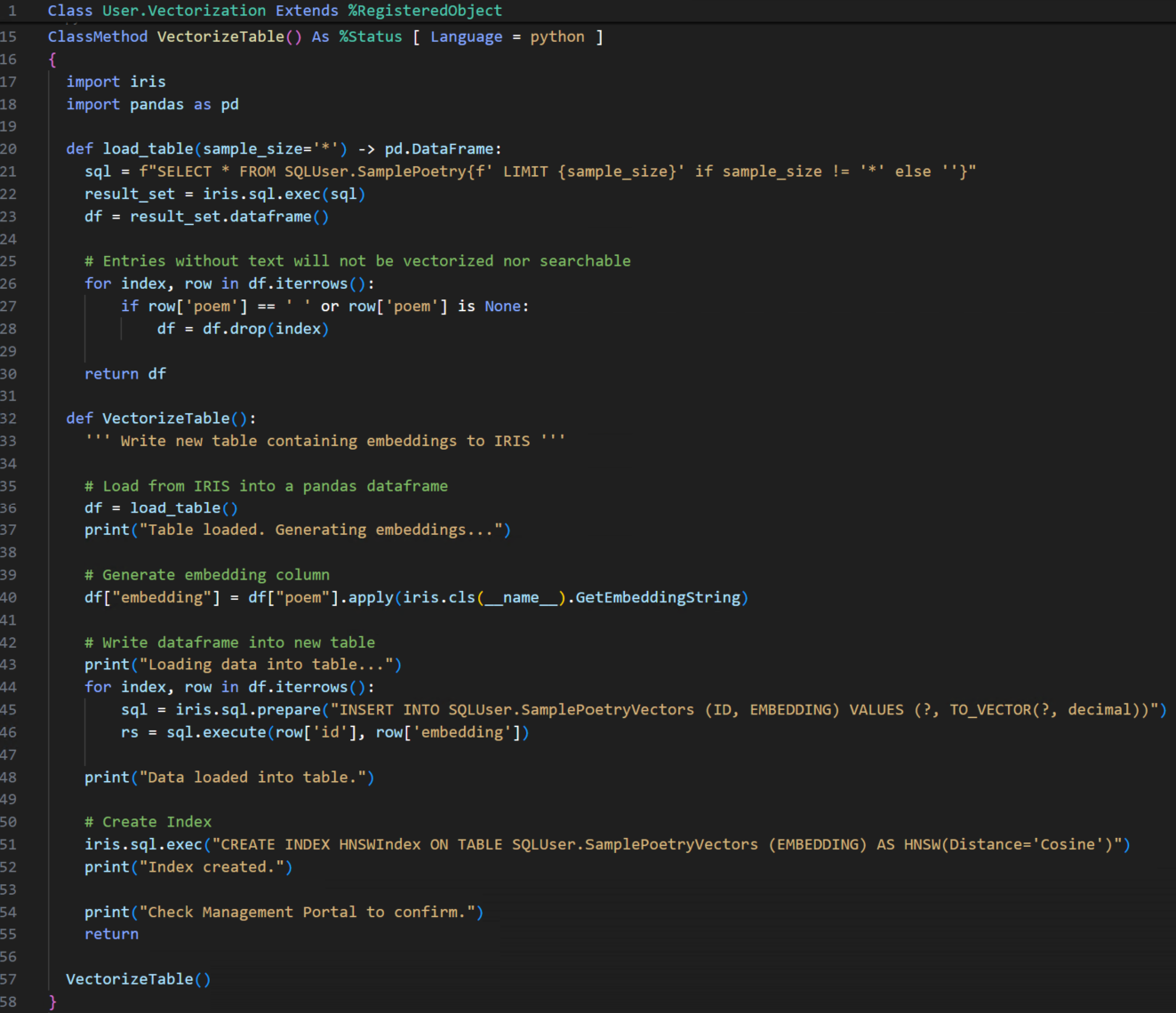
RegisteredObjectclass for our vectorization methods, which will be written in embedded python. First let's focus on aVectorizeTable()method, which will contain a driver function (of the same name) and a few supporting process functions all written in Python.- The driver function walks through the process as follows:
- Load from IRIS into a Pandas Dataframe (via supporting function
load_table()) - Generate an embedding column (via supporting class method
GetEmbeddingString, which will later be used to generate embeddings for queries as well)- Convert the embedding column to a string that's compatible with IRIS vector type
- Write the dataframe into the auxiliary able
- Create an HNSW index on the auxiliary table
- Load from IRIS into a Pandas Dataframe (via supporting function
- The
VectorizeTable()class method then simply calls the driver function: - Let's examine it step-by-step:
-
Load the table from IRIS into a Pandas Dataframe
-
def load_table(sample_size='*') -> pd.DataFrame: sql = f"SELECT * FROM SQLUser.SamplePoetry{f' LIMIT {sample_size}' if sample_size != '*' else ''}" result_set = iris.sql.exec(sql) df = result_set.dataframe() # Entries without text will not be vectorized nor searchable for index, row in df.iterrows(): if row['poem'] == ' ' or row['poem'] is None: df = df.drop(index) return df - This function leverages the
dataframe()method of the embedded python SQLResultSet objects load_table()accepts an optionalsample_sizeargument for testing purposes. There's also a filter for entries without unstructured text. Though our sample database is curated and complete, some use cases may seek to vectorize datasets for which one cannot assume each row will have data for all columns (for example survey responses with skipped questions). As opposed to implementing a "null" or empty vector, we chose to exclude such rows from vector search by removing them at this step in the process.- *Note that
irisis the InterSystems IRIS Python Module. It functions as an API to access IRIS classes, methods, and to interact with the database, etc. - *Note that
SQLUseris the system-wide default schema which corresponds to the default packageUser.
-
-
Generate an embedding column (support method)
-
ClassMethod GetEmbeddingString(aurg As %String) As %String [ Language = python ] { import iris import ollama response = ollama.embed(model='all-minilm',input=[ aurg ]) embedding_str = str(response.embeddings[0]) return embedding_str } - We installed Ollama on our VM, loaded the
all-minilmembedding model, and generated embeddings using Ollama’s Python library. This allowed us to run the model locally and generate embeddings without an API key. GetEmbeddingStringreturns the embedding as a string becauseTO_VECTORby default expects thedataargument to be a string, more on that to follow.- *Note that Embedded Python provides syntax for calling other ObjectScript methods defined within the current class (similar to
selfin Python). The earlier example usesiris.cls(__name__)syntax to get a reference to the current ObjectScript class and invokeGetEmbeddingString(ObjectScript method) fromVectorizeTable(Embedded Python method inside ObjectScript method).
-
-
Write the embeddings from the dataframe into the table in IRIS
-
# Write dataframe into new table print("Loading data into table...") for index, row in df.iterrows(): sql = iris.sql.prepare("INSERT INTO SQLUser.SamplePoetryVectors (ID, EMBEDDING) VALUES (?, TO_VECTOR(?, decimal))") rs = sql.execute(row['id'], row['embedding']) print("Data loaded into table.") - Here, we use Dynamic SQL to populate
SamplePoetryVectorsrow-by-row. Because earlier we declared theEMBEDDINGproperty to be of type%Library.Vectorwe must useTO_VECTORto convert the embeddings to IRIS' nativeVECTORdatatype upon insertion. We ensured compatibility withTO_VECTORby converting the embeddings to strings earlier.- The
irispython module again allows us to take advantage of Dynamic SQL from within our Embedded Python function.
- The
-
-
Create a HNSW Index
-
# Create Index iris.sql.exec("CREATE INDEX HNSWIndex ON TABLE SQLUser.SamplePoetryVectors (EMBEDDING) AS HNSW(Distance='Cosine')") print("Index created.") - IRIS will natively implement a HNSW graph for use in vector search methods when an HNSW index is created on a compatible column. The vector search methods available through IRIS are
VECTOR_DOT_PRODUCTandVECTOR_COSINE. Once the index is created, IRIS will automatically use it to optimize the corresponding vector search method when called in subsequent queries. The parameter defaults for an HNSW index areDistance = Cosine,M = 16, andefConstruction = 200. - Note that
VECTOR_COSINEimplicitly normalizes its input vectors, so we did not need to perform normalization before inserting them into the table in order for our vector search queries to be scored correctly!
-
- The driver function walks through the process as follows:
-
Implement a
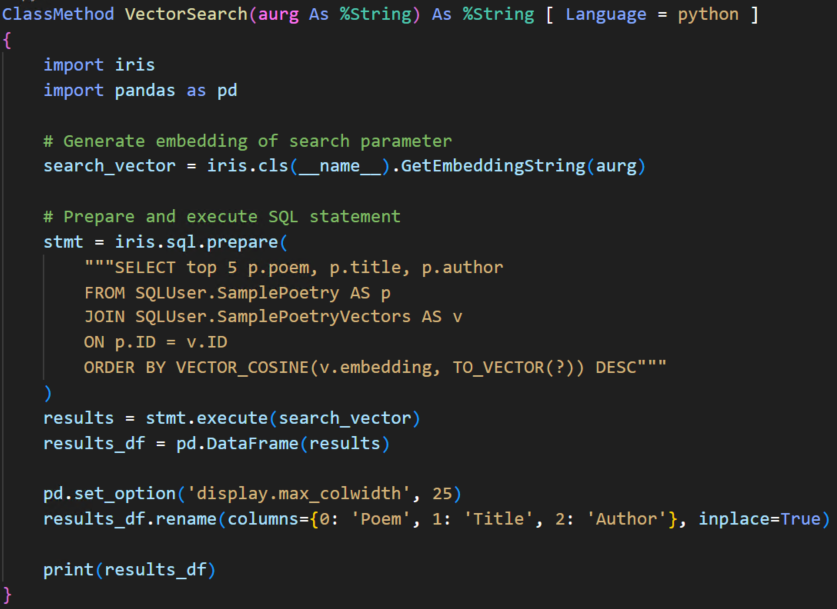
VectorSearch()class method-
Generate an embedding for the query string
-
# Generate embedding of search parameter search_vector = iris.cls(__name__).GetEmbeddingString(aurg) - Reusing the class method
GetEmbeddingString
-
-
Prepare and execute a query that utilizes
VECTOR_COSINE-
# Prepare and execute SQL statement stmt = iris.sql.prepare( """SELECT top 5 p.poem, p.title, p.author FROM SQLUser.SamplePoetry AS p JOIN SQLUser.SamplePoetryVectors AS v ON p.ID = v.ID ORDER BY VECTOR_COSINE(v.embedding, TO_VECTOR(?)) DESC""" ) results = stmt.execute(search_vector) - We use a
JOINhere to combine the poetry text with its corresponding vector embedding so we can rank results by semantic similarity.
-
-
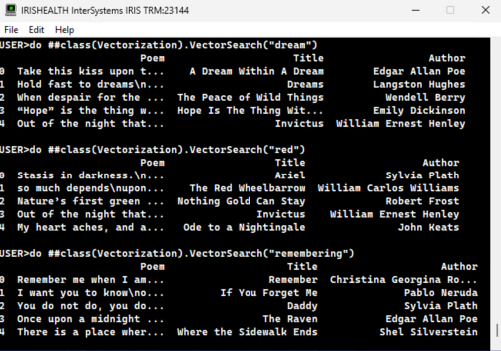
Output the results
-
results_df = pd.DataFrame(results) pd.set_option('display.max_colwidth', 25) results_df.rename(columns={0: 'Poem', 1: 'Title', 2: 'Author'}, inplace=True) print(results_df) - Utilizes formatting options from pandas to tweak how it appears in the IRIS Terminal:
-
-