WebTerminal : blank screen
I just downloaded and installed the latest WebTerminal into my local copy of Healthshare 2016.2.1
I installed via studio and everything compiled without error.
However when I run it I just see a black screen. The help window at the bottom of the screen pops open when I type '/' but I just can't get any response.
Any suggestions as to how to trouble shoot this?
Mike
Comments
Hi, Mike!
I believe it’s because HealthShare has different URL for web-apps vs Caché/Ensemble.
Pinging @Nikita.Savchenko7047 for more help.
Thanks Evgeny.
The docs say WebTerminal works on Ensemble/Healthshare > 2014.1 but there is no extra info an installing on Healthshare.
Regards
Mike
Hi Eduard,
Thanks from trying this. I definitely have a /terminal application in the SMP and already given %All role but just see black screen

Hi Nikita,
Thanks for the reply, I deleted the WebTerminal classes from the original namespace (USER) and re-installed into a differed namespace and it started working immediately. How solid is the VT100? I tried running %GD but got a blank reply even though there are many globals in that namespace?
Just installed Webterminal 4.8 on Cache for UNIX (SUSE Linux Enterprise Server for x86-64) 2015.2.1 (Build 705U) Mon Aug 31 2015 16:58:02 EDT [HealthShare Modules:Core:14.01.7952 + Linkage Engine:14.0.7952] and it seems to work.
Do you see /terminal web app in SMP? If it's not a production system try to give %ALL role to check if it helps.
The link should be:
http://host:port/terminal/
Are there any errors in browser console?
This is the browser console
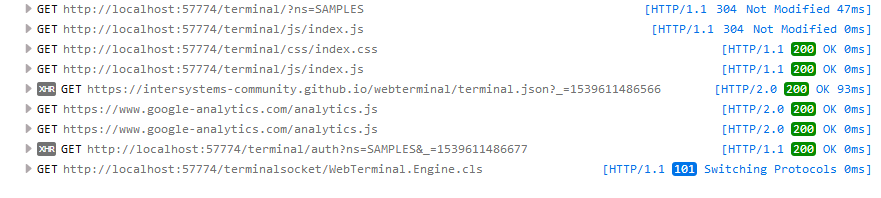
What browser is that?
Try Google Chrome.
That was Firefox. This is with Google Chrome. Why is it going to intersystems-community on F5?

Why is it going to intersystems-community on F5?
To check for updates.
Hi Mike!
When WebTerminal says “See You!”, it means that the server process normally exited. Which means that something prevents WebTerminal from running normally on the server or terminates WebSocket connection.
Try to delete WebTerminal classes and install it again into different clear namespace (like USER). Does it help?