検索

Article
· Apr 24, 2023 6m read

開発者向けウェビナー:アーカイブビデオ一覧

開発者の皆さん、こんにちは!

過去に開催した開発者向けウェビナー アーカイブビデオのまとめページを作成しました。

今後もウェビナーを開催していきますのでこのページをブックマークしていただけると嬉しいですlaugh

プレイリストはこちら👉https://www.youtube.com/playlist?list=PLzSN_5VbNaxB39_H2QMMEG_EsNEFc0ASz

2025年開催分:

✅ウェビナー

Connpassから申込が行えます:🤖はじめてのAI開発 ~ゼロからのIRIS環境構築とOpenAI連携チャットボット作り~🤖
残席7席ですので、ぜひお早めにお申し込みください!💨

2024年開催分:

✅ウェビナー


2023年開催分:

✅ウェビナー

✅ InterSystems 医療 x IT セミナー アプリケーション開発編2


2022年開催分:

    ✅ InterSystems 医療 x IT セミナー アプリケーション開発編1

    ✅モダンホスピタルショウ

    ✅ InterSystems Japan Virtual Summit 2022:プレイリストはこちら👉https://www.youtube.com/playlist?list=PLzSN_5VbNaxAGImHt9sB0n-e7IlHvfcOu

    ✅その他


    2021年開催分:ウェビナー

    ✅ウェビナー(1月)

    ✅ウェビナー(10月):プレイリストはこちら👉https://www.youtube.com/playlist?list=PLzSN_5VbNaxBlWFxRfrrrScerJrpo7xjr


    2021年開催分:InterSystems Japan Virtual Summit 2021

    ✅開発:プレイリスト👉https://www.youtube.com/playlist?list=PLzSN_5VbNaxAE7EpPq8npD_LFwMRvFRBI

    ✅HL7 FHIRによるインターオペラビリティ:プレイリスト👉https://www.youtube.com/playlist?list=PLzSN_5VbNaxD6pgXvPtS92UeElPq2cDac

    ✅運用・管理:プレイリスト👉https://www.youtube.com/playlist?list=PLzSN_5VbNaxDTIXYG_iwJczwzJbtSM8DF

    ✅マイグレーション:プレイリスト👉https://www.youtube.com/playlist?list=PLzSN_5VbNaxCYZuzDKN5miU0KlTSDlW1Z

    24 Comments
    Discussion (24)1
    Log in or sign up to continue
    Announcement
    · Apr 23, 2023

    Using GIFs in DC posts

    Hi Community!

    Here are some basic rules about using GIFs in posts on the InterSystems Developer Community:

    • Consider the context: Make sure that the GIF is appropriate for the context and the message you want to convey. Avoid using offensive or insensitive GIFs. 


    • Keep it small: Large GIFs can slow down the loading time of your web page or forum, which can be frustrating for users. Try to keep your GIFs small and optimize them for the web.  


    • Use sparingly: While GIFs can be a fun and engaging way to add some personality to your post, using too many can be overwhelming and distracting. Use them sparingly and strategically.  


    • Use caution with auto-play: Auto-playing GIFs can be distracting and annoying for some users, so use caution when deciding to have your GIFs auto-play. Consider giving users the option to play or pause the GIF.  


    • Accessibility: Consider the accessibility of your GIFs for users who may have visual or cognitive impairments. Provide alt-text descriptions and avoid flashing or rapidly changing images that can trigger seizures or migraines.

    Please make sure you follow these rules and use GIFs responsibly and definitely not in the teasers. This will ensure that everyone has a good time in the Community.

    4 Comments
    Discussion (4)2
    Log in or sign up to continue
    Announcement
    · Apr 19, 2023

    持续火热报名中:欢迎参加InterSystems 中国技术培训认证

    为支持医疗信息行业人才发展,InterSystems 为中国市场量身定制了贴近需求、灵活、实操性强的技术认证培训计划,由 InterSystems 资深技术专家亲自授课,帮助用户快速掌握 InterSystems 技术,确保用户从快速发展的 InterSystems 技术中获益,以更好地服务于医院信息化建设。点击此处查看课程详情:InterSystems中国技术培训认证

    您的最佳学习路径


    为什么要参加 InterSystems 技术认证培训?

    • InterSystems 数据平台技术已成为国内医疗信息化领域的主流技术之一,支持全国数百家大型公立医院核心系统长期稳定运行 20 余年;
    • 专为中国技术用户量身定制,具有贴近需求、灵活、实操性强等特点;
    • InterSystems 资深技术专家亲自授课,帮助用户快速掌握 InterSystems 技术及最佳实践;
    • InterSystems 官方技术认证培训具备更高权威性,可以助力用户更好地运用 InterSystems 技术,并从快速发展的 InterSystems 技术中获益,保持技术先进性。

    哪些用户可以参加认证培训?

    凡使用 InterSystems 技术或对 InterSystems 技术感兴趣的IT从业人员或机构均可参加。

    您可以从技术认证培训中获得哪些技能和成长?
    • 与时俱进的课程更新,理论与实践相结合的学习方式,可以帮助您持续提升对 InterSystems 技术的掌握;
    • 参与 InterSystems 的分级培训计划,考核通过即可获得认证证书;
    • 通过线下课程与活动,拓展技术人脉。
    InterSystems 中国的认证培训讲师团成员是哪些?

    InterSystems 中国资深工程师团队授课。

    报名方式及开课时间是如何安排的?

    报名人数满 5 人即开班,每季度一次,培训方式为线下培训,考试内容含书面测试与上机实践。课程收费请咨询您的 InterSystems 客户经理医院及医疗信息化企业推荐以机构方式参与培训。

    如需报名或咨询更多详情,请联系您的 InterSystems 客户经理,或通过以下方式与 InterSystems 中国团队联系:

    电话:400-601-9890

    邮件:GCDPsales@InterSystems.com

    2 Comments
    Discussion (2)0
    Log in or sign up to continue
    InterSystems Official
    · Apr 14, 2023

    IKO (InterSystems Kubernetes Operator) 3.5 Release Announcement

    InterSystems Kubernetes Operator (IKO) 3.5 is now Generally Available.  IKO 3.5 adds significant new functionality along with numerous bug fixes.  Highlights include:

    • Simplified setup of TLS across the Web Gateway, ECP, Mirroring, Super Server, and IAM
    • The ability to run container sidecars along with compute or data nodes – perfect for scaling web gateways with your compute nodes.
    • Changes to the CPF configmap and IRIS key secret are automatically processed by the IRIS instances when using IKO 3.5 with IRIS 2023.1 and up.
    • The initContainer is now configurable with both the UID/GID and image.
    • IKO supports topologySpreadConstraints to let you more easily control scheduling of pods
    • Compatibility Version to support a wider breadth of IRIS instances
    • Autoscale of compute nodes (Experimental)
    • IKO is now available for ARM


    Follow the Installation Guide for guidance on how to download, install, and get started with IKO.  The complete IKO 3.5 documentation gives you more information about IKO and using it with InterSystems IRIS and InterSystems IRIS for Health.  IKO can be downloaded from the WRC download page (search for Kubernetes).  The container is available from the InterSystems Container Registry.

    IKO simplifies working with InterSystems IRIS or InterSystems IRIS for Health in Kubernetes by providing an easy-to-use irisCluster resource definition. See the documentation for a full list of features, including easy sharding, mirroring, and configuration of ECP.

    Discussion (0)1
    Log in or sign up to continue
    Article
    · Apr 10, 2023 3m read

    管理ポータル:システムエクスプローラで参照のみ可能なユーザの設定

    これは、InterSystems FAQサイトの記事です。

    管理ポータル:システムエクスプローラの使用には、%DevelopmentリソースのUse特権が必要です。
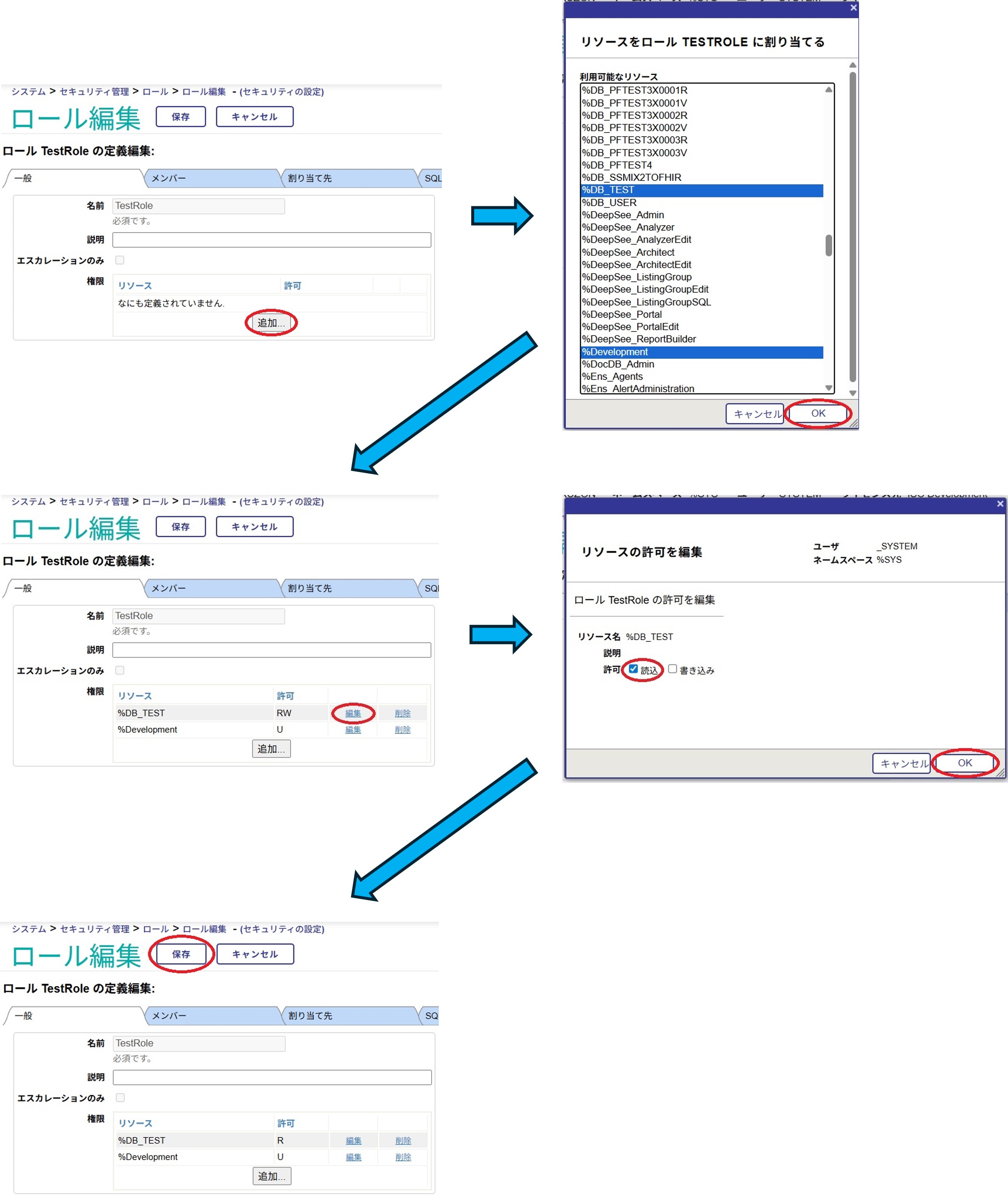
    システムエクスプローラでの参照のみ利用可能とする権限をユーザに付与したい場合は、%DevelopmentリソースのUse特権(※1)と、該当のデータベースリソース(※2)への参照特権(R)を付与したロールを作成し、これをユーザに与えます。
    ※1.「%Development:U」を付与している場合はターミナルやスタジオも参照のみで使用可能となります。
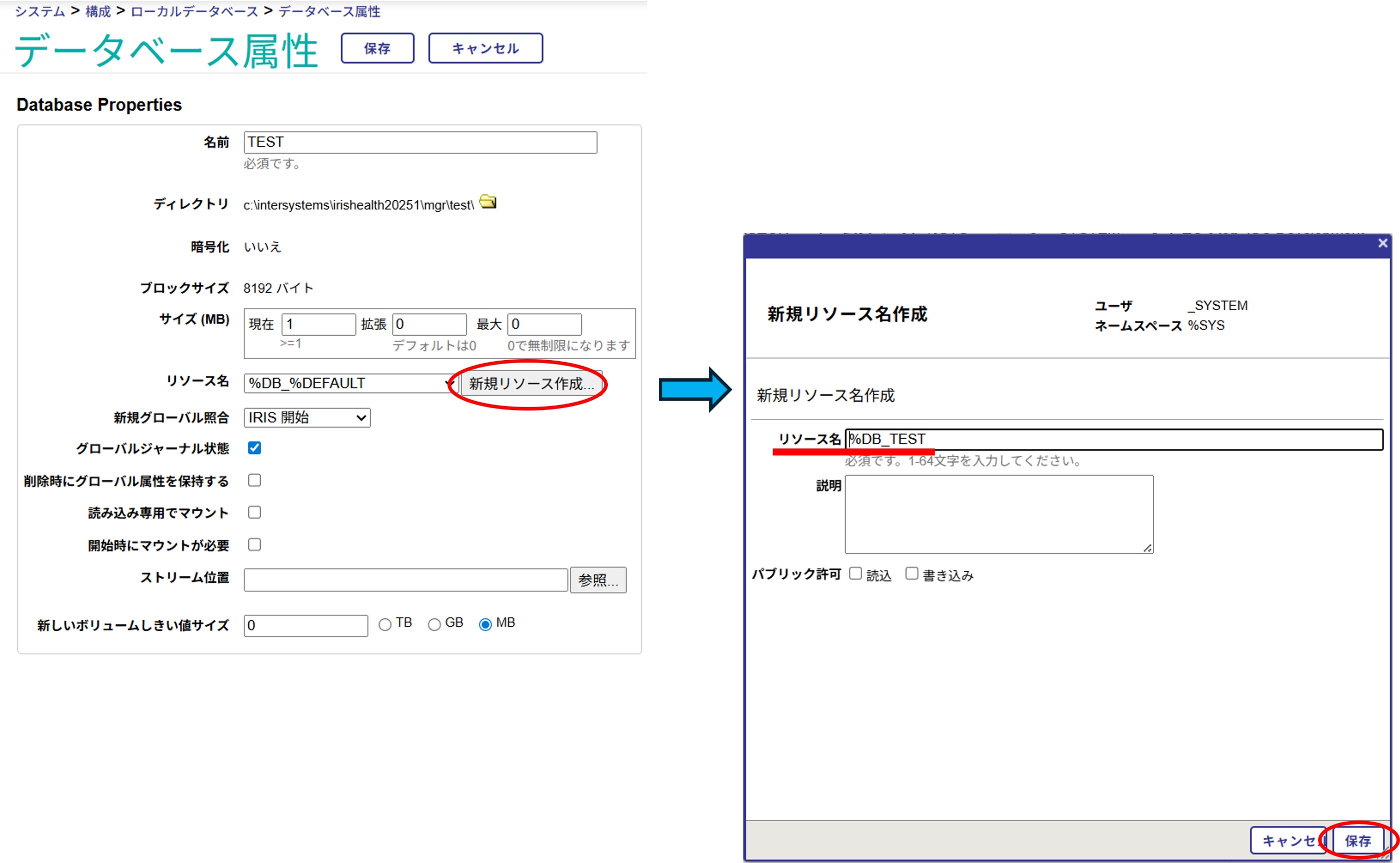
    ※2.参照したいデータベースに割り当てられているリソースが%DB_DEFAULTリソースになっており、このデータベースのみに参照権限を設定したい場合は、事前に、このデータベース用の独自リソース(%DB_<データベース名>)を作成し、該当データベースに割り当てるようにします。

    【例】:testAユーザに、TESTデータベースへの参照のみを許可する。

    0.独自リソースの作成

    管理ポータル:[システム管理]>[構成]>[システム構成]>[ローカルデータベース]>(該当データベースを選択)


    1.新規ロール作成


    2.ロール編集(リソースへの権限の追加)


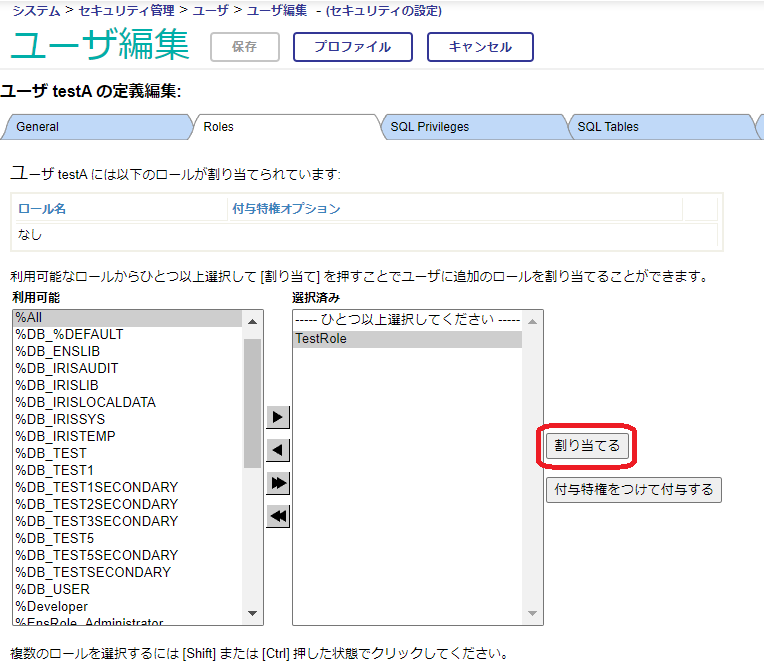
    3.上記で作成したロールをユーザに付与。


    以上の設定で、testAユーザは、システムエクスプローラでの該当データベースへの参照のみが可能となります。
    ※実際に対象ユーザ(上記testA)が使用する場合は、管理ポータルアクセス後、参照するデータベースに接続できるネームスペースに切り替えた後、システムエクスプローラでの参照を行ってください。

    ロールの追加が完了したら、管理ポータルのユーザ定義一覧から該当ユーザのプロファイルを確認し、希望の条件を満たしているか、確認してください。
    [管理ポータル]>[システム管理]>[セキュリティ]>[ロール]>ユーザ一覧>[プロファイル](一覧の該当ユーザの右端のリンク)

    なお、インストール時の初期セキュリティが「最小」の場合、デフォルトでは管理ポータルへはユーザログイン無しでアクセスできます。ユーザログイン出来るようにするためには、管理ポータル用のWebアプリケーションパスの設定として[許可された認証方法]で「パスワード」のみをチェックして、パスワード認証を有効にする必要があります。
    詳細は、関連トピック「管理ポータル/スタジオ/ターミナルにパスワード認証を設定するにはどうしたらいいですか?」をご参照ください。

    さらに、SQLでの参照を行いたい場合には、参照したいテーブルへのSQL権限を付与する必要があります。
    これについての詳細は、関連トピック「SELECTのみを実行できるユーザ作成方法について」をご確認ください。

    Discussion (0)1
    Log in or sign up to continue