Web Gateway Error "Invalid Request : Cannot identify application path"
I want to try SAM in AWS. I followed these steps:
docker pull store/intersystems/sam:1.0.0.115
git clone intersystems-community/sam: System Alerting and Monitoring (SAM) (github.com)
git clone https://github.com/intersystems-community/sam
tar zpxvf sam-<version>.tar.gz
tar zpxvf sam-1.0.0.115-unix.tar.gz
$ cd sam-<version>
cd /home/ec2-user/git/sam/sam-1.0.0.115-unix/
$ ./start.sh
In your browser, visit:http://<ip-address-of-host-where-SAM-runs>:8080/api/sam/app/index.csp
You'll be prompted to login. You can use standard InterSystems IRIS credentials like _SYSTEM/SYS. You'll be prompted to change the password.
I was able to visit http://10.2ab.1cd.xxx:8080/api/sam/app/index.csp and it prompted me to change my password.
Whenever I return to index.csp I only see a blank white screen. I see in console this:
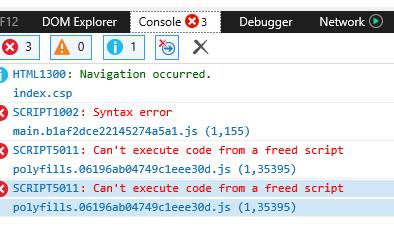
I do not know if my AWS Windows instance has browser restrictions preventing SAM index.csp to display. I attempted to create my own SAM image with webserver so I can connect from outside AWS on port 443.
cd /efs/ICS/oliver/git
git clone https://github.com/oliverwilms/sam.git
docker build --no-cache --ulimit nofile=8192:8192 -t sam .
Next I updated docker-compose.yml and I started sam again.
I tried to pull up https://10.2ab.1cd.xxx/api/sam/app/index.csp or https://10.2ab.1cd.xxx/csp/sys/UtilHome.csp and I get 500 Internal Server Error and I see:
Web Gateway Version 2020.2.0.211.0
Systems Management
Invalid Request : Cannot identify application path