#Performance

5 Followers · 190 Posts

Performance tag groups posts regarding software performance issues and the best practices on solving and monitoring performance issues.

InterSystems staff + admins Hide everywhere
Hidden post for admin
Article Bob Binstock · Apr 26, 2021 9m read

Like hardware hosts, virtual hosts in public and private clouds can develop resource bottlenecks as workloads increase. If you are using and managing InterSystems IRIS instances deployed in public or private clouds, you may have encountered a situation in which addressing performance or other issues requires increasing the capacity of an instance's host (that is, vertically scaling).

One common reason to scale is insufficient memory.

1
0 552
Article Tani Frankel · Dec 22, 2025 1m read

Looking at my database I see I have a very big ^rINDEXSQL global? Why is that? 😬

In the Management Portal SQL page, under "SQL Statements" I see a 'Clean stale' button - what does this do? 🤔

In the list of Statements some have a 'Location' value and some don't? How is that? 🤨

0
1 95
Article Oliver Wilms · Dec 24, 2021 4m read

One of my colleagues had developed an interface in Health Connect (HealthShare 2019.1) to add large amounts of data to an external SQL Server database. The data comes from many text files with delimited rows and data for one table per file. There is a business process to read a file line by line and send an Insert Request to an operation. The request contains an Insert statement like ‘Insert into TABLE columns (col1, col2, … colZ) values (val1, val2, … valZ).’ The Health Connect operation utilizes Outbound SQL Adapter to insert one row into a table per request.

0
0 405
Article Vachan C Rannore · Oct 21, 2025 3m read

Hello!!!

Data migration often sounds like a simple "move data from A to B task" until you actually do it. In reality, it is a complex process that blends planning, validation, testing, and technical precision.

Over several projects where I handled data migration into a HIS which runs on IRIS (TrakCare), I realized that success comes from a mix of discipline and automation.

Here are a few points which I want to highlight.

1. Start with a Defined Data Format.

Before you even open your first file, make sure everyone, especially data providers, clearly understands the exact data format you expect. Defining templates early avoids unnecessary bank-and-forth and rework later. 

While Excel or CSV formats are common, I personally feel using a tab-delimited text file (.txt) for data upload is best. It's lightweight, consistent, and avoids issues with commas inside text fields. 

PatID   DOB Gender  AdmDate
10001   2000-01-02  M   2025-10-01
10002   1998-01-05  F   2025-10-05
10005   1980-08-23  M   2025-10-15

Make sure that the date formats given in the file is correct and constant throughout the file because all these files are usually converted from an Excel file and an Basic excel user might make mistakes while giving you the date formats wrong. Wrong date formats can irritate you while converting into horolog.

12
2 232
Article David Loveluck · Dec 15, 2017 9m read

practical guide to using the tools PERFMON and MONLBL.

Introduction

When investigating performance problems, I often use the utilities ^PERFMON and ^%SYS.MONLBL to identify exactly where in the application pieces of code are taking a long time to execute. In this short paper I will describe an approach that first uses ^PERFMON to identify the busiest routines and then uses ^%SYS.MONLBL to analyze those routines in detail to show which lines are the most expensive.

The details of ^PERFMON and ^%SYS.

6
1 1293
Article Murray Oldfield · Apr 1, 2016 2m read

Previously I showed you how to run pButtons to start collecting performance metrics that we are looking at in this series of posts.


##Update: May 2020.

Since this post was written several years ago, we have moved from Caché to IRIS. See the comments for an updated link to the documentation for pButtons (Caché) and SystemPerformance (IRIS). Also, a note on how to update your systems to the latest versions of the performance tools.


2
0 1738
Article Fabian Haupt · Dec 22, 2016 8m read

I was benchmarking the populate utils when I noticed something strange. Consider this simple benchmarking method:

ClassMethod runBench(count As %Integer = 300000)
{
		s types=["name","ssn","company","title","phone","city","street","zip","mission","state","color","product","string","integer","float"]
		//s types=["name","ssn"]
		s iter=types.%GetIterator()
		while iter.%GetNext(.key,.value){
			s start=$P($ZTS,",",2)
			s opt={}
			s opt.type=value
			for i=1:1:count{
				s res=##class(DataGen.Generator).
0
1 526
Article Mark Bolinsky · Sep 7, 2018 2m read

Continuing on with providing some examples of various storage technologies and their performance profiles, this time we looked at the growing trend of leveraging internal commodity-based server storage, specifically the new HPE Cloudline 3150 Gen10 AMD processor-based single socket servers with two 3.2TB Samsung  PM1725a NVMe drives.  

2
0 1522
Article Guillaume Rongier · Apr 9, 2019 3m read

IRIS and Ensemble are designed to act as an ESB/EAI. This mean they are build to process lots of small messages.

But some times, in real life we have to use them as ETL. The down side is not that they can't do so, but it can take a long time to process millions of row at once.

To improve performance, I have created a new SQLOutboundAdaptor who only works with JDBC.

BatchSqlOutboundAdapter

Extend EnsLib.SQL.OutboundAdapter to add batch batch and fetch support on JDBC connection.

Benchmark

Benchmarks released on Postgres 11.2 with 1 000 000 rows fetched and 100 000 rows inserted on 2 columns.

alt text

10
3 1928
Article Jean Millette · Aug 22, 2019 3m read

Our team is reworking an application to use REST services that use the same database as our current ZEN application. One of the new REST endpoints uses a query that ran very slowly when first implemented. After some analysis, we found that an index on one of the fields in the table greatly improved performance (a query that took 35 seconds was now taking a fraction of a second).

We saw this improvement on our development system and our test system. However, when we moved the code to the production system, the query still took “forever”. What went wrong?

4
0 573
Article Jorge Jaramillo Herrera · Jan 9 9m read

1-command only required for an entire IRIS instance for Data Science projects, and leveraging this to compare query methods' speed (Dynamic SQL, Pandas Query, and Globals).

Before joining InterSystems, I worked in a team of web developers as a data scientist. Most of my day-to-day work involved training and embedding ML models in Python-based backend applications through microservices, mainly built with the Django framework and using Postgres SQL for sourcing the data.

3
0 39
Article Sergey Kamenev · May 11, 2020 8m read

Introduction

In the first article in this series, we’ll take a look at the entity–attribute–value (EAV) model in relational databases to see how it’s used and what it’s good for. Then we'll compare the EAV model concepts to globals.

Sometimes you have objects with an unknown number of fields, or perhaps hierarchically nested fields, for which, as a rule, you need to search.

Take, for example, an online store with diverse groups of products. Each product group has its own unique set of properties and has common properties as well.

0
4 4445
Article Harshitha · Oct 22, 2025 2m read

Hello community,

I wanted to share my experience about working on Large Data projects. Over the years, I have had the opportunity to handle massive patient data, payor data and transactional logs while working in an hospital industry. I have had the chance to build huge reports which had to be written using advanced logics fetching data across multiple tables whose indexing was not helping me write efficient code.

Here is what I have learned about managing large data efficiently.

Choosing the right data access method.

As we all here in the community are aware of, IRIS provides multiple ways to access data. Choosing the right method, depends on the requirement.

  • Direct Global Access: Fastest for bulk read/write operations. For example, if i have to traverse through indexes and fetch patient data, I can loop through the globals to process millions of records. This will save a lot of time.
Set ToDate=+H
Set FromDate=+$H-1 For  Set FromDate=$O(^PatientD("Date",FromDate)) Quit:FromDate>ToDate  Do
. Set PatId="" For  Set PatId=$Order(^PatientD("Date",FromDate,PatID)) Quit:PatId=""  Do
. . Write $Get(^PatientD("Date",FromDate,PatID)),!
  • Using SQL: Useful for reporting or analytical requirements, though slower for huge data sets.
6
1 187
Article Mark Bolinsky · Jul 10, 2018 4m read

Often InterSystems technology architect team is asked about recommended storage arrays or storage technologies.  To provide this information to a wider audience as reference, a new series is started to provide some of the results we have encountered with various storage technologies.  As a general recommendation, all-flash storage is highly recommended with all InterSystems products to provide the lowest latency and predictable IOPS capabilities.

The first in the series was the most recently tested Netapp AFF A300 storage array.  This is middle-tier type storage array with several higher models above it.  This specific A300 model is capable of supporting a minimal configuration of only a few drives to hundreds of drives per HA pair, and also capable of being clustered with multiple controller pairs for tens of PB's of disk capacity and hundreds of thousands of IOPS or higher. 

0
0 3541
Article David Loveluck · Jul 26, 2017 3m read

What is APM?

I am talking about Application Performance Management at global summit, and several people have asked what that means so it is time for a bit of an explanation.

APM or Application Performance Management (sometimes referred to as Application Performance Monitoring) has a very good (if complicated) explanation on Wikipedia but to me it just means looking at performance from the users’ point of view and the level of service provided to them.

0
1 802
Article Dmitry Maslennikov · Jul 2, 2023 1m read

InterSystems IRIS offers various ways how to profile your code, in most cases it produces enough information to find the places where the most time is spent or where the most global sets. But sometimes it's difficult to understand the execution flow and how it ended at that point. 

To solve this, I've decided to implement a way to build a report in a way, so, it's possible to dive by stack down

4
2 473
Article Guillaume Rongier · Jul 26, 2024 5m read

It's been a long time since I didn't write an update post on IoP.

image

So what's new since IoP command line interface was released?

Two new big features were added to IoP:

  • Rebranding: the grongier.pex module was renamed to iop to reflect the new name of the project.
  • Async support: IoP now supports async functions and coroutines.

Rebranding

The grongier.pex module was renamed to iop to reflect the new name of the project.

The grongier.pex module is still available for backward compatibility, but it will be removed in the future.

5
0 357
Article Fabian Haupt · Apr 19, 2017 2m read

Code coverage and performance optimization of code has come up a bunch of times already, so most of you should already be aware of the SYS.MONLBL utility. Often a visual approach to looking at code is much more intuitive than pure numbers, which is pretty much the whole point of this article series. This time we will take a slight excursion away from python and its tools and are going to explore generating heatmaps from ^%SYS.MONLBL reports.

As a quick reminder a heatmap is just a specific visualization tool, which gives us an overview of data where colors represent a certain value.

0
1 687
Article Sergei Sarkisian · Oct 1, 2018 4m read

Not everyone knows that InterSystems Caché has a built-in tool for code profiling called Caché Monitor.

Its main purpose (obviously) is the collection of statistics for programs running in Caché. It can provide statistics by program, as well as detailed Line-by-Line statistics for each program.

Using Caché Monitor

Let’s take a look at a potential use case for Caché Monitor and its key features. So, in order to start the profiler, you need to go to the terminal and switch to the namespace that you want to monitor, then launch the %SYS.MONLBL system routine:

zn "<namespace>"
do ^%SYS.
1
7 1153
Article sween · Sep 10, 2024 4m read

So if you are following from the previous post or dropping in now, let's segway to the world of eBPF applications and take a look at Parca, which builds on our brief investigation of performance bottlenecks using eBPF, but puts a killer app on top of your cluster to monitor all your iris workloads, continually, cluster wide!  

Continous Profiling with Parca, IRIS Workloads Cluster Wide

0
2 347
Article Carlos Sepulveda Mancilla · Dec 8, 2023 3m read

Windows Subsystem for Linux (WSL) is a feature of Windows that allows you to run a Linux environment on your Windows machine, without the need for a separate virtual machine or dual booting. 

WSL is designed to provide a seamless and productive experience for developers who want to use both Windows and Linux at the same time**.

WSL 2 is the default distro type when installing a Linux distribution. WSL 2 uses virtualization technology to run a Linux kernel inside of a lightweight utility virtual machine (VM). Linux distributions run as isolated containers inside of the WSL 2 managed VM.

0
1 491
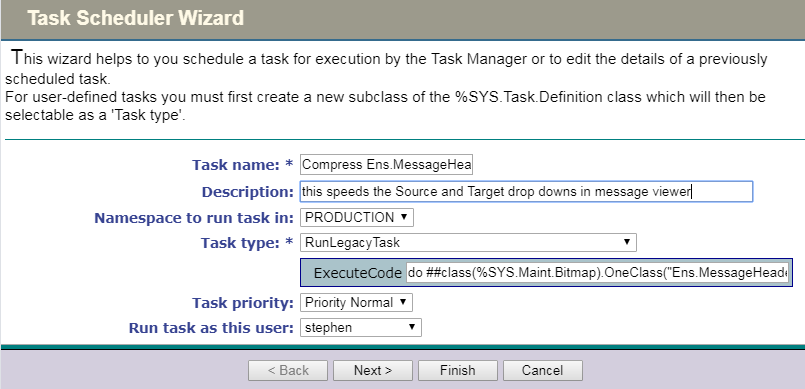
Article Stephen De Gabrielle · Jun 28, 2019 1m read

Slowness of the 'Source' and 'Target' parameters in the (portal) Message Viewer is caused by the Bitmap indices of Ens.MessageHeader.

Running the 'bitmap index clean up' routine for Ens.MessageHeader will fix the issue.

I checked with WRC and they advised:

“Yes it is safe to run this tool on a live system. It will eat up 1 CPU and load a lot of data from disk into global buffers so I would suggest running it at a slower time of day.”

To compress the Bitmap indices of Ens.MessageHeader use the terminal to call OneClass():

zn "PRODUCTION"

do ##class(%SYS.Maint.Bitmap).OneClass("Ens.

0
0 429
Article Sergey Kamenev · May 28, 2020 7m read

A More Industrial-Looking Global Storage Scheme

In the first article in this series, we looked at the entity–attribute–value (EAV) model in relational databases, and took a look at the pros and cons of storing those entities, attributes and values in tables. We learned that, despite the benefits of this approach in terms of flexibility, there are some real disadvantages, in particular a basic mismatch between the logical structure of the data and its physical storage, which causes various difficulties.

0
0 981
Article Ashok Kumar T · Feb 20 3m read

This is an excellent candidate for a developer community post (like Dev.to, Medium, or the InterSystems Community). It bridges the gap between high-level architecture and hands-on implementation.

Here is the summarized article format.


Building a Robust Asynchronous Queue Manager with InterSystems IRIS and Angular

As applications scale, handling heavy computational tasks synchronously becomes a bottleneck. Whether it's processing large data sets, sending high-volume emails, or managing API integrations, a decoupled architecture is essential.

0
0 68
New
Article Ashok Kumar T · Feb 24 2m read

In the modern healthcare landscape, finding clinically similar patients often feels like looking for a needle in a haystack. Traditional keyword searches often fail because medical language is highly nuanced; a search for "Heart Failure" might miss a record containing "Congestive Cardiac Failure."

I am excited to share iris-medmatch, an AI-powered patient matching engine built on InterSystems IRIS for Health. By leveraging Vector Search, this tool understands clinical intent rather than just matching literal strings.

0
0 77
Article Murray Oldfield · Nov 30, 2021 3m read

When looking at system performance and capacity planning I need to know what processors a server is running.

In ^SystemPerformance Linux systems report Intel processors explicitly, for example:

processor	: 0
vendor_id	: GenuineIntel
cpu family	: 6
model		: 79
model name	: Intel(R) Xeon(R) CPU E5-2673 v4 @ 2.30GHz
stepping	: 1
microcode	: 0xffffffff
cpu MHz	: 2294.
2
1 61465
Article Ashok Kumar T · Dec 28, 2025 3m read

Embeddedpy-bridge: A Toolkit for Embedded Python

Overview

Embedded Python is a game-changer for InterSystems IRIS, offering access to the vast Python ecosystem directly within the database. However, bridging the gap between ObjectScript and Python can sometimes feel like translating between two different worlds.

To make this transition seamless using embeddedpy-bridge.

This package is a developer-centric utility kit designed to provide high-level ObjectScript wrappers, familiar syntax, and robust error handling for Embedded Python.

1
2 99
Article David Loveluck · Feb 1, 2018 1m read

Here is a snippet that I learned yesterday

You can define an index on a collection property but when I tried to use it, I failed. I was using

     Select ….. where …. :xx %INLIST collproperty

But this will not use an index, but the equivalent syntax

     SELECT .. WHERE ... FOR SOME %ELEMENT(collproperty) (%VALUE=:xx)

will use the index 

Check out

     http://docs.intersystems.com/latest/csp/docbook/DocBook.UI.Page.cls?KEY…


Dave

2
1 414
Article Ashok Kumar T · Nov 10, 2025 2m read

FastJsonSchema: High-Performance JSON Validation in IRIS

Validating JSON data against JSON Schema is a common requirement for modern applications. FastJsonSchema brings this capability natively to InterSystems IRIS, combining speed, simplicity, and full schema compliance.

Unlike traditional validation approaches, FastJsonSchema generates native ObjectScript code from your JSON Schemas and compiles it directly to iris object code, enabling idiomatic performance without relying on external libraries or runtimes.

1
0 99