#Backup

5 Followers · 76 Posts

In information technology, a backup, or the process of backing up, refers to the copying and archiving of computer data so it may be used to restore the original after a data loss event.

In InterSystems Data Platform backup means procedures for backing up data in database files and all the related procedures which assure that no any application data is being lost during backup and recovery.

Documentation.

Article Murray Oldfield · Jan 12, 2017 19m read

Hi, this post was initially written for Caché. In June 2023, I finally updated it for IRIS. If you are revisiting the post since then, the only real change is substituting Caché for IRIS! I also updated the links for IRIS documentation and fixed a few typos and grammatical errors. Enjoy :)


In this post, I show strategies for backing up InterSystems IRIS using External Backup with examples of integrating with snapshot-based solutions. Most solutions I see today are deployed on Linux on VMware, so a lot of the post shows how solutions integrate VMware snapshot technology as examples.

29
9 12098
Article Anton Umnikov · Jan 21, 2021 26m read

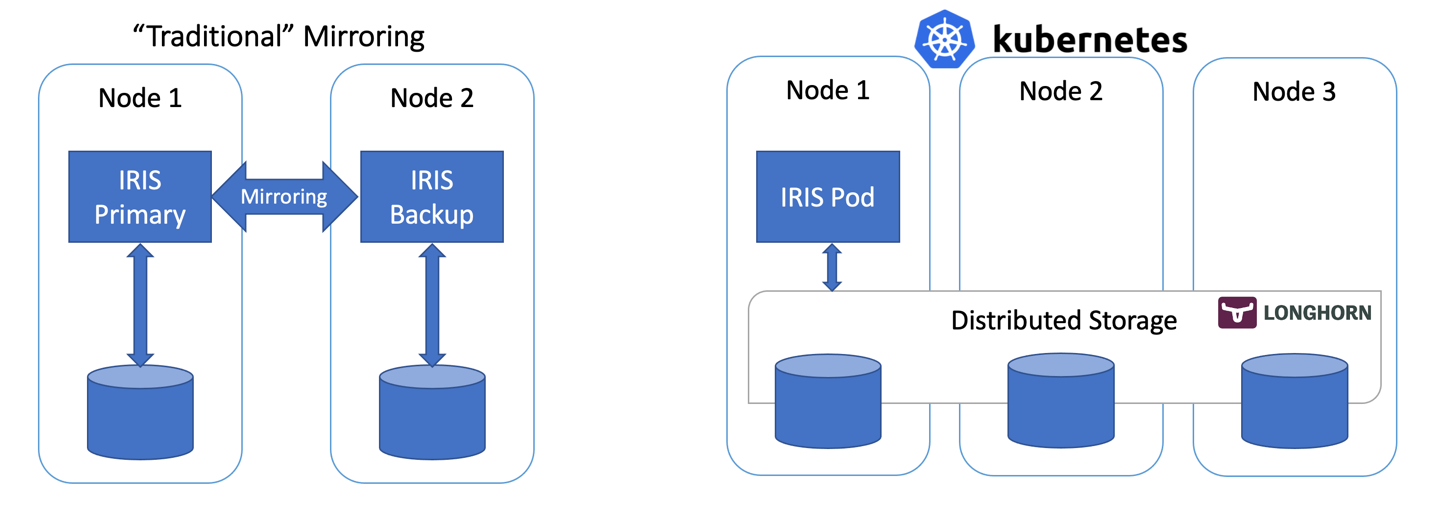
In this article, we’ll build a highly available IRIS configuration using Kubernetes Deployments with distributed persistent storage instead of the “traditional” IRIS mirror pair. This deployment would be able to tolerate infrastructure-related failures, such as node, storage and Availability Zone failures. The described approach greatly reduces the complexity of the deployment at the expense of slightly extended RTO.

16
8 3998
Article Mark Bolinsky · Mar 21, 2017 4m read

Database systems have very specific backup requirements that in enterprise deployments require forethought and planning. For database systems, the operational goal of a backup solution is to create a copy of the data in a state that is equivalent to when application is shut down gracefully.  Application consistent backups meet these requirements and Caché provides a set of APIs that facilitate the integration with external solutions to achieve this level of backup consistency.

7
2 2961
Question Murray Oldfield · Apr 21, 2017

I am looking for experience of people running Veeam with Caché databases. 

Tips/Tricks/General questions like; what Veeam features are you using, what your backup cycle looks like, where does your data end up, what recovery/integrity checks you do, what sort of compression/dedupe you get. 

Also what questions _you_ have and what problems you might be trying to solve.

9
0 2118
Article Sylvain Guilbaud · Feb 24, 2016 1m read

C:\data\backup.bat :

C:\InterSystems\Ensemble\bin\cache -s"C:\InterSystems\Ensemble\Mgr" -U%%SYS ##Class(Backup.General).ExternalFreeze() <C:\data\login.scr 

echo %ERRORLEVEL%

rem note that we need to check errorlevel from highest to lowest here.

0
0 1933
Article Sergey Mikhailenko · Jan 23, 2018 20m read

This article was written as an attempt to share the experience of installing the InterSystems Caché DBMS for production environment. We all know that the development configuration of a DBMS is very different from real-life conditions. As a rule, development is carried out in “hothouse conditions” with a bare minimum of security measures, but when we publish our project online, we must ensure its reliable and uninterrupted operation in a very aggressive environment.

2
5 1927
Question Marc Mundt · Jun 21, 2016

A customer is using Caché online backups and needs to automatically purge the cbk files with a scheduled task.

This is a wheel has been reinvented uncountable times already and I know somebody out there has a well written, extremely robust version that has already stood the test of time.

Does anyone have a nice routine/class/task for purging old Caché backup files? 

11
1 1821
Article Anton Umnikov · May 31, 2021 6m read

All source code to the article is available at: https://github.com/antonum/ha-iris-k8s&nbsp;

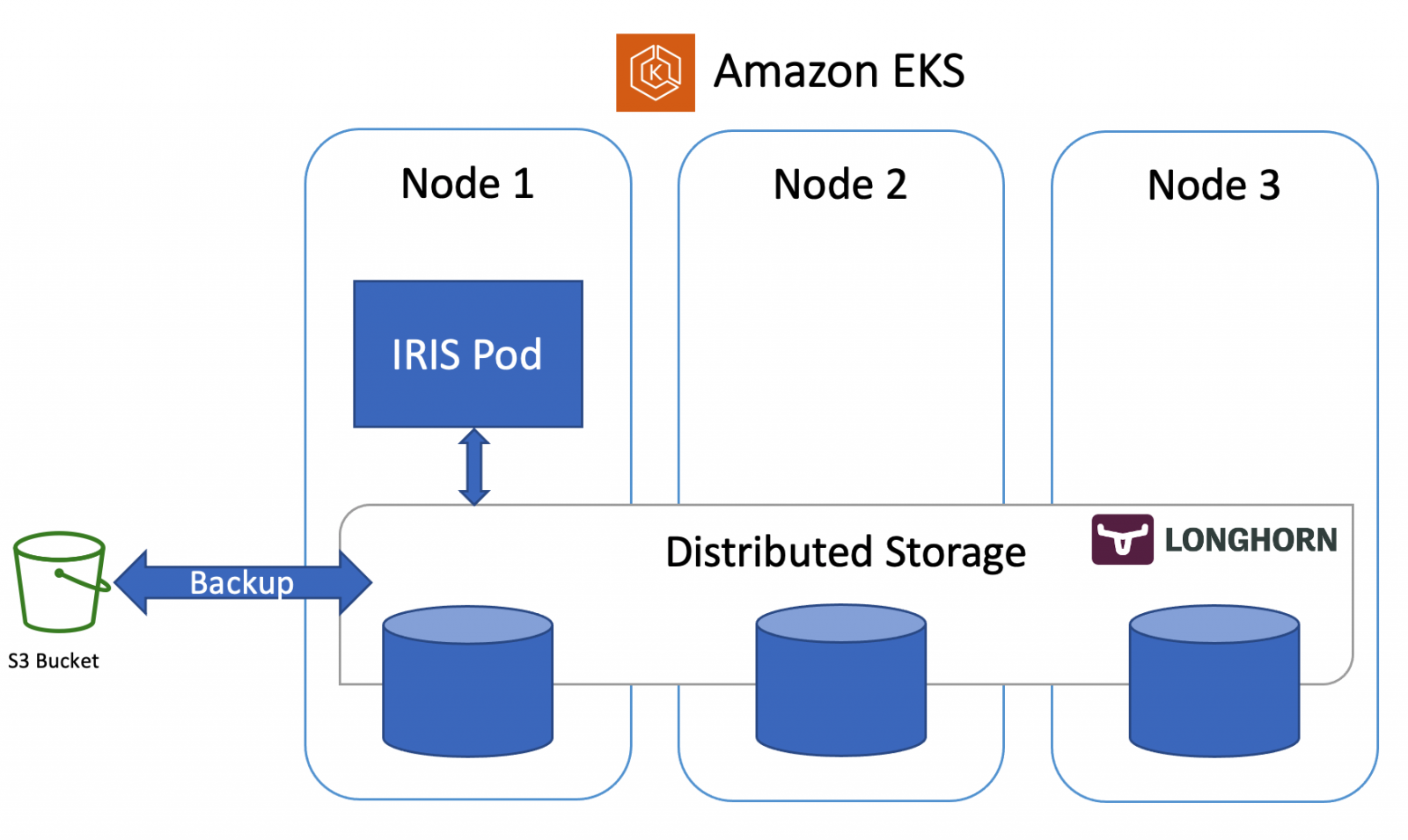
In the previous article, we discussed how to set up IRIS on k8s cluster with high availability, based on the distributed storage, instead of traditional mirroring. As an example, that article used the Azure AKS cluster. In this one, we'll continue to explore highly available configurations on k8s. This time, based on Amazon EKS (AWS managed Kubernetes service) and would include an option for doing database backup and restore, based on Kubernetes Snapshot.

Installation

Let's get right to business.

2
0 1578
Article Julian Matthews · Apr 14, 2021 3m read

Hey everyone.

I came across some issues when setting up Freeze and Thaw batch scripts for use with VMWare in a Windows ecosystem, and I wanted to share what I found in the hopes it can help others. This was undertaken in an environment using Healthconnect 2019.1.x.

IRIS not up (2)

It seems that the sample script from the documentation in my my case would tell me that the environment was not running (despite it running). To correct this, I provided the filepath to the Mgr location as so:

c:\InterSystems\HealthConnect\bin\irisdb -s"C:\InterSystems\HealthConnect\Mgr" -U%%SYS ##Class(Backup.General).
3
0 1447
Question Mark Runyan · Jun 27, 2023

We are retiring a hosted application for an electronic health care records (EHR) system which stored the data on Cache for UNIX (Red Hat Enterprise Linux for x86-64) 2017.2.2 (Build 867_4_20245) Thu Oct 8 2020 16:58:40 EDT.  The hosting company is providing me with a single CBK file.  I need to install a database system to restore the database and provide occasional SQL access for reports when necessary.  I'll need to maintain access to the data for an approximately 10 year retention period.

36
1 1324
Question William Caldwell · Apr 21, 2023

I have a client who' recently acquired a business that was running software that uses InterSystems IRIS as the database back end.  In the process of preparing to have my company's software installed the client formatted the hard drive of his server, wiping out his data.  I can't convert the data to MS SQL without a functioning database.  He had a backup on an external drive, which I have copied down to my local machine.  I loaded up  a virtual machine with Windows 10 Pro, I installed Docker and IRIS.  I started searching for explicit instructions for restoring the .

7
0 1054
Question Stefan Schick · Jul 20, 2022

Hello everyone,

I want to restore a database from an external backup with the journal files.

The manual says I should (in short):

  1. Stop journaling with ^JRNSTOP
  2. Restore the database file IRIS.DAT
  3. Run the journal restore utility with ^JRNRESTO
  4. Restart journaling ^JRNSTART

Since I want to restore one database only step 1 would disable journaling for the whole instance, not only for the database to be restored. As I understand, it would be impossible to restore a different database if there occurs a problem while journaling is disabled during the recovery process?

6
0 955
Article Mario Sanchez Macias · Nov 15, 2021 2m read

Working in support, I usually get asked how many days I should keep journals. Should it be two days or after two backups? More? Less? Why two?

The correct answer (for most of the environments) is that you should keep the journals since the last validated Backup. I.e., until you don't check if a Backup is valid (restoring the file and checking with the Integrity utility), you can't be sure there is a good copy of your data and can't purge the journals safely.

For example, imagine you need to restore your system after a hardware failure that corrupted some databases.

7
2 913
Question Steve Pisani · Feb 28, 2018

Hi,

A site has a Mirror set, and an Asynchronous DR.  The disk drives for each of the instances are local disks and the databases are large (>2 TB)

The current backup strategy is started off as using Cache Backup and is still the case today, but the size and time it take t do the backup is obviously prohibitive.

The External Backup procedure requires a Freeze/Thaw of the Cache environment, with a copy of the environment executing between these 2 steps, however, being on local disks, there seems to be no way to quickly copy off the OS files and cache databases in time.

8
0 866
Question Heikki Koivulehto · Oct 26, 2016

We are finally planning to migrate some ancient Caché applications that are run on Caché 5.0.21 to a new server with Caché 2016.2.0 or so.

I wonder if we could use Shadowing between those to keep the data on the new server up to date?

We would copy the Caché backup from the old environment to the new and do a RESTORE there and then start shadowing.

I know than 5.0.21 is no more officially supported by ISC.

5
0 830
Question Rick Clayton · Sep 17, 2019

We are currently implementing the Data Innovations Instrument Manager product.  In setting up our backup process we are wanting to use Veam snapshots. The application runs in a Caché 2016.1/Windows Server 2016 instance.  We are running an HA primary/secondary/arbiter config. The statement below is from DI.  I am curious to see what others that have implemented the DI Instrument Manager in the same or similar config have in place for backup.

"DI recommends is recommending that we not perform snapshots, but if you do choose to do so, here is some important information to consider.

4
0 828
Question Satish P · Oct 25, 2018

Hi,

We are trying to write an external backup application to backup Cache Database. After going through the Cache DB documentation, we have found that in Backup.General class there are methods for creating snapshot (Freeze/Thaw) which is required during backup. Are there REST APIs for the same?


Also we have the option of selecting individual DB instances in the management portal.  What are the methods/APIs of getting the DB list, so that user can select individual DB instances in an external backup application ? Do we have the methods/APIs to freeze/thaw the individual DB instances ?

Thanks!

5
0 791
Question Evgeny Shvarov · Sep 4, 2017

Hi, folks!

What could be the best backup/restore strategy for a small (less than 100MB) but very valuable database which is placed on AWS/DO virtual host?

1. Use AWS/DO backup/restore features?

2. External backup (as the most recommended)?

3. InterSystems backup?

4. Globals export to a zipped file?

5. cache.dat copy?

Looking for the most robust and easy to use/implement method of backup and restore in a way "setup and forget" (until it becomes needed :)

2
0 737
Question Lucas Fernandes · Jun 6, 2019

I have a FullBackup.cbk file generated by Caché Backup Online. This file has many databases.
Is there a Caché feature to restore only one database?
I've tried EXTSELCT^DBREST(), but this routine runs through all databases
(skipping the unselected). This process becomes slow, lasting 1 day to finalize the process.

1
0 672
Question David.Satorres6134 · Nov 16, 2018

Hello,

We are trying to migrate all our production to new IRIS servers. To test everything is working fine, and to be able to script the process, we want to import the data into new IRIS servers using a backup file (created with ^BACKUP). But we've found that IRIS doesn't recognize Ensemble backups so we can't import it using ^DBREST  :-O

Any of you know how to import in IRIS an Ensemble backup file?

Thanks a lot,
David

3
0 655
Question Nigel Salm · Jun 11, 2021

Hi

I have had customers who would rather use a backup application rather than using IRIS Backups. In my experience, I have tried a number of free backup tools and I have paid for at least two "very good Backup Tools" and all of them have failed to create usable backups especially if my Ensemble/IRIS Instances are still running and even if Ensemble/IRIS have been shut down I have found that the backups created by these tools have around an 80% chance of being able to restore a system (let's assume that I am not trying to backup core Windows elements like the Registry and Windows system files).

4
0 641
Question Graham Hartley · May 17, 2017

Hi,

Is there a way you can limit the amount of physical memory Cache uses?

During Cache backup it appears that all the available memory on the server is being used.

We are running Ensemble 2016.1 on Windows Server 2008 R2 with 32GB of RAM.

The database we are backing up is about 300GB.

Thanks,

Graham

3
0 624